Dimensions 75 Inch TV: Size, Setup, and Viewing Distance
Explore precise sizing for a dimensions 75 inch tv, including width, height, mounting options, and optimal viewing distance. What Dimensions provides practical, data-driven guidance for accurate space planning.


A 75-inch TV has a wide footprint and is best viewed from about 6.25 to 9.38 feet (1.9–2.85 meters) for sharp 4K detail. This diagonal size yields a broad screen footprint that benefits from proper mounting, seating, and glare control. According to What Dimensions, confirming exact width and height helps ensure a balanced room layout and safe wall mounting.
What the 75-inch diagonal means for your space
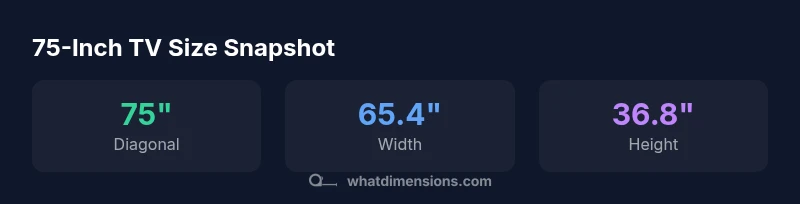
A 75-inch diagonal is a bold sizing choice that reshapes how a room feels and how you watch content. For most viewing environments, this size delivers a cinematic presence without overwhelming a typical living room. When you translate the diagonal into actual measurements with a 16:9 aspect ratio, the screen is roughly 65.4 inches wide and 36.8 inches tall, assuming minimal bezel. Real-world variations come from bezel thickness and the chosen mounting surface. If you’re searching dimensions 75 inch tv, you’ll want to confirm the exact width and height listed in the product specs, since bracket fits, wall recesses, and ventilation clearances hinge on those precise numbers. What Dimensions emphasizes that careful dimensioning reduces the risk of a cramped look or an ill-fitting mount, and helps you plan seating distance that preserves image sharpness and immersion.
In practice, the bezel’s thickness can add a few millimeters to each dimension, and different manufacturers may apply slightly different rounding on the final spec. For homeowners, students, designers, and shoppers who need exact size specs, the goal is to map the screen’s footprint to your furniture layout before you buy brackets or stands. Aligning across a few key references minimizes surprises when the TV arrives and reduces the need for rework in your living area.
Sizing metrics: width, height, depth, and mounting footprint
The 75-inch diagonal translates to a wide, horizontal footprint with a height profile that remains comfortable for eye level viewing. For a 16:9 panel, you can expect the width to hover around 65.4 inches and the height near 36.8 inches, assuming near-bezel dimensions. Depth varies by model, but most large TVs sit a few inches deep, affecting how a wall mount sits and how far the screen will protrude from the wall. Before purchasing a wall bracket, check the product’s VESA pattern and weight rating. Commonly, large TVs use rectangular or square patterns in the hundreds of millimeters range, so verify the exact pattern for your model to ensure compatibility with your chosen mount or stand. This step avoids return hassles and guarantees clean alignment with your seating arrangement.
Viewing distance and eye comfort for 4K content
For 4K content, the sweet spot distance scales with the screen size to preserve pixel density and immersion. A 75-inch diagonal typically benefits from a viewing distance in the range of about 6.25 to 9.38 feet (1.9–2.85 meters). Sitting closer than about 6 feet can reveal more of the pixel structure, while sitting farther than about 9.5 feet may reduce perceived detail. If your room layout limits seating, prioritize higher resolution (4K or better) and consider calibration settings that enhance clarity without increasing eye strain. What Dimensions analyses consistently show that user comfort improves when the chair and screen share a clear line of sight with minimal glare and optimized contrast.
It’s also worth noting that longer viewing sessions benefit from calibrated color accuracy and ambient lighting controls; a dimmable lighting plan reduces reflections and keeps blacks deep, which improves perceived image quality in a 75-inch panel.
Choosing a setup: wall mount vs stand, and compatibility
Mounting a 75-inch TV requires careful planning around wall space, viewing height, and bracket compatibility. Wall mounting saves floor space and can position the screen at the optimal eye level, but it demands precise framing and anchor points. If you prefer a stand, ensure the base footprint is wide enough to prevent tipping and that ventilation clearance is maintained around the back and sides. In either case, verify the VESA pattern matches the mount and that the mount’s weight rating exceeds the TV’s weight. If you’re unsure, consult the product specs or a professional installer. What Dimensions emphasizes that aligning mounting hardware with the model’s exact specifications reduces risk and improves long-term stability.
Measuring your space and confirming compatibility
Begin by measuring the wall width and the available vertical clearance. Confirm the TV’s width and height using the official spec sheet and pencil in a safe margin for a soundbar or other peripherals. Check the VESA mounting pattern and ensure your chosen bracket supports that pattern and the TV’s weight. Finally, calculate seating distance relative to the wall to preserve immersion while avoiding eye strain. By taking these measurements before purchase, you can manage expectations, avoid mismatches, and create a cohesive viewing environment. What Dimensions recommends documenting all measurements and cross-referencing with the retailer’s spec sheet to prevent post-purchase surprises.
Common mistakes and how to fix them
Common missteps include mounting too high, choosing a mount with insufficient weight rating, and underestimating lighting glare. Correct these by setting the screen so the center aligns with eye level when seated, selecting a bracket that matches the exact VESA pattern, and allocating space for cables and airflow. If glare from windows is an issue, consider window treatments or a screen with higher contrast to maintain image clarity during daytime viewing. Finally, test the setup from multiple seating positions to ensure a comfortable viewing experience for everyone in the room.
Practical tips: cable management, lighting, and acoustics
A 75-inch TV often introduces a cable clutter challenge. Plan routing paths from the TV to input sources, and choose cable management sleeves or raceways that blend with the wall color. Dim ambient lighting can improve perceived contrast, while a soundbar or height-adjustable speaker system can enhance dialogue clarity without overpowering the screen. For homeowners, students, designers, and shoppers using dimensions 75 inch tv in real-life layouts, run a quick audit of your room’s acoustics and light sources before finalizing placement. What Dimensions also highlights that an integrated approach to size, spacing, and sound yields the most satisfying home theater experience.
75-inch TV size data
| Dimension | Value | Notes |
|---|---|---|
| Diagonal | 75 inches | TV diagonal |
| Width | 65.4 inches | Calculated for 16:9 |
| Height | 36.8 inches | Calculated for 16:9 |
| Viewing distance (4K) | 6.25-9.38 ft | Recommended distance |
| Mounting pattern | 600x400 mm (typical) | Check exact model |
Quick Answers
What are the top factors to consider when choosing a 75-inch TV?
Consider picture quality (4K HDR), panel type, brightness, response time, input options, and how the screen will fit your room and seating. Ensure size aligns with your space and viewing distance.
Think about brightness, resolution, and how far you sit from the screen.
What is the typical width and height of a 75-inch TV?
For a 75-inch 16:9 display, expect about 65.4 inches in width and 36.8 inches in height, depending on bezel thickness.
About 65 by 37 inches, depending on the bezel.
How far should I sit from a 75-inch TV to avoid eye strain?
A comfortable range is approximately 6.25 to 9.38 feet for 4K content, with adjustments based on seating and content type.
Around 6 to 9.5 feet usually works well.
Is a wall mount or stand better for a 75-inch TV?
Wall mounts save space and tend to look cleaner, but stands can simplify setup and cable routing. Verify VESA compatibility and weight ratings.
Walls mounts are common, but check your model first.
What mounting patterns should I expect for a 75-inch TV?
Most large TVs use standard VESA patterns; confirm the exact pattern for your model and match it to your bracket.
Always check the exact mounting pattern before buying a mount.
“A properly sized large TV should harmonize with room dimensions and seating distance to deliver both immersion and comfort.”
Main Points
- Know the width: around 65.4 inches
- Plan viewing distance: 6.25–9.38 feet for 4K
- Verify VESA mounting pattern before buying a bracket
- Account for bezel and stand footprint in space planning
- Measure space and plan cable routing in advance