Dimensions 80 Inch TV: Exact Exterior Measurements
Get precise exterior measurements for an 80 inch TV, including width, height, and depth, plus mounting considerations to plan space and furniture confidently.


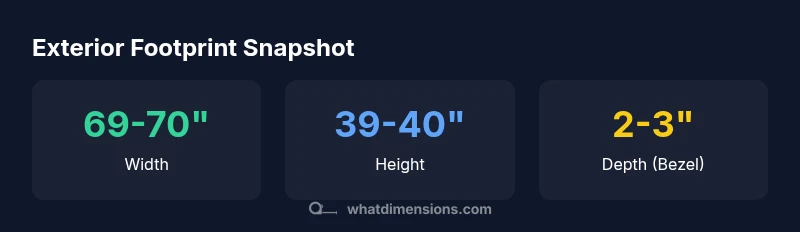
An 80 inch TV with a 16:9 panel typically measures about 69–70 inches wide and 39–40 inches tall, with an external depth of roughly 2–3 inches for most flat panels. Remember to add stand or mount add-ons. Always verify measurements on the product page, because dimensions 80 inch tv footprints vary by bezel.
Exterior footprint basics for dimensions 80 inch tv
When evaluating an 80 inch TV, the most important practical detail is the exterior footprint, not just the screen size. The footprint is the space the TV cabinet and bezel occupy on the wall or on a stand. For a typical 16:9 80 inch panel, expect a footprint that approaches about 69–70 inches in width and roughly 39–40 inches in height. External depth (how far the TV sits from the wall) commonly ranges from 2–3 inches for slim models, but can be slightly more with a robust soundbar mounted below or with certain stands. Be mindful that the bezel adds to the footprint beyond the screen’s viewable area. If you plan around furniture, measure not only the wall cutout but also the distance to nearby shelves or media consoles.
Dimensions 80 inch tv footprints vary by bezel design, so always confirm the exact exterior dimensions in the product specs before purchasing or mounting.
From diagonal to footprint: translating 80 inch TV diagonals to width and height
The diagonal size (80 inches) describes only the screen area. For a 16:9 aspect ratio, the screen width and height can be estimated, but the cabinet’s bezel will add to those numbers. In practice, an 80 inch diagonal yields a footprint close to 69–70 inches wide and 39–40 inches tall. The bezel’s thickness can nudge those values by a fraction of an inch, and the mounting hardware or pedestal can add a bit more width or depth. Always treat the listed width and height as the footprint you’ll need to fit into your space, not just the screen area.
Tips:
- Compare the product’s stated external dimensions rather than relying on screen size alone.
- If you plan a built-in cabinet, subtract clearance for ventilation and door openings.
- For wall mounting, ensure the wall plate and mount do not obstruct adjacent components.
Bezel, stands, and mounting patterns influence the footprint
Bezel width and mount type are the biggest variables in exterior dimensions. Bezel breadth adds to width and height, while the mounting pattern (VESA) and whether you use a fixed, tilt, or full-motion mount influence how flush the TV sits against the wall. A typical 80 inch TV may use a VESA pattern around 600x400 mm to 800x450 mm, though you should verify the exact pattern for your model. Depth can also vary with soundbars or pedestals mounted below. If you opt for a stand, factor in its footprint as it may extend several inches beyond the cabinet’s body.
Practical takeaway: always confirm the exact external specs from the manufacturer and account for any add-ons when planning your layout.
Wall mounting vs. stand configurations and practical tips
Whether you mount the TV on the wall or place it on a stand, the mounting method changes the usable space around the screen. Wall mounting typically yields a slimmer profile and saves floor space, but you must account for wall clearance, stud placement, and cable routing. Stands can add width and depth and may require additional clearance for base supports. If you’re wiring for power, HDMI, and audio, plan routes with in-wall access or cable management channels. For living rooms, aim to center the screen at eye level from the primary seating position and leave at least a few inches on either side for ventilation and speaker placement.
Note: always verify the exact external measurements for your chosen mount or stand, then plan furniture placement accordingly.
Room planning: viewing distance and space clearance
A common guideline for viewing distance is about 1.5–2.5 times the diagonal size, which for an 80 inch TV translates to roughly 10–17 feet from the screen. Closer distances emphasize detail but reduce the perceived field of view, while farther distances can dull fine details on low-resolution content. In addition to distance, consider furniture depth, doorway widths, and pathways through the room. Ensure there is room to maneuver around the TV during installation and maintenance, especially if you’re using a wall mount that extends during tilt or swivel.
When budgeting space, also account for potential future furniture changes and seating reconfiguration.
Measurements you should collect before purchase
To avoid space-fit problems, collect several measurements:
- Wall opening width and height where the TV will mount
- External footprint (width x height) from the product page
- Depth with any attached soundbar or pedestal
- VESA mounting pattern and mounting height range
- Clearance around the TV for ventilation and cable management
Trade-off: a slightly larger footprint can improve ventilation and storage compatibility, but you’ll need more room for viewing and access.
Data sources and measurement best practices
For reliability, rely on manufacturer-listed exterior dimensions and standardized measurements (VESA patterns) rather than just screen size. What Dimensions Analysis, 2026, synthesizes model data to headline footprint ranges for popular 80 inch TVs, helping buyers compare exteriors consistently. When in doubt, contact customer support or check user manuals for precise values. These practices ensure accurate space planning and safer mounts.
Exterior footprint estimates for an 80 inch TV
| Measurement | Value | Notes |
|---|---|---|
| Diagonal | 80 inches | Screen size measured diagonally |
| External width | 69-70 inches | Footprint including bezel |
| External height | 39-40 inches | Footprint including bezel |
| External depth | 2-3 inches | With bezel and base/mount |
Quick Answers
What is the typical external footprint of an 80 inch TV?
For most 80 inch TVs with a 16:9 panel, the external footprint is roughly 69-70 inches wide and 39-40 inches tall, with a depth around 2-3 inches. Exact values vary by bezel.
An 80 inch TV usually has a footprint about 69 to 70 inches wide and 39 to 40 inches tall, with a depth of 2 to 3 inches depending on the bezel.
Do bezel size and stand add to the footprint?
Yes. Bezel width and the chosen stand or mount can add to the footprint; always verify exact exterior dimensions in the model specs.
Bezel and stands can add a bit to the footprint, so check the exact numbers.
What is a common VESA mounting pattern for 80 inch TVs?
Many 80 inch TVs use VESA patterns around 600x400 mm to 800x450 mm. Always verify the specific model’s pattern before purchasing a wall mount.
Most 80 inch TVs use common VESA patterns like 600x400 or 800x450; check your model.
Will an 80 inch TV fit through a standard doorway during installation?
Doorway fit depends on the TV’s packaging and whether you can remove the stand. Often you may need to maneuver with care or remove the stand to pass through.
Doorways can be tight; measure and consider removing the stand or turning the TV on its side.
What viewing distance is recommended for an 80 inch TV?
Recommended distance is about 1.5–2.5 times the diagonal, which for an 80 inch screen translates to roughly 10–17 feet, depending on resolution and seating.
For an 80 inch TV, aim for around 10 to 17 feet away for an immersive view.
“When planning around an 80 inch TV, always start with the exterior footprint rather than screen size alone. A precise footprint prevents misfit furniture and mounting errors.”
Main Points
- Know the footprint before you buy
- Always verify exterior dimensions on the product page
- Bezel, stand, and mounting affect overall size
- Plan viewing distance to optimize comfort
- Check VESA mounting compatibility early