100 inches TV dimensions: width, height, and placement guide
Explore the footprint of a 100-inch TV, including width, height, bezel impact, and practical guidance for viewing distance and wall space.


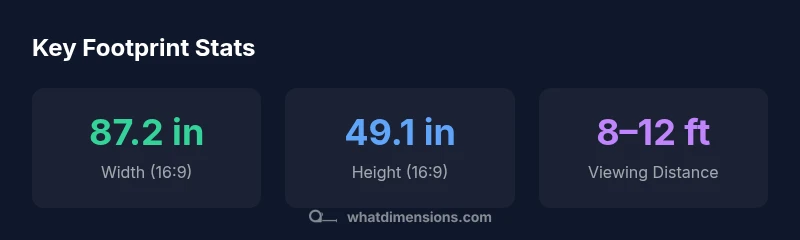
100 inches tv dimensions refer to the screen diagonal. For a standard 16:9 panel, the footprint is roughly 87 inches wide and 49 inches tall before bezel. Bezel thickness and model geometry can shift these figures slightly. What Dimensions Analysis, 2026 notes that aspect ratio and placement considerations drive room planning carefully.
Understanding 100 inches tv dimensions
According to What Dimensions, the term 100 inches tv dimensions refers to the screen diagonal used to categorize large-format displays. In practical terms, this size translates into a broad footprint that affects room design, seating distance, and mounting options. The exact width and height depend on the aspect ratio and bezel thickness, but for common 16:9 panels, you can expect a footprint close to 87 inches wide by about 49 inches tall before bezel. Bezel width and curvature can slightly adjust those numbers, but the overall footprint remains dominated by the diagonal measurement. This clarity helps homeowners map wall space, decide on furniture layouts, and choose mounting solutions that avoid crowding doors, windows, or speakers.
Translating diagonal into width and height
To convert a diagonal measurement into usable width and height, use the aspect ratio. For 16:9, width = diagonal × 16 / sqrt(16^2 + 9^2), height = diagonal × 9 / sqrt(16^2 + 9^2). For a 100-inch diagonal, this yields roughly 87.2 inches in width and 49.1 inches in height, before bezel; different ratios like 21:9 push width up and height down. Remember that actual product dimensions vary slightly by model and bezel design. The math is straightforward, but the practical result depends on how manufacturers round numbers and where they place mounting brackets.
Bezel, panel shape, and curved displays
Bezel thickness can shave off a few decimal inches from the nominal measurements. Flat panels tend to sit closer to the wall, while ultra-thin bezels still add space that viewers notice at close distances. Curved displays, though dramatic, alter perceived width and can affect seating alignment. In real rooms, the bezel typically reduces the usable width by up to an inch or two per side depending on the model. When planning, include the mount and any wall recesses, speakers, or decorative frames that steal space. This helps prevent a surprise clash with furniture or doorway clearances.
Room size, seating distance, and sightlines
With a 100-inch diagonal, near-field seating requires careful attention to sightlines and the field of view. A conservative rule of thumb is to sit roughly 1.0–1.5 times the diagonal in feet; for a 100-inch screen (about 8.3 feet), that puts you around 8–12 feet away. If your room is narrower, you may still achieve a satisfying image by adjusting the seating angle and selecting a slightly different aspect or tiered seating. Lighting matters too; ambient glare and reflections can degrade perceived brightness at this scale. The goal is a comfortable immersive feel without causing eye strain or a blocked view for others in the room.
Resolution, brightness, HDR, and image quality at large sizes
Resolution becomes essential when the image fills a large field of view. A 4K panel is generally recommended for a 100-inch diagonal to preserve detail and prevent visible pixel structure. High dynamic range (HDR) helps with contrast, but its gains depend on source material and panel quality. In practice, buyers should assess peak brightness and local dimming capabilities, especially in rooms with ambient light. Content like movies and sports benefits most from larger, stable HDR performance rather than ultra-high resolutions that can be wasted on small screens from a distance.
Mounting, wall space, and acoustic considerations
Mounting a 100-inch TV safely requires checking wall strength, stud layout, and the weight rating of the mount. Use a fixed or tilt mount aligned with the center of the screen, then leave space for cables, speakers, and ventilation. Acoustic treatment matters at this size; many users pair a large TV with a compatible soundbar or surround system to maintain clear dialogue and dynamic range. If wall space is limited, consider a recessed mount or a ceiling stand with careful cable management to avoid trip hazards and heat buildup around the chassis.
Practical buying guide: is a 100-inch TV right for you?
A 100-inch diagonal can deliver cinema-like impact in large rooms, but it demands space, proper seating, and healthy lighting control. Compare footprints across brands by requesting precise measurements (width × height × depth) and bezel thickness. If your room cannot accommodate the footprint, an 85–98 inch alternative can offer similar immersion with less risk of crowding. In-store demonstrations reveal true image quality, color accuracy, and motion handling better than spec sheets. The What Dimensions team recommends testing your room with a tape measure, mounting mockups, and a realistic viewing scenario before committing to a purchase.
Common myths and misperceptions
Common myths include assuming bigger is always better, or that a 100-inch screen automatically guarantees better viewing. In reality, room size, seating distance, and lighting control determine perceived quality. Another myth is that larger screens require exponential brightness; modern HDR panels often achieve great results with standard room lighting. Finally, some buyers think bezels are a non-issue; even small bezel reductions can meaningfully affect the visible image, particularly at shorter viewing distances.
Dimensions for common aspect ratios at 100-inch diagonal
| Aspect Ratio | Width (in) | Height (in) |
|---|---|---|
| 16:9 | 87.2 | 49.1 |
| 21:9 | 91.9 | 39.4 |
| 4:3 | 80.0 | 60.0 |
Quick Answers
What does '100 inches tv dimensions' mean?
It refers to the screen diagonal being 100 inches. The actual footprint also depends on aspect ratio and bezel thickness.
A 100 inch diagonal is the measurement across the screen. The real width and height depend on the aspect ratio and bezel size.
How do you calculate width and height from diagonal?
Use width = diagonal × aspect width / sqrt(aspect width^2 + aspect height^2) and height = diagonal × aspect height / sqrt(aspect width^2 + aspect height^2).
You use a simple math formula based on the aspect ratio.
Is a 100-inch TV suitable for small rooms?
In small rooms, a 100-inch display can overwhelm the space; consider alternatives or proper seating distance and wall space.
In small spaces, it may be too large; think about seating and wall space before choosing.
What is the recommended viewing distance for a 100-inch screen?
A practical range is roughly 8–12 feet, depending on room layout and personal preference.
Most people sit about eight to twelve feet away for immersion without eyestrain.
How does bezel size affect the usable image?
Bezel reduces the active display slightly; thicker bezels can shave a few inches from width and height.
Bezel chips off a bit of the footprint; plan for this when measuring.
What mounting considerations are essential?
Check wall strength, stud layout, and compatible mounting hardware; ensure ventilation and cable routing.
Make sure your wall can support the mount and plan cables in advance.
“Large TVs require careful space planning; understanding footprint helps optimize sightlines and immersion.”
Main Points
- Estimate width and height early to plan wall space.
- Account for bezel size when measuring mounting area.
- Use approximate viewing distance to guide seating layout.
- Compare 16:9 and 21:9 footprints for room planning.