Understanding Big TV Dimensions: A Practical Guide
A practical guide to big tv dimensions, covering footprint, bezel impact, mounting, and placement to help you plan the perfect 2026 living space.


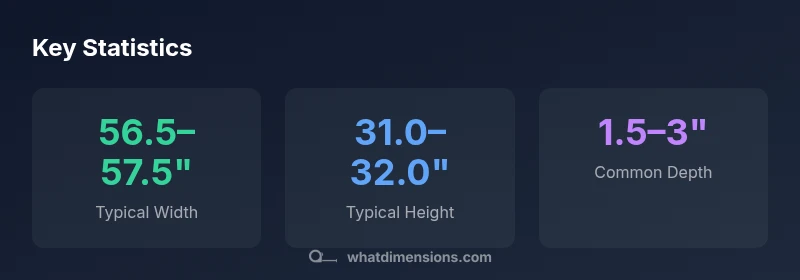
Big tv dimensions matter beyond the diagonal size, because bezel width, stand depth, and mounting footprint determine whether a screen fits your wall, furniture, and seating. For example, a 65-inch class TV typically runs about 56–57 inches wide and 31–32 inches tall, excluding bezel and stand specifics, with depth often around 1.5–3 inches. Always measure your wall, consider mounting vs. stand placement, and account for cable space and ventilation when comparing models.
Why big tv dimensions matter for space planning
Big tv dimensions influence more than just screen quality. The footprint of the display — including width, height, bezel, and the depth of any stand or wall mount — determines furniture layout, sightlines, and traffic flow. The What Dimensions team notes that accurate sizing helps prevent mismatched furniture, blocked outlets, or cramped viewing angles. When you consider a large screen, you should measure the wall space, seating distance, and potential obstructed vents or speakers. This upfront diligence saves time and money and makes it easier to integrate the TV into existing decor. In short, understanding big tv dimensions helps you create a balanced, comfortable viewing area without compromising room function.
Key takeaways: start with the wall footprint, then verify seating distance, and finally evaluate bezel and stand depth for full context.
Measuring for a big TV: a step-by-step guide
- Measure your wall: width available and any window or door openings that could affect placement. 2) Check mounting compatibility: determine wall stud layout and whether you need a fixed, tilting, or full-motion mount. 3) Consider the stand footprint: some TVs include a pedestal base or a recessed stand that adds depth. 4) Assess bezel impact: slimmer bezels reduce overall footprint but still need clearance for ventilation and cable management. 5) Plan cable routing: leave space behind the unit for power, HDMI, and speaker connections. 6) Verify viewing height: aim for the screen center at or slightly below eye level when seated. 7) Don’t forget ventilation: ensure at least a few inches of clearance from walls to prevent heat buildup. By following these steps, you’ll translate the diagonal measurement into a real-world footprint that fits your room.
bezel, aspect ratio, and the total footprint
Most modern large TVs use 16:9 aspect ratio, but some ultra-wide models are 21:9 or similar. The bezel width and the actual display area affect the overall width and height, especially on larger diagonals. Even a small bezel difference can add several tenths of an inch to the periphery, which matters when two units sit side-by-side or when mounting near a corner. For wall-mounted setups, the mount adds a few extra inches to the depth, and for stands, the base may extend forward significantly. When comparing models, subtract or add bezel size and mount depth to estimate the true footprint.
Comparing size categories: 55", 65", 75" and beyond
- 55-inch class: width approximately 47.9–48.5 inches; height 26.9–27.5 inches; area roughly 1,290–1,320 square inches; depth around 1.5–3 inches.
- 65-inch class: width approximately 56.5–57.5 inches; height 31.0–32.0 inches; area roughly 1,740–1,840 square inches; depth around 1.5–3 inches.
- 75-inch class: width approximately 65.3–66.0 inches; height 36.5–37.6 inches; area roughly 2,380–2,470 square inches; depth around 1.5–3 inches.
These footprints vary by manufacturer, bezel design, and mounting hardware. Use the numbers as a guideline, then confirm exact measurements from the product specifications before purchase.
Placement scenarios: living room, bedroom, and multi-room setups
In living rooms with open sightlines, a larger footprint often works best when seats are spread evenly. In bedrooms, you may prioritize wall height and distance rather than width. In multi-room setups or media walls, consider the reach of remotes, cable length, and ventilation pathways. If you’re mounting above a fireplace, ensure heat clearance and consider a low-profile mount to minimize depth. For ceilings with obstructions or sloped walls, angle-adjustable mounts can optimize viewing angles without sacrificing footprint accuracy.
Viewing distance, seating, and the science of comfort
A widely recommended rule is to sit approximately 1.5–2.5 times the screen diagonal for HD content, and roughly 1–1.5 times for 4K content to appreciate detail. For a 65-inch display, that translates to roughly 8–13 feet of viewing distance. Adjust this based on room layout, seating positions, and personal preference. Precise placement that aligns with eye level improves perceived contrast and reduces neck strain, which is a key aspect of managing big tv dimensions in real rooms.
Tips for integration: ventilation, cables, and mounting options
- Allow several inches of clearance behind the TV for heat dissipation and ventilation; avoid placing the unit directly against a back wall.
- If using a wall mount, choose a model that supports the screen’s weight and offers tilt or swivel for flexible viewing angles.
- Use a cable management kit to keep cords neat and accessible; consider in-wall rated cable paths for a cleaner look.
- For rooms with bright light, consider matte screen treatments or anti-glare coatings to preserve image quality.
- Plan for future upgrades by leaving space behind the TV and ensuring the mount supports potential weight increases. This practical approach makes big tv dimensions easier to manage as your space changes.
Representative footprints for common large-TV sizes (16:9). Exact numbers vary by model.
| TV Size (in) | Approx Width (in) | Approx Height (in) | Approx Area (sq in) | Depth (in) |
|---|---|---|---|---|
| 55 | 47.9–48.5 | 26.9–27.5 | 1290–1320 | 1.5–3 |
| 65 | 56.5–57.5 | 31.0–32.0 | 1740–1840 | 1.5–3 |
| 75 | 65.3–66.0 | 36.5–37.6 | 2380–2470 | 1.5–3 |
Quick Answers
What does 'big tv dimensions' include besides width and height?
Big tv dimensions include width, height, depth (including stand or wall-mount footprint), bezel size, and the required clearance for ventilation and cables. Don’t overlook mounting hardware and stand footprint when calculating space needs.
Big tv dimensions include width, height, depth, bezel size, and ventilation space. Remember to include mounting hardware and stand footprint in your measurements.
How should I measure for a wall-mounted TV?
Measure wall width and height, stud locations, mounting pattern, and desired screen center height. Verify wall strength and clearance for tilt or swivel motion, as bevels and mounts add to the overall footprint.
Measure wall space, stud pattern, and the mount’s footprint; account for tilt and swivel clearance.
Is a larger TV always better for a small room?
Not necessarily. In small rooms, a too-large screen can overwhelm sightlines and reduce perceived image quality if you’re too close. Use recommended viewing distances to choose a size that fits your room and seating.
Bigger isn’t always better; pick a size that fits your room and seating distance.
How do bezels affect the overall footprint?
Bezel width adds to the total width and height. Slim bezels minimize footprint, but the display area remains the primary component, so compare models by their total footprint rather than screen area alone.
Bezel size adds to footprint; compare total width and height, not just screen area.
What’s the best viewing distance for a 65-inch TV in HD and 4K?
For HD content, aim for about 7–9 feet; for 4K, you can sit closer, around 6–8 feet, depending on personal preference and room lighting. Adjust for comfort and image clarity.
HD looks best at about 7–9 feet; 4K lets you sit closer, around 6–8 feet, based on preference.
“Accurate big tv dimensions are essential for a balanced room layout and comfortable viewing; the footprint often dictates furniture placement, seating distance, and cable management more than the diagonal alone.”
Main Points
- Measure the footprint, not just the diagonal.
- Account for bezel and mount depth in space planning.
- Match viewing distance to screen size for comfort.
- Plan cable routing and ventilation early.