TV Size Dimensions: A Practical Guide to Screen Measurements
Discover what tv size dimensions mean, how to estimate width, height, and depth, and how to choose the right TV size for your room with practical, data-backed guidance.


TV size dimensions describe the physical footprint of the display and its enclosure, not just the diagonal figure shown on product boxes. Key measurements include width, height, and depth, plus the bezel and any stand footprint. Understanding tv size dimensions helps you plan space, ensure comfortable viewing distance, and compare models that differ in bezels or mounting options. By translating diagonal size into actual width and height, you can make more accurate shopping decisions beyond the label on the box.
What TV size dimensions actually cover
The term tv size dimensions covers the physical footprint of the display plus its enclosure, including the bezel and any feet or stand. While manufacturers advertise the diagonal, the total footprint—width, height, and depth—determines whether a TV will fit your space. Understanding tv size dimensions is essential for room planning, furniture compatibility, and viewing comfort. In practice, you’ll translate the diagonal into real-world width and height, then account for bezels, stands, and mounting hardware. The What Dimensions team emphasizes that precise measurements prevent layout surprises and poor placement later on. When you know the exact tv size dimensions, you can compare models fairly and avoid missteps caused by relying on diagonal figures alone.
Measuring for fit: width, height, depth
Begin with the space you’ll place the TV. Measure the wall width, vertical clearance, and the depth of any media console or wall-mount niche. For each model you’re considering, record the published width and height, plus the depth with the stand or bracket. Don’t forget the bezel—some screens look slim but add several tenths of an inch to width and height. If unsure, use a cardboard cutout or painter’s tape to map the footprint on the wall. Include ventilation space and cable routing room in your plan. By compiling tv size dimensions for multiple options, you’ll have a clear basis for comparison during shopping.
Aspect ratios and real-world size
Most consumer TVs use a 16:9 aspect ratio, though some models flirt with ultrawide formats. The diagonal alone cannot define width and height without the aspect ratio. For 16:9, width ≈ diagonal × 0.871 and height ≈ diagonal × 0.493. Hence a 55-inch class screen is roughly 47–49 inches wide and 27–29 inches tall, depending on bezel design. If a TV has a thicker frame, its footprint grows even if the diagonal is the same. When comparing models, read tv size dimensions published by manufacturers and translate them into room-fit numbers, not just the advertised diagonal.
Bezel, panel thickness, and stand footprint
Bezel width contributes to overall width; thicker panels add to depth and sometimes height. The stand footprint can dominate the depth if you’re using a media cabinet. Always check width, height, and depth including the bezel and stand. If you plan to mount, verify the VESA pattern and the wall clearance after brackets are installed. Don’t assume the diagonal tells the full story—tv size dimensions must include bezel, mount, and stand profiles to ensure a snug, balanced installation.
Wall-mount vs stand footprint
Wall mounting changes the footprint profile. A wall mount can bring the screen flush to the wall but adds depth from the bracket and cables. For stand-mounted TVs, measure the base width and depth and ensure you have cabinet clearance. If you’re uncertain about mounting, consult a professional to confirm wall studs, weight limits, and bracket compatibility. In every case, record the total footprint—the combination of width, height, and depth—so you can verify fit before purchase.
Space planning: viewing distance and layout tips
Viewing distance guides how large a screen should be for comfortable viewing. A common guideline is 1.5 to 2.5 times the screen diagonal, though personal preference matters. For a 55-inch TV, that translates roughly to 6.9 to 11.5 feet. Map your seating arrangement, then translate those distances into space requirements using tv size dimensions. Plan for ventilation, speaker placement, and seating geometry to maintain an immersive but comfortable viewing experience.
Common mistakes and how to avoid
Avoid relying solely on diagonal size when planning. Be sure to consider bezel, stand, and mounting depth, plus cabinet clearance. Forgetting to account for cable management or ventilation can lead to overheating or a cramped setup. Always cross-check manufacturer dimensions and add a small margin for adjustments. With careful attention to tv size dimensions, you’ll reduce the risk of a display that looks off or doesn’t fit your room.
Shopping tips: turning data into decisions
When evaluating options, create a simple checklist: width and height margins relative to available space, depth with stand or bracket, mounting compatibility, and total footprint. Build a quick side-by-side matrix of the top three candidates using manufacturer numbers for width, height, and depth. Visualize how each option fits on your wall or console—this reduces post-purchase regrets and simplifies installation.
Estimated footprint by screen size class
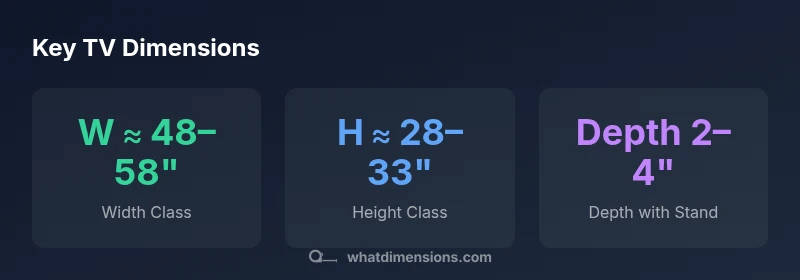
| Screen Size (in) | Approx Width (in) | Approx Height (in) | Depth with Stand (in) |
|---|---|---|---|
| 32 | 25-28 | 15-18 | 2-4 |
| 55 | 47-49 | 27-29 | 2.5-4 |
| 65 | 56-58 | 31-33 | 2.5-4.5 |
Quick Answers
What exactly are included in tv size dimensions?
TV size dimensions include width, height, depth, bezel footprint, and stand or mounting hardware. These measurements determine how a TV will fit in a given space, beyond the diagonal labels. Always use the published width, height, and depth to compare models.
TV size dimensions include width, height, depth, bezel, and stand or mount. Use the published numbers to compare models.
How do I convert diagonal size to width and height?
For a standard 16:9 panel, width ≈ diagonal × 0.871 and height ≈ diagonal × 0.493. This lets you estimate real footprint from the advertised diagonal. Remember to add bezel size if you need exact figures.
For 16:9, width is about 0.871 times the diagonal and height about 0.493 times the diagonal.
Why do bezels matter for space planning?
Bezel width adds to the overall footprint, so a slim-bezel model can still require more width than you expect. Don’t overlook bezel size when comparing tv size dimensions.
Bezel size changes how wide and tall the TV appears in your space.
What is the best viewing distance for a given size?
A common guideline is 1.5 to 2.5 times the screen diagonal, adjusted for room lighting and seating. Use this to decide whether a 55-inch, 65-inch, or larger set fits your room.
Aim for a distance about 1.5 to 2.5 times the screen diagonal.
How do I verify mounting compatibility?
Check the VESA pattern published by the manufacturer and confirm the wall or cabinet depth won’t interfere with brackets. If mounting, ensure you have clearance for cables and ventilation.
Look up the VESA pattern and check clearance for cables.
Can I rely on diagonal size alone when shopping?
No. Diagonal tells only part of the story. Always compare width, height, depth, and bezel/stand footprint to ensure the TV fits your space and meets your viewing needs.
Diagonal alone isn’t enough; compare full footprint and dimensions.
“Accurate tv size dimensions are the foundation of reliable room planning and furniture coordination.”
Main Points
- Define tv size dimensions before shopping to avoid space mismatches.
- Translate diagonal size into width and height using aspect ratio.
- Include bezel and stand when calculating footprint for fit.
- Plan for clearance, ventilation, and mounting depth in advance.