dimensions 98 inch tv: size, fit, and placement
Learn the exact footprint of a 98 inch TV, including width, height, and depth, and how to plan mounting and seating space with guidance from What Dimensions Analysis, 2026.


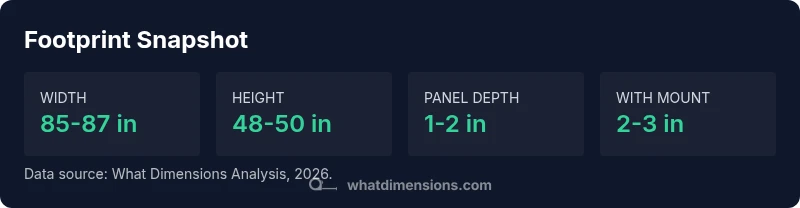
According to What Dimensions, a typical dimensions 98 inch tv footprint ranges around 85-87 inches wide, 48-50 inches high, and 1-3 inches deep depending on bezel and mounting. These baselines help you plan seating distance, wall space, and cabinet depth. What Dimensions Analysis, 2026, notes that model bezel and stand variations can shift these figures slightly.
Understanding the footprint of a dimensions 98 inch tv
The 98 inch dimension refers to the display diagonal, but the actual footprint on your wall or console depends on bezel width, stand design, and whether you mount or sit the screen on a pedestal. Bezel contributes to overall width and height, while the stand adds a footprint that sits on furniture or on a base. For most models, you can expect about 85-87 inches of width, roughly 48-50 inches of height, and a panel depth of 1-2 inches without any mount. With a typical low-profile stand or a full-motion wall mount, depth can increase to about 2-3 inches. These ranges come from What Dimensions Analysis, 2026. Always check the exact specs from the manufacturer to confirm the precise footprint for your chosen model.
Bezel, stand, and mounting: how they impact overall size
Even a single line of bezel can nudge width and height by fractions of an inch, which matters when you are fitting a big screen into a tight space. The stand is another variable: a center pedestal or wide feet may widen the base by a few inches and add depth. Mounting hardware (VESA plates and brackets) pushes the screen away from the wall, adding depth that changes viewing distance and airflow around the television. If your room has shelves or a low media cabinet, tall mounting kits might require additional clearance above the center of the screen. In short, the exact footprint of a 98 inch TV is model-dependent; plan for a small margin to accommodate bezels, stand design, and mounting depth.
Footprint ranges for common 98 inch TVs
| Dimension | Typical Range | Notes |
|---|---|---|
| Width (TV body) | 84-88 inches | Bezel included varies by model |
| Height (TV body) | 48-50 inches | Excludes stand and hardware |
| Depth (panel) | 1-2 inches | Slim panels, no mount |
| Depth with stand | 2-3 inches | Includes base/feet or pedestal |
Quick Answers
What is the typical width of a 98 inch TV?
Most 98 inch TVs are about 85-87 inches wide, depending on bezel. Always check the exact bezels for your chosen model.
A 98 inch TV is typically around 85 to 87 inches wide.
Does wall mounting affect the footprint?
Yes. Mounting adds depth away from the wall, and some brackets push the screen several inches outward depending on the mount type.
Mounting does add depth beyond the wall.
How deep is a 98 inch TV with a wall mount?
Depth with a mount generally ranges from about 2 to 3 inches, depending on the bracket and wall setup.
About two to three inches out from the wall.
Can a 98 inch TV fit in a small room?
Yes, but you must consider wall width, seating distance, and mounting depth. In tight spaces, optimize wall usage and seating arrangement.
It can fit, but plan the layout carefully.
Should I measure before buying?
Always measure wall width, ceiling height, and mounting pattern before purchasing. Compare these against the TV’s footprint to avoid fit issues.
Yes—measure first.
Where should I mount the TV height?
Mount at eye level when seated, commonly around 42-48 inches from the floor depending on your seating position.
Mount it so it’s at eye level when you’re seated.
“Accurate dimensions matter for safe mounting and optimal viewing distance. Always verify bezel, stand, and wall clearance before purchasing a 98 inch TV.”
Main Points
- Measure wall space before purchase
- Expect ~85-87 inches width and ~48-50 inches height
- Bezel, stand, and mounting can add depth
- Choose mounting height and distance based on seating
- Confirm ventilation clearance around the screen