65 inch TV Dimensions: A Practical Fit Guide
Understand 65 inch tv dimensions, plan space accurately, and pick models with confidence. Learn typical width, height, depth, and how bezels and stands affect your setup.


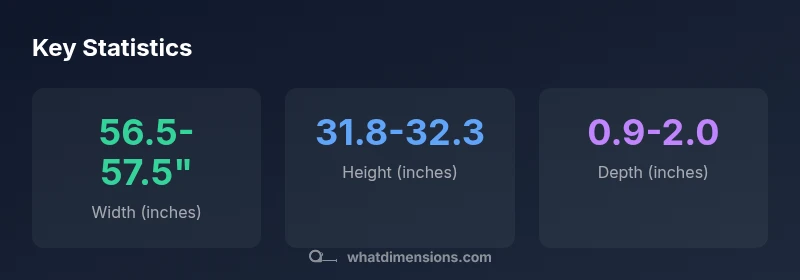
The typical footprint of a 65 inch TV is about 56.5–57.5 inches wide and 31.8–32.3 inches tall, with a depth of roughly 0.9–2.0 inches for slim panels. Layouts with stands add about 2–3 inches to depth, and bezel thickness can influence width. Always check model specs for exact measurements.
Understanding the 65 inch tv dimensions
When shoppers discuss a 65 inch TV, they usually refer to the diagonal screen size. However, the actual space the TV occupies depends on the width and height of the bezel plus any stand or mounting hardware. For most 65 inch televisions with a 16:9 aspect ratio, the screen width hovers around 56.5 to 57.5 inches and the height around 31.8 to 32.3 inches. The depth is typically shallow in modern LED designs, often between 0.9 and 2.0 inches, but can be thicker with built-in soundbars or robust backs.
Be mindful that these numbers describe the device’s footprint, not just the display area. In practice, you’ll want a little extra room on each side for ventilation and cable clearance. This is why what you measure in your room should reflect the exact model’s bezel and mount configuration, not only the screen size. As a rule, always cross-check the official spec sheet from the manufacturer for your model and consider any wall or cabinet protrusions that could affect fit.
According to What Dimensions, precise size specs are essential for accurate planning, especially when you’re fitting a TV into a built-in niche or mounting under cabinets. The diagonal size is a familiar reference, but the width and height determine whether a TV will physically fit and align with eye level for comfortable viewing.
How bezel thickness and stand affect overall footprint
Bezel thickness adds to the overall width and height by a small margin, often in the range of a few tenths of an inch to about an inch per side depending on the design. This means a 65 inch TV with a wide, premium bezel could exceed the 56.5–57.5 inch width by 0.4–0.8 inches on each side, effectively increasing the footprint. The stand can also alter depth and base width. Some desks or media consoles may require a recessed mount or a narrow stand to keep cords accessible while preserving a clean look. If you plan on wall-mounting, the VESA mounting pattern remains consistent, but ensure the wall plate doesn’t conflict with wall studs, outlets, or ventilation ducts.
For built-in shelves, consider the clearance behind the TV for cables and ports and the space above to prevent overheating. If a soundbar sits on a shelf below the TV, confirm the display’s bottom edge height remains comfortable for viewing and doesn’t reduce the perceived image quality.
Typical dimension ranges you can expect
In most retail listings, the 65 inch class is described using the diagonal screen size, but your planning should revolve around width, height, and depth. Typical ranges for bezel-inclusive measurements are: width around 56.5–57.5 inches; height around 31.8–32.3 inches; depth usually between 0.9–2.0 inches for slim panels, and up to 2.5–3.0 inches for older models with thicker bezels or integrated soundbars. That said, the mount and stand can add to total depth, commonly 1–2 inches more when the TV is on a stand or a wall mount adds some clearance for ventilation. Always pair these ranges with your room measurements to ensure the TV fits the intended space without blocking vents or causing glare.
When sizing for wall mounting, check the wall’s internal clearance and consider a tilting or full-motion mount if your seating distance varies. If you anticipate future upgrades with soundbars or other components, leave extra room for cabling and heat dissipation.
Mounting considerations: wall mounting vs table stand
Wall mounting requires precise attention to wall structure and mounting height. A standard recommendation is to position the screen so the center sits at or slightly below eye level when seated, typically around 42 inches from the floor, though this can vary with sofa height and viewer preference. Wall mounts come in fixed, tilting, and full-motion varieties; each influences clearance behind the TV and how depth is perceived from the seating area. A full-motion mount can add a few extra inches to the overall footprint when extended, while a fixed mount keeps the depth minimal but offers less flexibility.
If you choose a tabletop stand, verify the base width and depth and ensure it doesn’t protrude beyond your entertainment center. Clearance behind the TV for ports and cables is essential to avoid bending HDMI or power cords. For wall installations, confirm stud spacing and use a mounting plate that aligns with the TV’s VESA pattern. Always consider cable management solutions to maintain a clean, safe setup.
How to measure your space for a 65 inch TV
Begin by measuring the intended display area: width (left to right), height (top to bottom), and depth (front to back) including the mounting or stand footprint. Add at least 1–2 inches of clearance on each side for airflow and cable management. Translate these measurements into a planning grid: if the area is 60 inches wide, a 65 inch TV with bezel-tight dimensions will barely fit, but with a slim bezel and low-profile stand, it could be viable with careful placement. Make a mock layout with painter’s tape to visualize the footprint on your wall or cabinet before you buy. Use your room’s seating distance as a guide: you want the TV to fill a comfortable portion of your field of view without causing neck strain.
Additionally, measure from power outlets and video ports to ensure cable routing won’t require awkward bends or extensions. Keep a small buffer for future rearrangements or additional devices like consoles or soundbars. If you have windows or bright lighting nearby, assess how glare will interact with screen size and brightness at your typical viewing angle.
Choosing the right model for your room
Beyond absolute measurements, consider how your room’s lighting, seating distance, and viewing preferences influence the perceived size. A 65 inch TV at close seating distances benefits from slim bezels and a compact depth to avoid feeling oversized in a smaller room, while a dimly lit living room with a large seating area may require a bigger screen and higher brightness for contrast. A practical rule of thumb: for a typical living room seating distance of about 8–11 feet, a 65 inch TV provides immersive viewing without overwhelming the space. If your space is smaller, a 55 inch model with the same aspect ratio might feel more balanced. In larger rooms, a 75 inch class could be preferred for a similar seating distance, but it’s still essential to verify the available width and depth before committing to a purchase. Always cross-check the manufacturer’s spec sheet for exact dimensions, including bezel width and mounting requirements.
Quick reference scenarios
- Small living room or bedroom: aim for a 55–65 inch class with strong bezel efficiency and a wall mount to save space. Check the depth to avoid blocking outlets or shelves.
- Medium living room with a stand: ensure the stand footprint is stable and doesn’t crowd the room’s footprint. Measure distance to seating to keep a comfortable viewing angle.
- Large living room with seating opposite a wall: a 65 to 75 inch class can provide immersive viewing; ensure the wall can support a wall mount and that the HDMI and power outlets won’t require excessive cable lengths.
Quick conversion and calculation tips
Remember: 1 inch equals 25.4 millimeters. To estimate width in millimeters, multiply inches by 25.4. For a 65 inch TV, the typical width in millimeters sits around 1435–1460 mm, height around 808–823 mm, and depth in the 23–51 mm range for slim panels. If you need to convert for a custom cabinet or shelf, create a simple conversion chart and keep decimal precision to avoid miscalculations. The key is to compare the screen’s footprint to your space rather than rely on the diagonal measurement alone. For precise planning, use the manufacturer’s exact dimensions in both inches and millimeters.
Typical 65 inch TV footprint ranges by dimension
| Dimension | Typical value | Notes |
|---|---|---|
| Width (bezel included) | 56.5-57.5 in | |
| Height (bezel included) | 31.8-32.3 in | |
| Depth (panel only) | 0.9-2.0 in | Bezel/back panel varies |
| Depth with stand | 2.0-3.0 in | If using a stand or speaker bar |
Quick Answers
What is the typical width of a 65 inch TV?
Most 65 inch TVs measure about 56.5–57.5 inches in width when including the bezel. Actual width varies slightly by bezel design and model. Check the exact spec sheet for your chosen model.
Most 65 inch TVs are around fifty-six and a half to fifty-seven and a half inches wide, depending on the bezel. Always check your model's spec sheet.
Do 65 inch TVs include the bezel in measurements?
Yes. When discussing footprint, manufacturers typically include the bezel. The visible screen area is smaller than the overall width and height due to the bezel.
Yes. Footprint specs include the bezel, so the screen area is slightly smaller than the total width and height.
How far should I sit from a 65 inch TV?
A common guideline is about 1.5 to 2.5 times the diagonal size, which for 65 inches translates to roughly 8 to 11 feet. Personal preference and room lighting also play a role.
A good starting point is roughly 8 to 11 feet away, depending on your room and comfort with sharpness and immersion.
Can I mount a 65 inch TV on a small stand?
A compact stand can work if the base footprint fits your surface and leaves room for cables. Wall mounting often saves space but requires proper clearance and mounting hardware.
Yes, you can use a small stand if it fits your surface and leaves room for cables, but wall mounting can save space.
Are 65 inch TVs the same size across brands?
Brand-to-brand differences exist due to bezel and chassis design. The diagonal is the same, but width and height can vary by a few tenths of an inch.
Sizes are similar, but width and height can vary slightly between brands due to bezels and chassis design.
“Exact size specifications can vary by bezel and stand design, so always verify model specs before finalizing a purchase.”
Main Points
- Measure before buying to confirm fit
- Bezel and stand add to footprint
- Choose wall mount or stand considering depth
- Use model specs for exact numbers
- Plan clearance for ventilation and cables