tv 65 inch dimensions: precise measurements for fit and layout
Explore tv 65 inch dimensions with exact width, height, and depth insights. Learn how bezel, stand, and mounting options affect footprint and plan your room layout accurately.


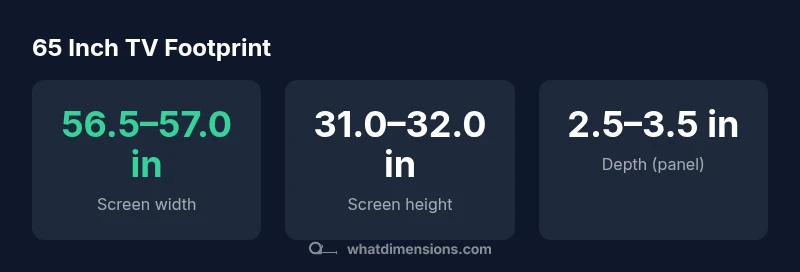
A 65-inch TV refers to the screen diagonal, not the entire cabinet. For a typical 65-inch panel with a 16:9 aspect ratio, the screen width is about 56.5–57.0 inches and the height around 31.0–32.0 inches. Bezel and stand add footprint, often bringing total width to roughly 57–58 inches and depth to 8–12 inches. Always verify exact numbers from the manufacturer for the model you choose.
What tv 65 inch dimensions mean in practice
According to What Dimensions, tv 65 inch dimensions describe the screen diagonal, not the entire cabinet size. In most consumer models, the 65-inch label refers to the display surface, which means the actual cabinet width will be slightly larger due to bezels and the frame around the screen. For a typical 65-inch panel with a 16:9 aspect ratio, the screen width is around 56.5–57.0 inches and the height about 31.0–32.0 inches. When you add the bezel, plus any decorative kickers or integrated stands, the total footprint tends to grow by 0.5–2 inches on each side. If you include the stand, the width can reach roughly 57–58 inches, and the depth can range from 8–12 inches, depending on the stand design. These figures provide a reliable baseline for room planning, but always verify the exact numbers from the manufacturer for the specific model you are considering.
How to measure a TV's footprint accurately
Measuring the footprint of a 65-inch TV requires care and a methodical approach. Start with the official spec sheet from the manufacturer and note the screen width, height, and depth including bezel. If you plan to mount the TV, record the VESA pattern and the mounted depth. When using a stand, measure its width and depth separately and then add these figures to the screen footprint. Finally, add a little extra space for air circulation and cable routing. By collecting these measurements, you can compare against furniture and wall space to prevent fitting problems at installation.
Typical dimensions for 65-inch TVs (16:9) and bezel impact
In a standard 65-inch 16:9 display, the screen width is roughly 56.5–57.0 inches and the height is about 31.0–32.0 inches. The panel depth typically sits around 2.5–3.5 inches, depending on the cooling design. Bezel thickness and decorative trims can add slightly to these figures. If you mount the TV on a wall or place it on a stand, expect the overall footprint to be approximately 57–58 inches wide and 8–12 inches deep. These ranges account for market variations while staying anchored to the 65-inch diagonal reference.
Planning space: viewing distance and stand/ mounting clearance
A comfortable viewing distance for 65-inch TVs depends on content quality. For 4K HDR content, a common guideline is about 1 to 1.5 times the diagonal, which translates to roughly 5.5 to 8.0 feet depending on viewer preference. In practice, many living spaces position seating around 8–10 feet from the screen to achieve an immersive yet comfortable experience. Don’t forget to reserve space for cable management and any soundbar or speaker below or beside the TV, as well as proper ventilation behind the display.
Quick tips for comparing models by footprint
- Read the full spec sheet, not just the diagonal label
- Distinguish screen measurements from cabinet footprint
- Include stand width if the TV sits on furniture
- Check wall-mount compatibility and VESA pattern
- Plan for cable routing and ventilation space behind the TV
Common mistakes when sizing a TV for a room
- Underestimating the footprint can lead to cramped seating
- Ignoring stand width or wall mount clearance
- Forgetting about cable management and soundbars
- Assuming all 65-inch TVs have the same bezel size
- Not leaving space around the TV for ventilation
Mounting options and clearance factors
Wall mounting can significantly reduce depth but requires sturdy mounting hardware and proper wall studs. When mounting, verify the VESA pattern, weight rating, and clearance for wall-mounted soundbars or shelves. If you prefer a stand, choose a base that fits your furniture width and depth. Always leave space for ventilation and cable management behind the TV and ensure the device does not block air vents.
Typical footprint ranges for a 65 inch class TV
| Component | Typical Dimension (inches) | Notes |
|---|---|---|
| Screen width | 56.5–57.0 | 65" diagonal, 16:9 aspect |
| Screen height | 31.0–32.0 | 16:9; bezel adds minor variation |
| Depth (panel only) | 2.5–3.5 | Vary by panel depth and cooling |
| Footprint with stand (W x D) | 57–58 x 8–12 | Stand adds width; depth depends on stand |
Quick Answers
What does 65 inch refer to on a TV?
65 inch refers to the screen diagonal. The overall cabinet size varies with bezel thickness and the chosen stand or mounting system.
65 inch is the screen diagonal; cabinet size varies with bezel and stand.
Is width the same for all 65 inch TVs?
No. Width changes with bezel thickness, panel design, and whether a stand is modeled directly into the cabinet.
Width varies by model due to bezel and stand design.
How do I calculate the overall footprint with the stand?
Add the stand width and depth to the screen footprint as specified in the manual. This gives the total width and depth you should plan for.
Add the stand measurements to the screen footprint.
Do wall mounts reduce depth?
Yes, mounting on a wall reduces depth but keeps the width determined by the screen and bezel. Check the mounting hardware and studs.
Wall mounting reduces depth; check mounting hardware.
What is the best viewing distance for a 65 inch TV?
For 4K content, 1 to 1.5 times the diagonal is a common guideline, typically around 8 feet or more depending on room size and preference.
Typically 1 to 1.5 times the diagonal for 4K content.
Are curved 65 inch TVs different in footprint?
Curved panels can alter perceived width slightly and may marginally affect depth due to curvature and mounting alignment.
Curved panels may slightly change footprint and mounting needs.
“Accurate footprint measurements prevent surprises during installation and furniture planning. Always compare a model's official dimensions to your wall and furniture layout.”
Main Points
- Know 65 inch refers to diagonal, not cabinet size
- Expect screen width around 56.5–57.0 in and height 31–32 in
- Bezel and stand can add ~0.5–2 inches per side
- Always verify model-specific dimensions before mounting or furniture planning