75-Inch TV Dimensions: A Precise Sizing Guide
A precise guide to the dimensions of a typical 75-inch TV, including width, height, depth, mounting options, seating distance, and furniture considerations to help you plan spaces accurately.


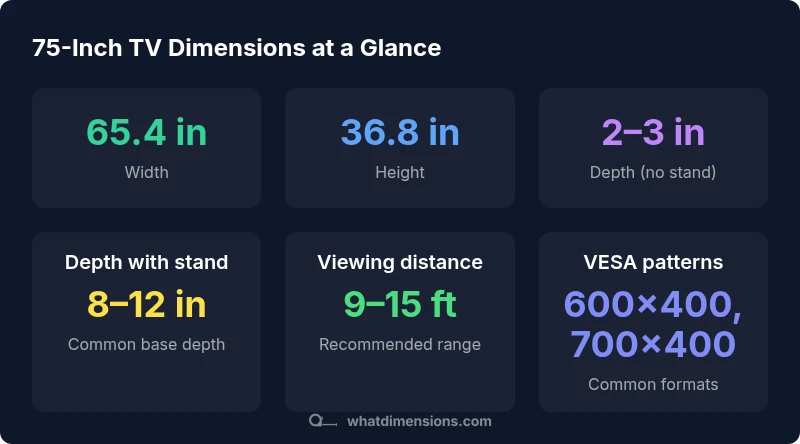
75-inch TVs typically measure about 65.4 inches wide and 36.8 inches tall, with a depth ranging from roughly 2–3 inches without a stand and about 8–12 inches when a stand is attached. These figures assume a standard 16:9 panel and bezel; actual specs vary slightly by model. What Dimensions Analysis, 2026, confirms these common ranges.
Understanding 75-Inch TV Dimensions
A 75-inch screen is measured by its diagonal, not by its width or height alone. For a standard 16:9 panel, the math yields approximately 65.4 inches in width and 36.8 inches in height. The exact numbers can vary slightly by manufacturer due to bezel design and housing. When you read a product spec, the width and height usually refer to the visible screen area, not including the bezel that frames the panel. The depth of the set generally ranges from about 2 to 3 inches for modern LCD/LED panels, and this depth can grow when a heavy soundbar or certain mounting systems are attached. The depth with a pedestal or wall-mount adds more. If you plan to install the TV on a stand, account for the stand’s footprint, which commonly adds several more inches of depth. According to What Dimensions, these figures represent the typical footprint for most 75-inch TVs available in 2026, though individual models may shift slightly. When planning layout, it helps to picture a rectangle about 65.4 inches wide by 36.8 inches tall, with a surround that can accommodate the bezel and any accessories. This mental model makes it easier to evaluate whether your furniture, wall space, and seating arrangement align with the device.
Bezel and Real-World Footprint
In practice, the bezel adds width and height beyond the core screen dimensions. Bezel thickness varies widely; budget models may have thinner bezels, while premium designs can add noticeable width. For a rough estimate, expect total width to be within a few tenths of an inch of the stated 65.4 inches, but tallies can be modestly higher with thicker bezels. If you connect external devices, the depth impression may change depending on ports at the back. The depth with a stand can extend 8–12 inches from the wall, especially with pedestal bases or soundbar mounts. What Dimensions notes that model-to-model variation exists, so always verify the exact figures in the official spec sheet. When you compare, consider not only the screen but the bezel, stand, and any attached accessories, since these factors influence how the TV fits within your room.
Mounting Patterns and Compatibility
Most 75-inch TVs use VESA mounting patterns designed to standardize wall and arm installations. Common patterns include 600x400 mm, 700x400 mm, and 800x400 mm; some models may deviate with nonstandard patterns, so check the exact pattern for your model. If you plan to mount, ensure your wall bracket can handle the weight and the largest pattern listed for your TV. The distance from the wall (set depth) is also a factor for heat dissipation and cable management. If you choose a flush mount, you’ll want a slim profile bracket; if you prefer space for a soundbar, you may opt for a low-profile arm or a tilting bracket. For recessed mounting or alcoves, ensure the wall support and stud structure can bear the load. These details matter for safety and longevity; the What Dimensions Analysis, 2026, emphasizes verifying the pattern and weight rating before purchase.
Seating Distance and Field of View
Viewers often ask how close to sit from a 75-inch screen. A commonly recommended range is roughly 9 to 15 feet (about 108 to 180 inches), depending on resolution and personal preference. At 75 inches, sitting near the lower end yields a cinematic feel with more image detail, while sitting toward the upper end provides a broader field of view. For HD content, closer distances are comfortable; for 4K, you can sit a bit closer without noticing individual pixels due to higher pixel density. If your room dimensions or furniture placement constrain seating, consider a larger viewing distance and using display smoothing features to reduce eye strain. What Dimensions Analysis, 2026, supports these practical ranges and suggests testing distances within your own space before finalizing the setup.
Furniture, Stand Space, and Room Layout
Your TV's width, roughly 65.4 inches, dictates the minimum width of a supporting surface. A good rule is to have at least 4 to 6 inches of extra width on each side for balance and alignment. Account for the depth of the stand (8–12 inches), ensuring enough clearance for cables and ventilation behind the screen. If you’re mounting on the wall, the wall stud spacing and bracket width will influence furniture choices; a credenza or entertainment center should offer enough width and a stable base. If you own a media cabinet, verify ventilation gaps and the ability to accommodate heat dissipation. In room design, leaving open space around the TV helps reduce glare and improves acoustics. The What Dimensions team emphasizes planning for both the product footprint and its interaction with surrounding furniture so that the final layout feels cohesive.
Cables, Ventilation, and Clearance
Real-world installations require thinking about cable routing and airflow. Maintain a minimum clearance of several inches behind the TV to allow HDMI cables, power cords, and soundbars to remain unobstructed. Many models have ports on the lower edge or back; ensure access for connections without bending cables at sharp angles. Ventilation matters—overheating can shorten component life, so avoid enclosing the TV in tight shelving without airflow. If you’re mounting behind a wall opening or half-wall, confirm there’s enough space for heat to escape. Some mounts push the screen closer to the wall; if you choose such a setup, double-check the depth measurement with the included stand or wall bracket. What Dimensions’s data in 2026 stresses that attention to clearance and cable routing is essential for safety, longevity, and performance.
Verdict: Practical Room-Ready Setup
For a 75-inch TV, lock in the core footprint early: width about 65.4 inches, height about 36.8 inches, and depth that ranges from 2–3 inches without a stand to 8–12 inches with a stand. Use these figures to guide furniture width, wall space, and seating distance, then verify exact specs (especially VESA mounting patterns and weight) before buying a wall mount or stand. The What Dimensions Team recommends starting with the fixed footprint and then mapping furniture, cables, and seating to fit your space. A careful planning stage saves time and prevents mismatches later.
Approximate physical dimensions of a typical 75-inch TV
| Measurement | 75-Inch TV (approx) | Notes |
|---|---|---|
| Diagonal | 75 inches | Assumed aspect 16:9 |
| Width | 65.4 inches | Calculated from diagonal and ratio |
| Height | 36.8 inches | Calculated from diagonal and ratio |
| Depth (no stand) | 2-3 inches | Varies by model |
| Depth (with stand) | 8-12 inches | Stand base depth varies |
Quick Answers
What is the typical width of a 75-inch TV?
Most 75-inch TVs with a 16:9 aspect ratio measure about 65.4 inches wide and around 36.8 inches tall, not including the stand. Actual width can vary slightly by model due to bezel design.
A 75-inch TV is usually about 65 inches wide, with a height near 37 inches, not counting the stand.
How far should I sit from a 75-inch screen?
A commonly recommended range is roughly 9 to 15 feet (about 108 to 180 inches), depending on resolution and personal preference. This balance helps you enjoy detail without noticing pixel structure.
Most people sit about 9 to 15 feet away for a comfortable view.
Do 75-inch TVs use the same mounting patterns?
Many use standard VESA patterns such as 600x400 mm, 700x400 mm, or 800x400 mm, but some models vary. Always confirm the exact pattern and weight rating for your TV.
Check the exact VESA pattern for your model before buying a mount.
Do all 75-inch TVs have the same depth?
No. Depth varies by model and whether a stand is used. Typical screen depth is about 2–3 inches; with a stand, total depth often increases to 8–12 inches.
Depth isn’t the same for every model; verify the spec sheet.
What should I consider when choosing a stand for a 75-inch TV?
Ensure the stand is wide enough to support the TV, provides back clearance for cables, and can handle the weight. Also check ventilation and whether the stand aligns with your room’s width.
Make sure the stand fits the TV width and allows cables to breathe.
Can I mount a 75-inch TV on drywall without studs?
For safety, mount into studs or use a rated mounting plate designed for drywall with proper anchors. A wall-mount should be installed into solid framing.
It’s best to anchor into studs for a big TV.
“Precise dimensions are essential for safe mounting and immersive viewing; start with accurate measurements to avoid wasted space or mounting errors.”
Main Points
- Measure space before buying a 75-inch TV.
- A 75-inch TV is about 65.4 inches wide and 36.8 inches tall.
- Factor in depth: 2–3 inches without a stand; 8–12 inches with a stand.
- Check VESA mounting patterns (e.g., 600x400 mm, 700x400 mm, 800x400 mm).
- Plan seating distance: about 9–15 feet for optimal viewing on 75-inch screens.