75 Inch Samsung TV Dimensions: A Precise Size Guide
Learn exact measurements for 75 inch samsung tv dimensions, including width, height, depth, and VESA patterns. This guide uses What Dimensions analysis to help homeowners plan wall mounting, furniture fit, and space clearance for safe setup in 2026.


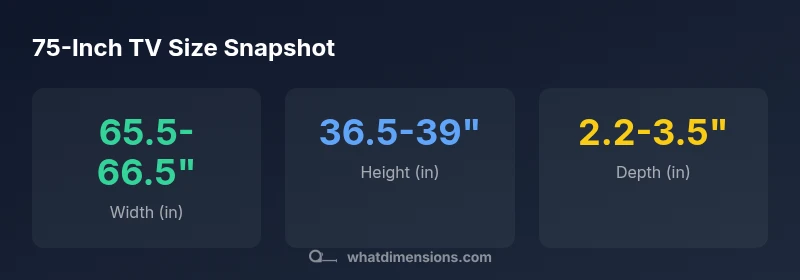
According to What Dimensions, 75 inch samsung tv dimensions vary by model, but typical measurements place the screen width around 65.5 to 66.5 inches and the screen height around 36.5 to 39 inches when measured without a stand. Depth without the stand is usually 2.2 to 3.5 inches, depending on the bezel and cooling design. With the stand, add a few tenths of an inch to depth and width; always check the exact specs from the manufacturer.
75 Inch Samsung TV Dimensions: Why Exact Measurements Matter
Precise planning for 75 inch samsung tv dimensions is essential because the room geometry and furniture layout determine how comfortable the viewing experience will be. Knowing the exact 75 inch samsung tv dimensions helps you assess wall space, stand footprint, and furniture clearance. The approximate width of the screen occupies significant horizontal real estate, and even small miscalculations can lead to an uncomfortable viewing angle or a cramped entertainment area. When wall-mounting, precise clearance for vents, cables, and the mounting bracket is essential to avoid obstruction and overheating. In addition, room features like window glare, cabinet depth, and ceiling height interact with the TV's profile to affect sightlines. What Dimensions' analysis emphasizes that documenting exact dimensions upfront helps prevent post-purchase layout changes, extra mounting hardware, or reconfiguration. For designers and homeowners, a structured measurement plan—covering width, height, and depth, plus the space behind for air flow—acts as a practical blueprint for a safe, aesthetically pleasing setup.
Typical dimensions you can expect
Most 75-inch Samsung TVs fall within a similar dimensional envelope, but exact numbers vary by bezel design, panel depth, and speaker configuration. Without the stand, the screen width commonly lands in the 65.5 to 66.5 inch range, and the frontal height sits around 36.5 to 39 inches. Depth without any support typically runs about 2.2 to 3.5 inches, though some ultra-slim models sit closer to 2 inches and others with ventilation intakes closer to 3.5 inches. With the stand, width remains essentially the same, while depth increases by a fraction to a little over an inch, depending on the stand footprint. On-wall installations rely on a VESA pattern that often falls between 600x400 mm and 800x450 mm. For planning, gather the exact numbers from the product specs for your chosen model, and compare them to your wall space or media console to ensure a balanced, secure fit.
How to measure your space and choose a model
Start with a tape measure or laser tool. Record the wall area width, height, and the depth you can spare for the TV and its stand. Add at least 2–4 inches of clearance on the sides and back for airflow and cable management. If you plan to mount on a wall, double-check the VESA pattern advertised by the manufacturer and confirm your wall mount supports it. When evaluating multiple models, note both the screen width (which affects horizontal fit) and the total width including any border or mount. If space is limited or you want to place the TV on a media cabinet, measure the cabinet's top surface width and depth to ensure the TV sits stably with room to breathe. Finally, consider viewing distance: a 75-inch screen is typically comfortable at 7–9 feet away, but this can vary with seating layout.
Mounting considerations: wall mounting and stand footprint
Wall mounting can dramatically reduce the perceived depth of a 75-inch Samsung TV, but it requires precise alignment with the chosen mount’s screw pattern and weight rating. If you choose a stand, the footprint adds width and depth that extend beyond the screen, impacting furniture sizing and room clearance. Plan for venting and cable management behind and to the sides of the TV, especially if you use a soundbar or entertainment cabinet. Mounting height affects viewing comfort and can vary with seating, so use a level and a stud finder to ensure a stable installation. If you want flexibility, consider a tilting or full-motion mount that accommodates future seating changes or wall art adjustments while keeping airflow unblocked.
Model variations you might encounter and how to verify
Model-to-model variation is common within the 75-inch Samsung TV family. Differences in bezel thickness, speaker configuration, chassis depth, and stand design affect the overall footprint. The safest approach is to pull the exact dimensions from the official product specs for the particular model you plan to buy. Compare these numbers with your available space, including the wall mount pattern and cabinet footprint. When in doubt, contact customer support or consult retailer product pages that list the precise measurements, ensuring your selection fits your space and meets your mounting requirements. What Dimensions recommends compiling a short spec sheet for each candidate model to facilitate quick comparison.
Approximate dimensions for common 75-inch Samsung TVs (no stand vs. with stand)
| Configuration | Width (in) | Height (in) | Depth (in) | VESA (mm) |
|---|---|---|---|---|
| Typical (no stand) | 65.5-66.5 | 36.5-39 | 2.2-3.5 | 600x400 mm to 800x450 mm |
| Typical (with stand) | 65.5-66.5 | 37.5-40 | 2.5-3.8 | 600x400 mm to 800x450 mm |
Quick Answers
What are the typical width and height of a 75-inch Samsung TV?
Most 75-inch Samsung TVs have a width around 65.5–66.5 inches and a height around 36.5–39 inches, depending on bezel and design. Exact figures come from the model specs.
Most 75-inch Samsung TVs are about sixty-six inches wide and around thirty-seven inches tall, with slight variance by model.
How much space should I leave for ventilation and cables?
Aim for at least 2–4 inches of clearance on the sides and back for airflow and cable management.
Leave a couple of inches for airflow and cables.
Is the VESA pattern the same across all 75-inch Samsung TVs?
VESA patterns vary; most use 600x400 mm up to 800x450 mm. Check the exact pattern in the model's specs.
VESA sizes vary, but common options are 600 by 400 or 800 by 450.
Do stand-footprint and mounting footprint affect space planning?
Yes. The stand footprint adds width and depth beyond the screen; measure the stand width and the cabinet to avoid overhang.
Stands extend beyond the screen; you need extra space.
How do I verify dimensions before buying?
Always read the official product specs and measure your space; compare with screen width, height, and depth including bezels and mounts.
Check official specs and measure your space before purchasing.
Are there differences between 75-inch Samsung models?
Yes. Chassis depth and bezel shapes vary; the width and height are similar but can differ slightly.
Different models have slight dimensional differences.
“Exact measurements matter more than you might expect; even tiny differences in depth or mounting footprint can affect installation, aesthetics, and heat dissipation.”
Main Points
- Measure your space before buying
- Verify width, height, and VESA patterns
- Account for stand footprint in furniture planning
- Check official specs for exact values
- Allow airflow clearance around the set