YouTube Profile Image Dimensions: The Complete Guide
Learn the exact YouTube profile image dimensions, recommended formats, and practical tips to ensure your channel avatar looks sharp on desktop, mobile, and TV across devices.


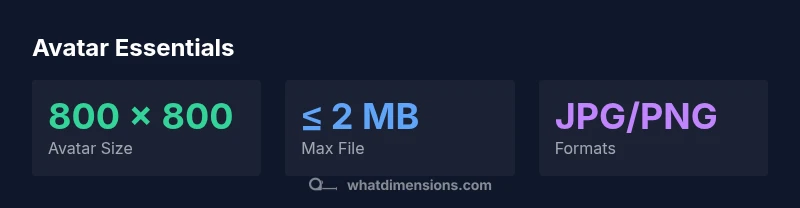
Your YouTube profile image should be a square (1:1 aspect ratio). Aim for about 800 x 800 pixels, saved as JPG or PNG, and keep the file under 2 MB. Use a clear, well-lit photo where your face is centered; this ensures the avatar looks good on desktop, mobile, and TV displays.
Why YouTube profile image dimensions matter
Your profile image is the first visual cue viewers encounter for your channel. It anchors your branding across all places YouTube users interact with you, from search results to comments and recommendations. When the image is cropped or scaled poorly, your face or logo can blur, reducing recognizability and trust. According to What Dimensions, maintaining consistent YouTube profile image dimensions reinforces brand recognition and improves click-through rates. A well-sized avatar also minimizes on-platform compression artifacts that degrade detail on smaller screens.
The anatomy of a strong YouTube avatar
A high-quality avatar usually follows a few simple rules: a square frame (1:1 aspect ratio) ensures perfect centering on all devices; a high-contrast subject keeps you identifiable even when scaled down; and a clean, uncluttered background prevents distraction. For creators and brands, consistency with your logo or face photo across social profiles helps users recognize you instantly. The viewer’s eye should land on the face or logo, not on stray pixels or busy backgrounds.
Recommended dimensions and formats
- Square shape is non-negotiable: 1:1 aspect ratio guarantees uniform cropping on all screens.
- Preferred size: aim for around 800 x 800 pixels to preserve detail when YouTube crops and displays avatars in different UI contexts.
- File types: JPG or PNG are usually best; PNG preserves sharp edges for logos, while JPG is efficient for photos.
- File size: keep uploads under 2 MB to reduce compression artifacts and ensure fast loading.
- Color and contrast: opt for a well-lit image with strong contrast between subject and background to maintain legibility at small sizes.
Image quality: resolution, color, and compression
Image sharpness matters more than you might expect on small profile icons. When saving, choose a high-quality setting, but balance with file size. PNG is preferred for logos with crisp edges; JPG is acceptable for photos with subtle gradients. Be mindful of color profiles and ensure the image uses sRGB for broad compatibility across devices and browsers.
Centering and safe area for cropping
YouTube crops avatars differently in various contexts, so keep critical content within a central safe area (roughly the central 70–80% of the image). This ensures faces or logos aren’t cut off when YouTube applies circular crops in some interfaces. Test how the image looks at smaller sizes to confirm subject visibility remains strong.
sourceGuidanceNoteTextShortForMarkdownUsesForBodyBlocks":null},
YouTube avatar dimensions at a glance
| Aspect | Recommended range | Rationale |
|---|---|---|
| Square size (px) | 800 x 800 | Maintains 1:1 aspect across devices |
| Max file size | ≤ 2 MB | Reduces compression and load times |
Quick Answers
What is the minimum size for a YouTube profile image?
There isn’t a hard minimum publicly published by YouTube, but using a square image around 800 x 800 px provides reliable clarity across devices. Larger, high-quality images reduce upscaling artifacts when displayed at smaller sizes.
Most creators aim for a square around 800 by 800 pixels so it stays crisp on all screens.
Should I use a photo or a logo for my avatar?
Choose based on how you want to present your brand. Photos work well for personal channels; logos are better for brand channels. In either case, ensure the subject is clear, centered, and cropped to a square.
If you’re branding a business, a clean logo often performs best as an avatar.
Does YouTube compress avatars, and will that affect quality?
Yes, avatars may be compressed to optimize loading. Using a high-quality source image at 800 x 800 px and a lossless or low-compression format helps preserve details after processing.
Expect some compression, so start with a strong, sharp original.
What file formats are best for YouTube avatars?
JPEG and PNG are widely supported. Use PNG if you need sharp edges (e.g., logos), otherwise JPEG is fine for photos. Keep the file within a reasonable size to minimize compression.
JPEG or PNG are the safe bets for YouTube avatars.
Should the avatar edge be rounded or square?
The display usually renders as a circular avatar, but uploading a square image ensures the corners aren’t cropped unexpectedly. Center your subject, keeping important content away from the edges.
Upload a square image; cropping will center the subject when shown as a circle.
How can I test my avatar before finalizing?
View the image at small sizes and on different devices (mobile, desktop). If the subject stays clear and centered, you’re likely good to go.
Check how it looks on small screens to catch any cropping issues early.
“A well-sized YouTube profile image improves recognition and trust, especially on small screens where icons dominate the initial impression.”
Main Points
- Use a square image (1:1 aspect ratio) for all platforms
- Aim for ~800 x 800 px to balance clarity and size
- Upload JPG or PNG under 2 MB
- Test appearance across desktop, mobile, and TV
- Center important content to avoid cropping issues