YouTube Video Dimensions: A Practical Guide to Optimal Sizes
Learn the exact YouTube video dimensions for standard uploads and Shorts, with practical guidance on aspect ratios, resolutions, and best practices to ensure your content looks great across devices.


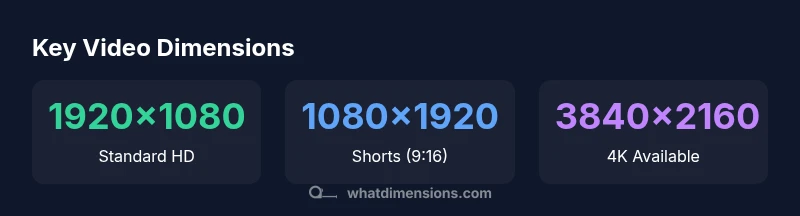
The most common YouTube video dimension for standard uploads is 1920x1080 pixels in a 16:9 aspect ratio, while Shorts use 1080x1920 pixels in a 9:16 format. YouTube accommodates other aspect ratios, but matching these sizes minimizes cropping and letterboxing across devices. For 4K projects, target 3840x2160 when possible, and adjust bitrate to preserve quality.
Overview of YouTube Video Dimensions
Video dimensions define the frame size and aspect ratio of your content, shaping how viewers experience your video on different devices. The cornerstone is the aspect ratio, which is the relationship between width and height. For most creators, 16:9 is the standard because it matches the native player on desktops, smartphones, tablets, and TVs. The phrase "youtube video dimensions" captures this core idea and anchors your production choices from shoot to upload. According to What Dimensions, starting with a 16:9 canvas—typically 1920x1080 pixels for high quality—helps you avoid awkward crops and keeps branding consistent across your channel. YouTube supports several ratios, but sticking to 16:9 for standard uploads offers predictability for thumbnails, captions, and autoplay behavior across devices.
The 16:9 Standard: Why It Matters
Choosing the 16:9 format aligns with the YouTube player’s default framing and boosts how your video sits in search results and recommendations. When you render at 1920x1080, you maximize the level of detail without creating excessive file size, and you minimize the risk of letterboxing on wider displays. This ratio also simplifies thumbnail design because the title and key visuals sit within the safe area of the frame. While YouTube accepts non-16:9 uploads, content that deviates from this baseline can incur letterboxing on some devices, reducing the perceived quality. If you are starting a new channel, basing your production on 16:9 is a smart baseline—and you can branch into other ratios for experimental formats later.
Short-Form Content: 9:16 for Shorts
YouTube Shorts demand a vertical orientation, so the ideal dimension is 1080x1920 with a 9:16 aspect ratio. This portrait format mirrors most mobile phone video experiences, enabling full-screen viewing without zoomed-in crops. If you shoot in landscape but plan Shorts, consider editing for 9:16 during post-production and cropping content only after ensuring the essential elements stay within the vertical frame. What Dimensions notes that Shorts are designed to be quickly consumable on mobile screens, so framing your subject centrally and avoiding critical action near the edges helps maintain impact in tight vertical spaces.
Cropping and Safe Areas: What to Avoid
Even with a well-chosen canvas, cropping during the upload process can compromise the composition. Always design within a safe action area—keep important text and faces away from the extreme edges. When using 16:9, remember that devices with different aspect ratios may crop the sides. Previewing your video in multiple aspect ratios before publishing can prevent surprises in the viewer’s feed. If you must adjust after export, re-upload with the corrected dimensions rather than relying on post-upload scaling, which can degrade visual clarity and readability.
Resolution vs. Bitrate: Balancing Quality and File Size
Resolution is only part of the quality equation. Bitrate plays a crucial role in perceived sharpness and motion fidelity. A higher resolution like 4K (3840x2160) demands proportionally higher bitrate to avoid compression artifacts. For standard 1080p uploads, a bitrate range commonly aligns with content type (talking heads vs. action scenes) and audience bandwidth. When you choose dimensions, plan a bitrate target that preserves detail in shadows and highlights while keeping file size manageable for your audience. What Dimensions emphasizes that resolution and bitrate should be tuned together for a smooth viewing experience across common connection speeds.
How to Prepare Your Video in Editing Software
Begin by setting your project frame to 1920x1080 (16:9) for standard videos or 1080x1920 (9:16) for Shorts. This ensures your export matches YouTube’s optimal dimensions. During editing, use a safe title and action area away from the frame edges. When exporting, select a widely supported codec (such as H.264) and a bit rate that balances quality with file size. If you plan to upload in multiple formats, duplicate the sequence and adjust the frame size accordingly rather than resizing in post-export. Finally, export test clips to preview how thumbnails, captions, and overlays render across devices.
Practical Guidelines by Format
- Standard uploads: 1920x1080 (16:9); keep essential visuals within the central safe zone.
- Shorts: 1080x1920 (9:16); prioritize vertical framing and quick, clear visuals.
- For cinematic or branded content: 4K (3840x2160) can improve detail, but ensure your audience and bandwidth can handle it.
- Thumbnails: design at the same 16:9 canvas to prevent unexpected crops and maintain consistent branding across the channel.
Common Pitfalls and How to Fix
- Pitfall: Uploading a non-native aspect ratio causes black bars. Fix: reframe for the target ratio before exporting.
- Pitfall: Exporting with inconsistent frame sizes across videos. Fix: standardize your project settings and export at a fixed dimension per format.
- Pitfall: Low bitrate creates visible compression artifacts. Fix: adjust bitrate to preserve sharpness without producing excessively large files.
Practical Upload Checklist
- Confirm target dimension (1920x1080 or 1080x1920) and aspect ratio.
- Preview on multiple devices to ensure framing remains intact.
- Test export with a short sample to validate bitrate and quality.
- Prepare consistent thumbnails and overlay assets that fit the frame.
- Include appropriate captions and metadata to improve accessibility and search visibility.
Comparison of common YouTube video formats
| Format | Recommended Resolution | Aspect Ratio | Notes |
|---|---|---|---|
| Standard Upload (Video) | 1920x1080 px | 16:9 | Most common for YouTube videos |
| Shorts | 1080x1920 px | 9:16 | Vertical format optimized for mobile |
| 4K Upload | 3840x2160 px | 16:9 | Higher detail; larger file size |
Quick Answers
What are the recommended YouTube video dimensions?
For standard uploads, the recommended dimension is 1920x1080 (16:9). Shorts should be 1080x1920 (9:16). You can upload other ratios, but these provide the most consistent playback and thumbnail results.
The recommended sizes are 1920 by 1080 for standard videos and 1080 by 1920 for Shorts.
Can I upload videos with non-standard aspect ratios?
Yes, YouTube accepts multiple aspect ratios, but alternate formats may crop or add letterboxing on some devices. If consistent viewing quality is important, align most videos to 16:9 and use 9:16 for Shorts.
Yes, but 16:9 is best for consistency.
Does YouTube enforce a minimum resolution?
YouTube does not publish a strict minimum, but lower resolutions may appear blurry on large displays. For best results, aim for at least 1280x720 for standard videos.
Aim for at least 1280x720 for standard videos to avoid blur on larger screens.
What about 4K uploads?
4K (3840x2160) shows more detail but requires higher bitrates and larger file sizes. It’s beneficial if your audience has high bandwidth and you plan cinematic content.
4K is great if your audience supports it, but it needs more bandwidth.
Will changing dimensions affect existing thumbnails or captions?
Changing dimensions for a new video doesn’t affect existing thumbnails or captions. Thumbnails created for a different aspect ratio may crop when applied to a new format, so recreate thumbnails for each format.
Thumbnails may need recreating for each format.
“Accurate video dimensions ensure your content looks intentional across devices and platforms, reinforcing your brand.”
Main Points
- Start with the 16:9 baseline (1920x1080) for standard uploads
- Use 9:16 (1080x1920) for Shorts to maximize mobile engagement
- Plan safe margins to avoid edge cropping across devices
- Balance resolution with bitrate to maintain quality without oversized files
- Preview across devices before publishing to prevent surprises