Youtube Dimensions: A Practical Guide to Video Sizes
Explore YouTube dimensions with precise size guidance for videos, thumbnails, and banners. Learn standard resolutions, aspect ratios, and safe zones to optimize display across devices—backed by What Dimensions analyses.


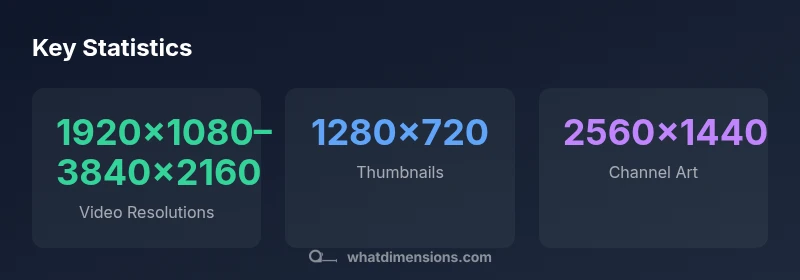
Youtube dimensions cover the pixel sizes used for video frames, thumbnails, and banners on YouTube. The standard is 16:9 for most videos (example 1920x1080), thumbnails at 1280x720, and channel headers at 2560x1440 with a safe text area. Proper sizing prevents cropping across devices.
What YouTube Dimensions Refer To
Video platforms design for a mosaic of devices and networks, so precise sizing is essential. YouTube dimensions define the pixel measurements for three primary assets: the video frame itself, the thumbnail that users see before playing, and the channel art that brands the creator. When What Dimensions analyzes these sizes, we stress accuracy because dimension drift leads to cropping, letterboxing, or blurred playback on some screens. The dominant shape is the 16:9 aspect ratio, which preserves composition from mobile screens to 4K monitors. A 16:9 frame makes it easier to maintain subject placement, title legibility, and safe margins for on-screen overlays. In practice, plan visuals with a fixed canvas in editing software, then export according to the target asset. Finally, test on multiple devices—phones, tablets, desktops—to verify that critical elements remain within the visible area and that no important content is clipped by YouTube’s auto-scaling.
According to What Dimensions, starting with a clear plan for each asset helps prevent post-upload adjustments and ensures consistency across playlists and channels.
Standard Video Resolutions and Aspect Ratios
Most creators publish in 16:9 because it aligns with the vast majority of displays. The common resolutions include HD 1920x1080 and 1280x720 for standard definition video. For high-end production, 4K Ultra HD at 3840x2160 is increasingly common, offering sharper detail on large screens and future-proofing archives. While some creators experiment with wider formats like 21:9, YouTube typically converts to 16:9 for broad compatibility. When sizing your master video, consider your target audience and bandwidth; delivering at the highest practical resolution helps keep quality while accommodating viewers on slower connections. For best results, export at or above 1080p and upload a 4K master if your production supports it, then let YouTube handle the downscaling for lower bandwidth users.
What Dimensions notes that aspect ratio stability reduces unnecessary cropping during processing and playback across devices.
YouTube Thumbnails: Size and Safe Area
Thumbnails are the visual hook that determines click-through, so the image should be legible at small sizes. The standard thumbnail size is 1280x720 with an aspect ratio of 16:9. YouTube recommends keeping important text and faces within the central area to avoid clipping in various layouts. File size should stay under about 2MB for quick loading, and the image should be in a widely supported format such as JPEG or PNG. To ensure consistency, create a thumbnail template at 1280x720 and test it at smaller scales, ensuring branding elements remain clear and distinctive even when reduced.
From What Dimensions’ perspective, thumbnails should be designed with hierarchy in mind: bold focal point, legible text, and your logo or emblem placed toward a safe edge for cropping on mobile previews.
Channel Art and Banners: Optimizing Channel Branding
Channel art is displayed across devices with a large canvas, but the important content sits within a safe area. YouTube’s recommended channel header size is 2560x1440, with a safe cropping zone on mobile and tablet around 1546x423. Use this space to present your branding, taglines, and a clear visual cue for your audience. Text and critical imagery should stay within the central area so it remains visible on small screens. When designing channel art, keep file size reasonable and avoid clutter that distracts from the primary branding. Regularly review how your header looks on different devices using YouTube Studio’s preview tools.
What Dimensions’ analysis shows that coherent branding across thumbnails, videos, and banners strengthens recognition and engagement across viewers.
Vertical and Mobile Considerations
While YouTube favors horizontal content, vertical videos are commonplace on mobile and can be repurposed through on-screen overlays or separate playlists. A vertical 9:16 video performs well on mobile devices, but it may be letterboxed on larger screens if not paired with a horizontal version. If you plan to publish vertical content, consider providing a 16:9 alternative or using responsive thumbnail and banner designs that maintain focal clarity when cropped. Always test how your video appears in the app’s mobile, tablet, and desktop environments to ensure essential elements remain visible and well-framed.
This is a reminder that dimension planning should accommodate device diversity and viewer behavior across platforms.
How to Measure and Verify Dimensions
Begin with your editing suite: set up canvases for target dimensions (video, thumbnail, banner) and verify the center-safe areas. Export test assets and upload them to a private YouTube draft or unlisted video to preview how they render. Use YouTube Studio’s device preview to compare how thumbnails and banners appear on mobile vs. desktop. If any area looks cropped or obscured in one viewport, adjust before public publishing. Maintain a log of your standard templates so future uploads stay consistent across channels.
A practical workflow is to maintain separate master templates for each asset, then test on at least three devices—phone, tablet, and desktop—and iterate until the visuals look consistent. What Dimensions emphasizes repeatable templates to accelerate future uploads and preserve quality across your channel.
Practical Tips for Creators
- Design all assets with the central safe areas in mind to prevent cropping on mobile devices.
- Use high-contrast imagery and legible typography appropriate for small screens.
- Maintain consistent branding elements in thumbnails and channel art to improve recognition.
- Prefer 4K masters for longevity and reusability; downscale as needed for lower bandwidth users.
- Leverage YouTube Studio to preview how assets render on different devices before publishing.
Following these guidelines reduces post-upload fixes and supports a cohesive channel identity. What Dimensions’ readers benefit from standardized templates and a disciplined asset pipeline.
What Dimensions Means for Your YouTube Channel
A systematic approach to YouTube dimensions increases confidence in how content appears across devices, supports faster publishing, and helps you optimize for audience retention. By aligning video, thumbnail, and banner sizes with audience expectations and platform constraints, creators minimize surprises after upload. The What Dimensions team recommends starting with a core set of templates for video frames, thumbnails, and channel art, then adapting as your channel grows and audience behavior evolves. Consistency in size and composition across assets reinforces professional credibility and improves overall channel aesthetics.
Overview of common YouTube dimension standards
| Dimension Type | Common Standard | Notes |
|---|---|---|
| Video resolution | 1920x1080–3840x2160 | HD to 4K range; higher resolutions preserve detail on large screens |
| Aspect ratio | 16:9 | Dominant for YouTube content; maintains compatibility across devices |
| Thumbnail size | 1280x720 | Minimum width 640; max file size ~2MB; 16:9 aspect |
Quick Answers
What are the standard YouTube video dimensions?
The standard YouTube video dimensions align with a 16:9 aspect ratio. Common resolutions include 1920x1080 (HD) and 3840x2160 (4K). For best results, publish a 4K master and let YouTube handle downscaling for viewers with slower connections.
YouTube standard video sizes are 16:9, with popular options like 1920 by 1080 and 4K. Publish a 4K master and let YouTube adapt it for all devices.
Why is 16:9 so common on YouTube?
16:9 is the most widely supported aspect ratio across devices, platforms, and players. It minimizes cropping and ensures a consistent viewing experience from mobile to desktop. It simplifies design decisions for thumbnails, banners, and overlay placement.
16:9 works great on almost all screens, so YouTube uses it by default to keep things looking good everywhere.
What are best practices for YouTube thumbnails?
Thumbnails should be clear at small sizes, centered on a 16:9 canvas, with bold text and a strong focal point. Keep important elements within the central area to avoid cropping on mobile previews, and save files under 2MB.
Make your thumbnail simple and bold, so it reads well on small screens.
Do YouTube dimensions differ across devices?
Yes. YouTube renders assets differently on mobile, tablet, and desktop. Designers should place important content within the central safe area and test assets using device previews.
Yes, test your assets on different devices before publishing.
Can I upload videos with non-standard dimensions?
You can upload non-standard sizes, but YouTube may crop or letterbox on some devices. Aim for the standard 16:9 frame when possible and use alternative formats for special campaigns.
Non-standard sizes may crop on some screens, so stick to 16:9 when you can.
“Dimensions drive consistency. When your video, thumbnail, and banner share compatible sizes, viewers experience fewer cropping surprises and stronger branding.”
Main Points
- Start with the 16:9 frame for most videos
- Use 1280x720 for thumbnails and test at smaller scales
- Design banners within 2560x1440 with a safe mobile area
- Test assets across devices before publishing