Which size for YouTube banner: precise dimensions and best practices
Learn the exact YouTube banner size for optimal display on all devices. This guide covers official measurements, safe zones, device-specific cropping, and practical steps to create a banner that looks great on desktop, tablet, and mobile.


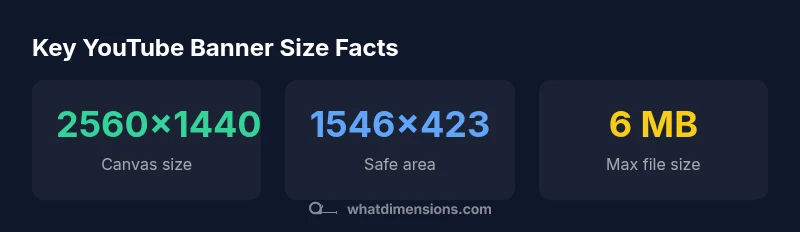
The recommended YouTube banner size is 2560x1440 pixels, with the safe text area 1546x423 centered in the image. Upload files under 6 MB in PNG or JPG. Use a 1:1.78 aspect ratio and test how it renders on desktop, tablet, and mobile using YouTube’s preview tool.
which size for youtube banner
When teams ask which size for youtube banner, the answer is anchored to a single baseline: a 2560x1440 pixel canvas. According to What Dimensions, this is the official starting point for YouTube channel art, chosen to optimize visibility across devices while preserving the integrity of your branding. The size matters not only for image sharpness but also for how the banner crops on different screens. As content designers, understanding this baseline helps you plan typography, logos, and imagery so that everything important sits inside a readable, device-agnostic area. This article leans on What Dimensions Analysis, 2026 to establish a consistent standard that designers, homeowners, and students can apply to projects ranging from a personal channel to a small business presence. By embracing the baseline and the surrounding rules, you’ll avoid common cropping pitfalls and ensure that your banner communicates your brand clearly from day one.
Official specifications and safe zones
The official YouTube channel art size is 2560x1440 px with a central safe zone that YouTube guarantees to display on all devices. The safe area is 1546x423 px, centered within the canvas, where you should place critical text and logo elements. Around this safe zone, the banner may be cropped on smaller screens (phones and some tablets), so avoid crowding your important content near the edges. For best results, save the file in PNG or JPG format and keep the file size under 6 MB. These specifications—canvas, safe zone, and file limits—form the foundation of a banner that looks good on desktop, tablet, and mobile.
Device-aware composition: desktop vs mobile vs TV
A banner designed strictly for desktop may look misaligned on mobile devices if you place content near the edges. The central safe area expands and contracts with display sizes, so prioritize elements within the 1546x423 px window. Logos should stay within this zone, while decorative imagery can bleed toward the edges without compromising legibility. A consistent color palette and readable typography help ensure your message survives cropping and zoom differences across screens.
Practical sizing workflow: from concept to final banner
- Start with a 2560x1440 px canvas and outline the central safe area (1546x423 px). 2) Draft a layout with a short headline, logo, and a minimal supporting line in the safe zone. 3) Test against desktop, tablet, and mobile previews using YouTube’s banner editor or editor screenshots. 4) Export in PNG or JPG, keeping file size under 6 MB. 5) Re-check the safe zone after exporting to ensure no critical content was cropped.
Common mistakes and how to avoid them
• Placing key text outside the safe zone. Always keep essential elements in the 1546x423 px center. • Using high-contrast colors that lose readability on small screens. • Exceeding 6 MB file size, which can hamper upload and rendering. • Ignoring the crop edges by not testing previews across devices. • Relying on a single-device test; always check multiple devices and aspect ratios.
Tools, templates, and resources to speed up design
Utilize templates that target YouTube banner dimensions, and start from a 2560x1440 px baseline. Save multiple versions for desktop and mobile, and keep a master source file with layered vector or high-resolution raster graphics. Consider using a color palette with strong contrast and scalable typography to preserve legibility at various sizes.
Final checks before publishing
Before publishing, run a final check to ensure the safe area contains your essential branding, verify that the file size is under 6 MB, and preview on desktop, tablet, and mobile. Align with brand guidelines, ensuring consistency with other social visuals. If changes are needed, update the banner, re-export, and re-upload for the best possible first impression.
YouTube banner sizing overview
| Platform/Display | Banner size (WxH) | Safe area | Recommended file type | Max file size |
|---|---|---|---|---|
| YouTube desktop | 2560x1440 | 1546x423 | PNG/JPG | 6 MB |
| Mobile crop advisory | 2560x1440 (cropped) | central safe zone | PNG/JPG | 6 MB |
| Tablet/TV ambient | 2560x1440 | 1546x423 | PNG/JPG | 6 MB |
Quick Answers
What is the official YouTube banner size?
The official size is 2560x1440 px. Place critical content within the central safe zone of 1546x423 px to ensure visibility on all devices.
The official size is 2560 by 1440 pixels, with the safe area at 1546 by 423 pixels for essential content.
What is the safe area, and why does it matter?
The safe area is the central region guaranteed to display on all devices. It is 1546x423 px within the 2560x1440 canvas, and you should keep important text and logos there.
The safe area is the center of your banner, where important content should live so it stays visible on every device.
Can I use other aspect ratios for YouTube banners?
No; the YouTube banner uses the 16:9 canvas (2560x1440). Other ratios may crop important content differently on various devices.
You should stick to 16:9 to avoid unexpected cropping.
Should I test banners on devices before uploading?
Yes. Use YouTube’s preview options or screenshots to verify how the banner appears on desktop, tablet, and mobile. Adjust content as needed.
Always preview on different devices before publishing.
What file types and size should I use?
Export as PNG or JPG with a file size under 6 MB to ensure quick upload and proper rendering.
Save as PNG or JPG under 6 MB for best results.
What common mistakes should I avoid?
Avoid placing critical elements near the edges, ignoring the safe zone, and failing to preview across devices.
Avoid edge content and always preview on multiple devices before publishing.
“A well-sized banner maintains brand integrity across devices by respecting the central safe area and consistent typography.”
Main Points
- Start with a 2560x1440 px canvas.
- Keep essential content within the central 1546x423 px safe zone.
- Upload banner under 6 MB in PNG or JPG.
- Preview across desktop, tablet, and mobile to ensure consistency.