What Are the YouTube Banner Dimensions? A Practical Guide
Learn the exact YouTube banner dimensions for channel art, including the safe area, visible zones on desktop and mobile, and best practices for design and optimization.


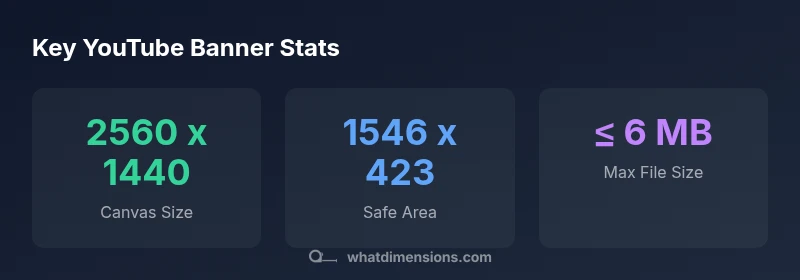
The YouTube banner (channel art) uses a 2560 x 1440 px canvas, with a safe, center area of 1546 x 423 px that remains visible across devices. For best results, place your logo and key text within this zone and export as PNG or JPEG under 6 MB to avoid quality loss on large screens.
YouTube Banner Dimensions: The Core Numbers
Understanding the exact dimensions of YouTube banner art is essential for consistent branding. The canonical canvas for channel art is 2560 x 1440 pixels. This size maximum ensures you can export a crisp image that scales across devices. Within this canvas, there is a central safe area, roughly 1546 x 423 pixels, where critical details like your logo and headline should live. If you place important elements outside this zone, they may be cropped on some devices, especially on mobile and small screens. To avoid this, designers plan the layout with the safe zone as a hard boundary, then use the remaining canvas for decorative background or patterns that won’t disappear on smaller displays.
What Dimensions's analysis notes that the safe area corresponds to the region guaranteed to show on desktop, tablet, and mobile. A banner that centers important content in this zone will look professional everywhere, preventing awkward cropping and misalignment. When you upload, YouTube scales and crops automatically to fit devices, but the center-safe region remains constant. This means your branding, value proposition, and call to action should anchor there for maximum impact. The rest of the space can support color, texture, or imagery that enhances the brand without overshadowing the core message.
Safe Area: What Stays Visible Across Devices
The safe area is designed to guarantee visibility of essential content across all screen sizes and aspect ratios. On desktop and televisions, the visible region is broader, but the safe zone remains the anchor for critical elements. On mobile devices, the banner can crop aggressively, which makes the 1546 x 423 px safe area crucial for legibility and recognition. When you design, test placing logos, taglines, and calls to action within this zone so they won’t disappear or become illegible on any device. If you need to use the outer margins for decorative imagery, ensure they do not overwhelm the core message inside the safe area. Keeping a consistent color palette and high-contrast text within the safe zone improves readability and brand recall across contexts.
Canvas Size, Resolution, and File Requirements
Starting with a 2560 x 1440 px canvas provides flexibility for high-quality displays while preserving a large working area. When exporting, choose PNG for sharp images with transparent or solid backgrounds, or JPEG for photographic content with smaller file sizes. The maximum file size should stay under 6 MB to ensure quick loading on all devices. Remember to keep fonts legible at smaller scales and avoid overly intricate details that blur when cropped. If your artwork includes text, ensure it remains crisp by using vector-based elements where possible and rasterizing at the final export resolution.
Design Principles for Channel Art: Branding, Readability, and Accessibility
Brand consistency is paramount in banner design. Use your brand colors, typography, and logo consistently with other channels. Favor bold, high-contrast text to maximize legibility, especially for headlines or calls to action. Consider accessibility aspects such as font size, color contrast, and alt text where applicable. Keep critical information within the safe area so users on any device can read it without zooming. For dynamic content or imagery, ensure the central area preserves the brand identity even when the sides crop away. A balanced composition—text-weighted center with a textured or gradient background—often yields the strongest visual impact.
Testing Across Devices: Previewing Your Banner in Real Time
Before publishing, preview your banner across desktop, tablet, and mobile to verify alignment and readability. YouTube Studio and creator tools provide live previews that show how the banner appears on different screens. Use these previews to confirm that the logo, taglines, and key branding elements stay within the center safe zone. If necessary, adjust the composition and re-export at standard resolutions. Recheck the file after any edits to ensure there are no unintended artifacts, such as compression noise or pixelation, especially around text edges.
Common Mistakes and How to Fix Them
Common mistakes include placing important content outside the safe area, using too-small fonts, and exporting at resolutions far below the target. To fix these: relocate logos to the safe zone, choose fonts with strong contrast, and export at 2560 x 1440 px with 72–144 PPI for on-screen clarity. Also avoid overly busy backgrounds that reduce readability; aim for clean, minimal backdrops that allow your branding to pop. Finally, verify color accuracy across devices by viewing swatches on multiple screens.
Practical Workflow: From Idea to Upload
- Define core branding elements (logo, primary slogan, and color palette). 2) Create a 2560 x 1440 px canvas with a clearly defined safe area of 1546 x 423 px. 3) Place all critical content inside the safe area; use the outer space for texture or complementary imagery. 4) Export as PNG or JPEG under 6 MB, and check the file in YouTube Studio previews. 5) Iterate based on device-specific previews until the banner remains legible and balanced on all screens.
Quick Check: 8-Point Banner Checklist
- [ ] Canvas size 2560 x 1440 px
- [ ] Safe area 1546 x 423 px populated with key content
- [ ] Logo clear and legible within safe zone
- [ ] Text uses high-contrast typography
- [ ] File size ≤ 6 MB
- [ ] PNG or JPEG format
- [ ] Previewed on desktop, tablet, and mobile
- [ ] Branding aligns with overall identity
YouTube banner size and safe-zone reference
| Aspect | Recommended Size | Visible Area (Center) | Notes |
|---|---|---|---|
| Canvas Size | 2560 x 1440 px | Center-safe 1546 x 423 px | Allows full-quality images with safe-zone focus |
| Safe Area | N/A | 1546 x 423 px | Critical content should fit here across devices |
| File Size & Formats | ≤ 6 MB | PNG/JPEG | Balance quality and load speed |
Quick Answers
What is the recommended YouTube banner size?
The recommended banner size is 2560 x 1440 pixels, with a central safe area of 1546 x 423 pixels to keep essential content visible on all devices. Export as PNG or JPEG under 6 MB to maintain clarity.
Use a 2560 by 1440 canvas with a 1546 by 423 safe area for universal visibility.
What is the safe area and why does it matter?
The safe area ensures critical content remains visible across desktop, tablet, and mobile. Placing logos and headlines within this zone prevents cropping and ensures readability on smaller screens.
Place key content in the safe area to avoid cropping on any device.
Can I upload a banner in a different aspect ratio?
YouTube will crop banners to fit the canvas on various devices, so always center important elements within the safe area. Using the standard 2560 x 1440 px helps maintain visual integrity.
Stick to the recommended canvas and rely on the safe area for important content.
Which file formats should I use?
PNG preserves clarity with solid colors, while JPEG is suitable for photographic backgrounds. Both should stay under 6 MB for smooth loading.
Choose PNG or JPEG under 6 MB for best quality and performance.
How can I ensure my banner looks good on mobile?
Preview your banner on mobile views in YouTube Studio, then adjust the placement of text and logos to stay within the safe area. Avoid placing thin lines or small text near the edges.
Preview on mobile and keep important content inside the safe area.
“Precise sizing minimizes cropping surprises and preserves brand identity across devices.”
Main Points
- Anchor critical branding inside the safe area (1546 x 423 px).
- Use a 2560 x 1440 px canvas for high-quality channel art.
- Export to PNG or JPEG under 6 MB for reliability.
- Test banners with device previews before publishing.
- Maintain brand consistency across desktop, tablet, and mobile.