What photo dimensions for instagram: A precise sizing guide
Discover exact Instagram photo dimensions for posts, stories, and reels, plus safe margins, cropping tips, and templates to ensure pixel-perfect visuals across devices.


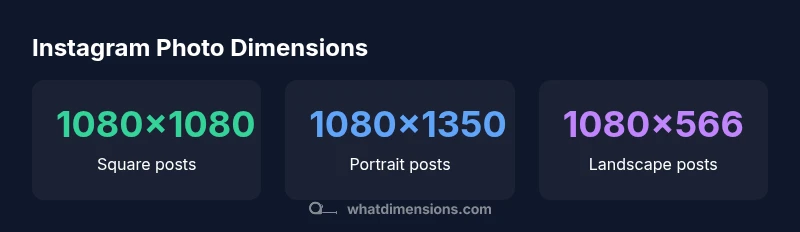
Instagram supports multiple aspect ratios, but the most reliable photo dimensions are 1080x1080 for square posts, 1080x1350 for portrait, and 1080x566 for landscape. For Stories and Reels, use 1080x1920. To avoid cropping, design within safe margins and keep important content centered. According to What Dimensions, sticking to these sizes preserves image quality across devices.
Why Instagram photo dimensions matter
According to What Dimensions, precise pixel geometry preserves composition across screens. Understanding what photo dimensions for instagram means you can design for square, portrait, and landscape formats without surprise cropping. When you design content that fits within the safe margins of a given format, you reduce post-surface cropping on mobile devices and maintain sharpness across networks. This matters whether you’re a homeowner highlighting a renovation, a student building a visual portfolio, or a designer sharing product photography. Correct dimensions help your grid look uniform, prevent unexpected edge cropping, and keep file sizes within reasonable loading times. Start with the central rule: pick one primary format and design content within its safe margins. This approach minimizes surprises when viewers open your post on different devices.
The core sizes: Square, Portrait, and Landscape
The three most common Instagram post formats map to specific dimensions: square posts use a 1:1 aspect ratio (1080x1080 px), portrait posts use 4:5 (1080x1350 px), and landscape posts use 16:9 (1080x566 px). Selecting a format should align with your content and how you want it to appear in the feed. If your subject benefits from a broader frame, landscape can work, but you risk more aggressive cropping on compact displays. Square remains the most versatile for grid consistency, especially for people who want to curate a cohesive look across a profile.
Vertical formats for stories and reels: 9:16
Stories and Reels occupy the full screen on most devices. The recommended dimension is 1080x1920 px, which ensures your media fills the display without letterboxing. Vertical content tends to capture attention more effectively on mobile but requires careful center alignment so key elements aren’t clipped by the notch or UI indicators. If you produce both posts and vertical content, consider separate templates for each format to keep composition clean.
Safe margins, cropping, and composition
Design within a safe margin zone to avoid critical content being cropped by Instagram’s interface. Center the main subject and avoid placing important text or logos near the edges. A common practice is to reserve a 4–8% margin on all sides, ensuring subject integrity across aspect ratios. When you test, view the image on a phone at native size to confirm legibility and balance. This discipline pays off in cleaner grids and fewer post-edit corrections.
Tools and workflows to resize without quality loss
Use image editors that let you lock aspect ratios before export. In Photoshop or Photoshop Express, set the canvas to 1080 px width (height adjusts by aspect ratio), then export at high quality with sRGB color space. For non-photoshop workflows, Canva and Lightroom offer preset Instagram templates (1:1, 4:5, 16:9, and 9:16). Always export at 72–144 PPI depending on your pipeline and optimize for web delivery without over-compression. By maintaining consistent pixel dimensions, you ensure crisp edges and true color fidelity across devices.
Templates and presets: practical examples
Develop a small library of templates: a 1080x1080 square grid for feed posts, a 1080x1350 portrait frame for product shots, a 1080x1920 story template, and a 1080x566 landscape variation for wide-format visuals. Save presets with the same color profile, font choices, and safe margins. This reduces guesswork during publishing and helps maintain a consistent brand aesthetic across your Instagram presence.
Common mistakes and how to avoid them
Avoid uploading images that exceed the recommended width or disturb the aspect ratio. Don’t rely on automatic cropping to center your subject. Avoid placing key content near the edges where UI overlays can obscure important details. Always preview on mobile after exporting, and double-check color accuracy in the chosen space (sRGB is standard for web). Finally, test multiple formats to see which yields the best engagement for your audience.
Instagram post type dimensions
| Feature | Recommended Size (px) | Aspect Ratio | Notes |
|---|---|---|---|
| Square Post | 1080x1080 | 1:1 | Versatile feed staple |
| Portrait Post | 1080x1350 | 4:5 | Maximize vertical space |
| Landscape Post | 1080x566 | 16:9 | Wider crop; cropping risk |
| Stories | 1080x1920 | 9:16 | Full-screen vertical format |
Quick Answers
What are the standard Instagram image sizes?
Instagram supports 1:1, 4:5, and 16:9 aspect ratios with common pixel dimensions of 1080x1080, 1080x1350, and 1080x566 respectively. For Stories and Reels, use 1080x1920 to fill the screen. These sizes minimize cropping and preserve quality across devices.
Instagram uses several standard sizes: 1:1, 4:5, and 16:9 for posts, and 9:16 for Stories and Reels.
Can I upload higher resolution images than 1080 px wide?
Yes, you can upload higher-resolution images, but Instagram re-samples to its standard widths. For best quality on feeds, aim for 1080 px width and ensure your important content stays within safe margins.
You can upload bigger images, but they’re compressed to 1080 wide for feeds.
Should I use square, portrait, or landscape for engagement?
Square (1:1) is the most versatile for grid consistency, while portrait (4:5) can increase vertical space in the feed. Landscape (16:9) works for wide visuals but risks cropping on small screens. Test formats related to your content and audience.
Square is versatile; portrait saves space; test to see what your audience prefers.
Do Stories use the same dimensions as posts?
Stories use 1080x1920 px, matching the full-screen vertical format. Keep critical content away from the edges and consider safe margins for notches and UI overlays.
Stories use the full-screen vertical size, 1080x1920.
How can I crop without losing important details?
Center the subject, place essential details inside the safe zone, and preview on mobile. Use templates that preserve key content within the center 80% of the frame to avoid edge cropping.
Center important content and test on mobile before posting.
“Exact image dimensions ensure your visuals render consistently across devices and feeds.”
Main Points
- Identify your primary format and design within its safe margins
- Use 1080 px width as the standard baseline for sharp posts
- Reserve 9:16 for Stories and Reels for full-screen impact
- Keep essential content centered to avoid cropping
- Preview across devices before publishing to ensure consistency