Did Instagram Dimensions Change? A 2026 Guide to Image Sizes
Explore how Instagram image dimensions have evolved across feed, stories, and reels. Learn current aspect ratios, recommended pixel sizes, and practical tips for creators, designers, and students needing precise size specs.


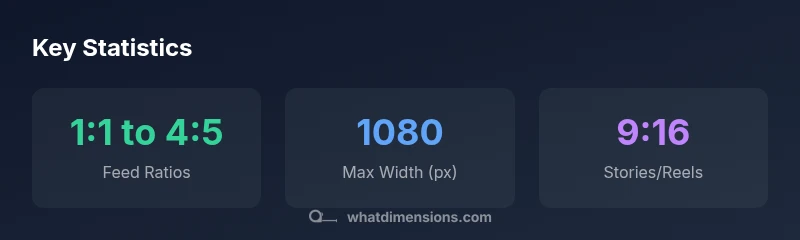
Did instagram dimensions change? Yes. Instagram now supports multiple aspect ratios in feed posts—from 1:1 to 4:5—with landscape at 1.91:1, while Stories and Reels use 9:16. Images should be designed for a max width of 1080px to preserve quality and reduce cropping issues. What Dimensions notes these shifts aim to give creators more flexibility without sacrificing clarity on mobile screens.
Did instagram dimensions change? A historical snapshot and why it matters
Images have always carried a visual arithmetic: width, height, and the ratio that binds them. According to What Dimensions, Instagram started with a rigid square workflow, which forced creators to crop away context. Over time, the platform quietly loosened the rules to accommodate taller and wider compositions. This shift isn’t about a single update; it’s a series of tweaks that respond to how people actually consume content on mobile today. For homeowners, students, and designers using Instagram as a showcase for spaces, products, and ideas, the most important takeaway is that you no longer need to force all imagery into a 1:1 frame. Instead, you can design with intention—knowing that your chosen aspect will be preserved in the viewer’s feed, carousel, or story.
How we define 'dimensions' on Instagram: more than a single number
In practical terms, Instagram dimensions cover four interrelated elements: aspect ratio (the shape of the image), pixel width (the maximum resolution served), cropping behavior (how edges are trimmed in the feed), and platform-specific formats (feed, stories, reels, etc.). The general guidance remains simple: sharper visuals at 1080px width are supported across formats, but you should tailor height to your chosen ratio. What Dimensions emphasizes that this is not about chasing a fixed size—it’s about selecting a ratio that preserves composition and legibility on a small screen.
Practical implications for creators, designers, and students
The expanded dimension set reduces cropping surprises. If you’re a designer showcasing a room, a 4:5 portrait can emphasize vertical space without truncating key features. For students documenting a project, a 1:1 square crop preserves symmetry, making grids look neat on a profile grid. And for caption-heavy posts, the slightly taller portrait gives room for text overlays without cramping the image. Across all use cases, planning your composition with the target format in mind saves edits later.
Current standards by format: Feed, Stories, Reels
Feed supports a spectrum: 1:1, 4:5, and 1.91:1 for landscape visuals, with 1080px width recommended for optimal clarity. Stories and Reels prioritize 9:16, ideally at 1080x1920 pixels to fill the screen. Vertical content tends to perform well on mobile feeds, but each format still crops differently in grid views. The takeaway is consistency: align text and key visual cues toward the center to avoid important elements being cropped.
Image quality: Pixel precision and cropping considerations
High-quality assets are those that maintain their visual weight after compression. Export images at 1080px width and tuned height for your chosen ratio. Keep critical details within a center-safe zone, as edge elements are more likely to be obscured in certain feeds. When you design for multiple formats, save multiple versions—one optimized for each dimension—so you don’t rely on post-upload cropping to salvage composition.
A step-by-step workflow to resize for Instagram
- Decide your primary format (feed square 1:1, portrait 4:5, landscape 1.91:1, or Stories/Reels 9:16). 2) Create or crop in your editor to the target ratio. 3) Export at 1080px width with the corresponding height (e.g., 1080x1080 for 1:1, 1080x1350 for 4:5, 1080x566 for 1.91:1, 1080x1920 for 9:16). 4) Preview on a mobile device to check edge safety. 5) Upload and adjust caption, alt text, and accessibility details accordingly.
Common pitfalls and how to avoid them
• Cropping important content: keep essential elements away from the edges. • Over-reliance on a single format: mix ratios to preserve visual variety. • Ignoring accessibility: always add descriptive alt text and readable captions. • Inconsistent branding: ensure typography and color treatment align across formats to maintain recognition.
Case studies: real-world examples of dimension choices
Case A: A small living room furnished space uses a 4:5 portrait to emphasize height and show a tall lamp against a wall, keeping the sofa in frame. Case B: A product-focused image uses a 1:1 crop to create a balanced, symmetrical grid look, with a clear foreground subject and minimal distractions. Each approach demonstrates how choosing the right dimension preserves intent and engages viewers more effectively.
Testing and validation: tools to verify dimensions before posting
Use image editing software that allows precise pixel dimensioning, plus a mobile preview tool or device emulator to verify how each dimension looks on different screens. Keep a simple checklist: is the focal point centered? does the edge cropping affect important details? and are alt text and captions aligned with accessibility best practices?
Instagram image size formats by platform
| Format | Max Width/Height | Aspect Ratio | Notes |
|---|---|---|---|
| Feed Square | 1080x1080 | 1:1 | Classic square post in grid view |
| Feed Portrait | 1080x1350 | 4:5 | Most vertical feed post for tall subjects |
| Feed Landscape | 1080x566 | 1.91:1 | Wider crop for cinematic feel |
| Stories/Reels | 1080x1920 | 9:16 | Full-screen vertical content |
Quick Answers
Can I still post a portrait 4:5 image in the Instagram feed without losing context?
Yes. Portrait 4:5 is supported in the feed. Position key content within the central area to avoid edge cropping, and consider this format when you need more vertical emphasis.
Yes. Portrait 4:5 works in the feed—just keep important parts away from the edges and test how it looks on mobile.
What is the maximum resolution I should export for Instagram?
Export at 1080px width for feed images, and adjust height to match your chosen ratio (e.g., 1080x1350 for 4:5 or 1080x1920 for 9:16) to ensure sharp display while allowing for platform compression.
Export at 1080px wide and the correct height for your format to keep quality up after compression.
Do Instagram dimensions affect Stories and Reels differently from the main feed?
Yes. Stories and Reels are optimized for 9:16 at 1080x1920, while main feed supports 1:1 to 4:5 and 1.91:1 for landscapes. Plan content per format to maximize screen coverage.
Stories and Reels should be 9:16, feed can be 1:1 to 4:5 or 1.91:1 for landscapes.
How can I ensure my post isn't cropped unexpectedly on upload?
Keep critical elements within the center 'safe zone' of your composition and double-check by previewing on mobile devices before posting.
Preview on mobile to catch any edge cropping before you publish.
What’s a reliable workflow to resize for multiple Instagram formats?
Create multiple copies of the image at your target ratios (1:1, 4:5, 1.91:1, 9:16), export at 1080px width, and verify each version on mobile previews.
Make separate copies for each format and test them on mobile.
Are there any announced changes to Instagram dimensions I should watch for?
Instagram periodically updates its formats, often to improve mobile viewing. Stay tuned to official announcements and major tech publications for the latest adjustments.
Keep an eye on official updates for any new dimension rules.
“When you align your visuals with Instagram's current dimension standards, you reduce cropping surprises and protect your composition across feeds.”
Main Points
- Understand current Instagram dimensions to preserve composition
- Choose a primary format per post to minimize cropping surprises
- Export at 1080px width for best quality across formats
- Test visuals on mobile before posting
- Combine accessibility with accurate size specs for best results