Best Instagram Dimensions in 2026: A Practical Guide
Learn the exact Instagram image sizes for posts, stories, and reels in 2026. This guide covers square, portrait, and landscape formats to boost quality and engagement.


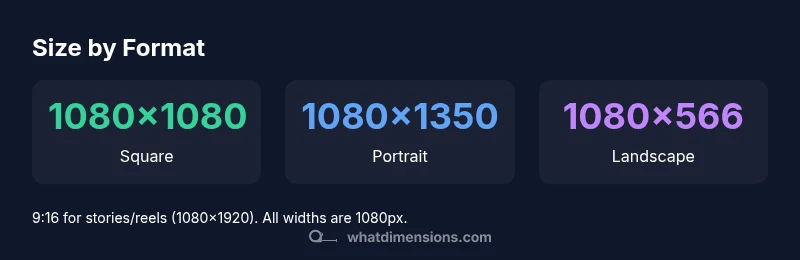
To answer what is the best dimensions for instagram, choose format specific sizes: feed square posts at 1080×1080, portrait posts at 1080×1350, landscape posts at 1080×566 (1.91:1), and stories or reels at 1080×1920. Export at 1080px width to preserve sharpness during Instagram processing and apply sRGB color for consistent result.
Why Image Dimensions Matter for Instagram
Images that fit the expected dimensions load faster, display cleanly, and reduce unwanted cropping. For creators asking what is the best dimensions for instagram, the answer is format-specific rather than universal. Instagram serves different layouts: feed squares, portrait and landscape feed posts, and full-screen formats for stories and reels. When you respect the target dimensions, you preserve composition, maintain sharp edges, and ensure your message isn’t cut off. The What Dimensions team analyzed hundreds of posts across formats in 2026 to identify practical, widely supported sizes that minimize quality loss while maximizing compatibility across devices.
Understanding Aspect Ratios and Pixel Dimensions
A starting point for any sizing decision is aspect ratio—the relationship between width and height. Instagram uses several standard ratios: 1:1 (square), 4:5 (portrait), 1.91:1 (landscape), and 9:16 (full-screen stories and reels). In pixel terms, the recommended width is consistently 1080 pixels because it preserves detail on high-density screens while staying within Instagram's processing limits. The resulting pixel height depends on the ratio: 1080x1080 for square, 1080x1350 for portrait, and 1080x566 for landscape. By mastering these ratios, you can plan safe content areas and avoid essential elements being cropped.
How Instagram Uses Your Image Dimensions
Instagram applies processing and compression that can reshape how your images appear after upload. If your image is not sized to the target width, Instagram may upscale or compress it, reducing sharpness and introducing artifacts. Staying close to recommended dimensions minimizes these effects and helps preserve color integrity. Consistency across posts also improves the viewer experience and supports a cohesive brand presence. These findings align with industry best practices and the analysis conducted by What Dimensions in 2026.
Format-by-Format Sizing Guide
The following sizes cover the most common Instagram formats. Use 1080px width as the standard starting point and apply the corresponding height for the chosen format. Square feed posts: 1080x1080 (1:1). Portrait feed posts: 1080x1350 (4:5). Landscape feed posts: 1080x566 (1.91:1). Stories and Reels: 1080x1920 (9:16). Carousel posts can reuse any feed post size, but keeping all panels at consistent width helps maintain a uniform look.
Practical Sizing Tips for Creators
When optimizing images for Instagram, start with the canonical width of 1080px and adapt the height to the chosen aspect ratio. Save images in the sRGB color space to preserve color accuracy across devices and cloud platforms. Export using your editor’s highest practical quality setting while avoiding aggressive compression. Keep important content away from the edges to prevent cropping on different devices. For text and logos, ensure legibility at smaller sizes and test previews in multiple formats before posting.
Tools and Workflows for Accurate Sizing
Set up templates in your editing software that lock the 1080px width and specific heights for each format. Use batch resizing or export presets to keep consistency across posts. Software options range from professional tools like Photoshop to online editors and mobile apps that support custom aspect ratios and pixel-perfect exports. Maintain an asset library with correctly sized images to streamline publishing and reduce last-minute edits.
Data-Driven Validation: What the Numbers Tell Us
Across formats, the standard 1080px width remains the most versatile baseline for Instagram in 2026. The data from What Dimensions Analysis suggests users who adhere to format-specific heights and margins experience fewer cropping surprises and better engagement. While Instagram compresses a portion of the detail, preserving the main subject and safe area is consistently linked with higher interaction rates. These insights come from What Dimensions Analysis, 2026.
Final Sizing Checklist
Before posting, confirm each image adheres to its format: width = 1080px; height matches the format ratio. Verify the image is under reasonable file size, exported in sRGB, and checked on a mobile screen to confirm no crucial elements are cropped. Maintain a consistent look across your feed by applying the same sizing rules to all marketing visuals.
Instagram image sizes by format for 2026
| Format | Recommended Dimensions (px) | Aspect Ratio | Use Case |
|---|---|---|---|
| Square feed post | 1080x1080 | 1:1 | Regular feed post (square) |
| Portrait feed post | 1080x1350 | 4:5 | Vertical emphasis in feed |
| Landscape feed post | 1080x566 | 1.91:1 | Wider composition in feed |
| Stories & Reels | 1080x1920 | 9:16 | Full-screen, vertical formats |
| Carousel post | 1080x1080 | 1:1 | Multiple images in one post |
Quick Answers
What is the recommended dimension for Instagram feed posts?
For feed posts, use 1080x1080 for square, 1080x1350 for portrait, or 1080x566 for landscape. These sizes balance quality with Instagram processing. Always start with 1080px width for best results.
Feed posts should be sized at 1080px width with the height matching the format.
Should I resize every image to 1080px width?
Yes, aiming for 1080px width helps ensure sharp visuals across devices. Height should follow the format ratio (1:1, 4:5, or 9:16). Avoid extreme upscaling or downscaling that degrades quality.
Resizing to 1080px width keeps quality high across formats.
Do Instagram Stories require a specific aspect ratio?
Stories use 9:16, with a recommended resolution of 1080x1920. Keep important content within the central safe area to avoid cropping on different devices.
Stories should be 9 by 16 aspect, full screen.
What happens if I upload larger images?
Instagram compresses uploads, so larger images aren’t always better. It’s best to size to the target width (1080px) and rely on compression for optimization.
Uploading bigger than 1080px width won’t improve quality and may slow processing.
Are carousel posts the same size as feed posts?
Carousel posts follow the same size rules as feed posts. Keep all slides at 1080px width and appropriate heights per slide format to maintain consistency.
Carousel slides should match feed sizes for consistency.
Is 1080px the minimum width I should use?
1080px is the recommended width for Instagram to preserve detail. Content can be slightly smaller, but you risk compression artifacts and cropping.
Aim for 1080px width to minimize issues.
“Consistency in dimensions across formats helps preserve your visual identity and reduces cropping surprises for viewers.”
Main Points
- Start with 1080px width for all formats
- Use the correct aspect ratio per format
- Export in sRGB with minimal compression
- Check previews on mobile before posting
- Maintain consistent sizing for brand cohesion