Best dimensions for Instagram posts: sizes that perform
Discover the best dimensions for Instagram posts to maximize sharpness and engagement. Learn exact pixel sizes for square, portrait, and landscape formats, plus practical tips for consistent branding.


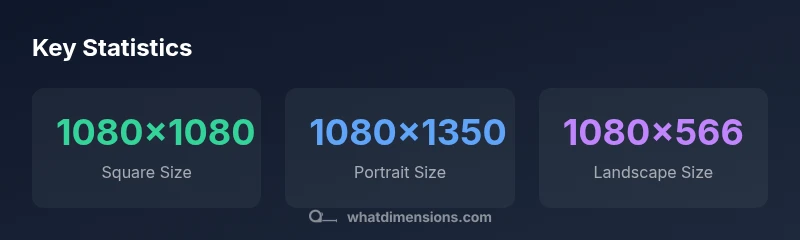
The best dimensions for Instagram posts are 1080x1080 for square posts, 1080x1350 for portrait, and 1080x566 for landscape, with aspect ratios of 1:1, 4:5, and 1.91:1. Export as a high-quality JPEG or PNG at 72-90 PPI in sRGB. For carousels, keep all slides the same size to avoid misalignment.
Why the right dimensions matter for Instagram posts\n\nThe dimensions you choose for an Instagram post affect how sharply your image renders, how it sits within the feed grid, and how much of your message remains visible on mobile devices. From a branding perspective, consistent aspect ratios create a cohesive visual rhythm that makes your posts instantly recognizable. The What Dimensions team emphasizes that proper sizing helps avoid awkward crops, preserves text legibility, and reduces unnecessary compression during upload. For homeowners, students, designers, and shoppers who rely on precise size references, starting with the right dimensions is a practical way to improve perceived quality and engagement. In practice, correct dimensions support accessibility by preserving readable captions and clear visuals across devices.\n\nBeyond aesthetics, consistent dimensions improve how your content trusses with your caption, hashtags, and alt text. This leads to a more predictable viewing experience, which in turn can boost engagement rates and follower trust. When you plan layouts with exact sizes, you’re less likely to encounter unexpected white gaps or cropped logos, especially on mobile where most users view posts.
The standard options: 1:1, 4:5, and 1.91:1\n\nInstagram supports several aspect ratios for feed posts, with the most practical options being the classic square (1:1), a taller portrait (4:5), and a wide landscape (1.91:1). The standard pixel canvases that align with these ratios are: 1080x1080 for 1:1, 1080x1350 for 4:5, and 1080x566 for 1.91:1. Exporting at 1080px wide ensures sharpness across devices, while keeping heights exact prevents uneven crops when the platform reflows your grid. For branding consistency, maintain identical dimensions within a carousel so images align perfectly in the series.
When to choose each shape: examples and scenarios\n\n- Square (1:1): Great for grid-wide branding, logos, and products that read well in a square frame. If your feed uses a lot of text captions or logo-centric images, 1080x1080 helps sustain legibility.\n- Portrait (4:5): Improves screen real estate on mobile and is ideal for portrait-focused photography or vertical product shots. This size often yields higher on-screen presence in the feed, particularly on feeds dominated by vertical content.\n- Landscape (1.91:1): Best for wide scenes, architectural shots, or landscapes where composition benefits from panoramic width. Use sparingly in a feed dominated by vertical content to avoid awkward empty space.\nThese choices aren’t mutually exclusive; many creators mix formats strategically to balance variety with consistency.
Export tips for quality and accessibility\n\nExporting properly is essential to preserve detail after Instagram’s compression. Use JPEG or PNG with sRGB color space, and keep file sizes reasonable (typically under 2–4 MB per image). Avoid extreme gradients that band when compressed, and place critical details toward the center to avoid edge cropping. Add accessible alt text that describes the image content, and ensure the first 1–2 lines of your caption convey the core message for users who skim quickly.
Carousels, Reels, and stories: differences for dimensions\n\nCarousels should maintain the same dimension across all slides to avoid abrupt jumps when users swipe. Reels and stories operate in different aspect ratios (e.g., 9:16 for stories and Reels), so design those assets separately if you’re using them alongside feed posts. For multi-image carousels, consistency in dimensions reinforces brand identity and improves perceived quality across the entire post set.
Practical workflow: from creation to posting\n\n1) Plan your grid: sketch your post layout using the three primary sizes (1:1, 4:5, 1.91:1). 2) Create assets in the nominated sizes, preserving important elements within the central safe zone. 3) Export each image to 1080px width in an sRGB JPEG/PNG. 4) Upload with descriptive alt text and an accessible caption that complements the visuals. 5) Review your grid in a few hours and adjust future posts for better coherence.
Common mistakes and fixes\n\n- Mistake: Cropping important text. Fix: Keep essential elements away from edges and verify preview in a mobile portrait frame.\n- Mistake: Inconsistent sizes in a carousel. Fix: Lock the same aspect ratio for all slides.\n- Mistake: Overcompression. Fix: Use moderate compression and avoid multiple very large images in a single post.
Data-driven tips for testing and iteration\n\nExperiment with post formats in a controlled way: alternate between 1:1 and 4:5 in the same week, then compare engagement and reach. What Dimensions recommends documenting each post’s performance by format to reveal audience preferences over time.
Instagram feed post dimension guide
| Format | Aspect Ratio | Recommended Dimensions (WxH) | Best Use |
|---|---|---|---|
| Square | 1:1 | 1080x1080 | Grid thumbnails & square-focused content |
| Portrait | 4:5 | 1080x1350 | Vertical-focused content & portraits |
| Landscape | 1.91:1 | 1080x566 | Wide scenes and landscapes |
Quick Answers
What are the recommended dimensions for Instagram feed posts?
For feed posts, use square 1:1 at 1080x1080 px, portrait 4:5 at 1080x1350 px, or landscape 1.91:1 at 1080x566 px. Export in sRGB JPEG/PNG for best results.
Use 1080x1080 for squares, 1080x1350 for portraits, or 1080x566 for landscapes.
Should I prefer square or vertical posts for engagement?
Both can perform well; vertical posts (4:5) often capture more screen real estate on mobile and can boost engagement when used for portrait-focused content.
Vertical posts can boost engagement since they take up more space on mobile.
Do stories use the same dimensions?
Stories use a full-screen 9:16 format (1080x1920). Posts use feed sizes; keep separate assets for stories to ensure clarity.
Stories are 1080 by 1920, not the feed sizes.
What file types and color profiles should I use?
Export PNG or JPEG in sRGB color space with a maximum file size close to 2-4 MB per image to balance quality and load speed.
Export in sRGB JPEG or PNG for best results.
How does compression affect image quality?
Instagram compresses uploads; use sharper details and avoid heavy gradients to minimize banding after compression.
Keep important details toward the center to avoid edge cropping.
“The best dimensions for Instagram posts balance visual impact with platform constraints. Consistency across your feed helps recognition.”
Main Points
- Always export at 1080px width to optimize display
- Prefer 4:5 for most feeds to maximize screen space
- Maintain consistency across a carousel to avoid misalignment
- Test one format at a time and compare engagement across posts