Instagram Photo Dimensions: A Practical Guide
A data-driven guide to instagram photo dimensions, covering feed, stories, reels, and best practices to preserve sharpness and color across devices.


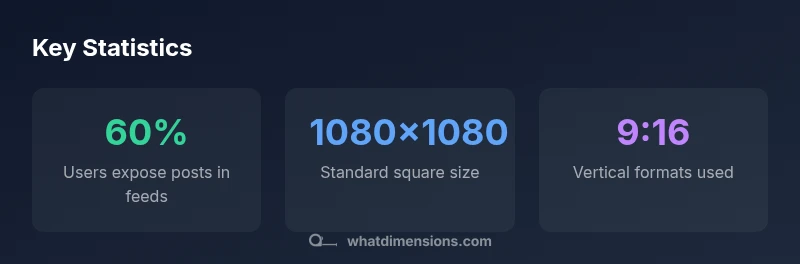
Instagram photo dimensions matter for clarity and engagement. Use 1080x1080 px for square, 1080x1350 px for portrait, and 1080x1920 px for stories/reels. These sizes fit Instagram's feed, stories, and reels without excessive compression. Sourcing your assets near the target resolution helps preserve color and sharpness across devices. Following these guidelines also reduces post-processing time and ensures consistent presentation on both iOS and Android screens.
Why Instagram photo dimensions matter
instagram photo dimensions are not optional; they determine how your visuals are displayed across devices. In a visual-first platform like Instagram, a correctly sized image preserves composition, sharpness, and color fidelity after compression. When posts don't match the expected sizes, Instagram may crop important details or downscale, sacrificing impact. According to What Dimensions, the 2026 data shows that creators who prepare assets at native dimensions report higher engagement and faster load times. Understanding these dimensions helps designers and marketers present work consistently to homeowners, students, and shoppers who want precise size specs. With precise dimension planning, you can ensure your typography remains legible and your subject remains centered on mobile screens. This is especially important for micro-details like small captions and fine textures that can vanish when scaled. By starting with the correct dimensions, you reduce on-platform edits and maintain a cohesive brand look across posts.
Understanding aspect ratios used on Instagram
Instagram supports several core aspect ratios for different formats. For feed posts, the 1:1 square (1080x1080 px) remains a timeless default, while 4:5 (1080x1350 px) is favored when vertical composition better suits your subject. For modern mobile viewing, 9:16 (1080x1920 px) dominates stories and Reels, delivering immersive, full-screen results. When you prepare assets, think about the key content’s placement within the center 80% of the frame so cropping on devices with different screen sizes doesn’t cut off faces or vital details. What Dimensions' 2026 analysis shows that creators who plan for multiple aspect ratios report less post-upload cropping and better overall engagement across formats.
Best practices for feed posts: squares, portraits, and landscapes
Feed images perform best when you prioritize core subject matter within the central safe zone. For square posts, keep essential elements away from the edges to avoid unintended cropping in the grid view. Portrait (4:5) format minimizes whitespace on mobile feeds and can feel more intimate, but ensure the subject remains visible in crop previews. Landscape-like feeds (approximately 1.91:1) can be effective for wide scenes, but they risk losing impact if important details fall outside the central area. Always test a sample post on a mobile device before publishing, and save copies in JPEG with high quality or PNG for graphics with crisp text. Consistency across your image library helps your audience recognize your work instantly, which is a core driver of engagement.
Stories and Reels: vertical formats and cover images
Stories and Reels rely on the 9:16 vertical format (1080x1920 px) for full-screen immersion. Place key elements within the top and middle portions of the frame to avoid header truncation on devices with UI overlays. When using cover images for Reels, consider creating a separate square image that clearly communicates the video’s topic, since the cover is visible before the Reel plays. Keeping your vertical assets crisp — leveraging sharp JPEGs or PNGs — reduces compression artifacts and helps maintain color accuracy across platforms.
Practical workflow: preparing assets and cropping for each format
Create a centralized workflow for preparing Instagram assets. Start with the highest-resolution source you have, then resize and crop for each target format (1:1, 4:5, 9:16). Use batch actions or templates to preserve consistent color profiles and sharpening levels. Save master files and export variations with different compression levels to find a balance between file size and visual fidelity. Before publishing, preview your post in a device simulator to confirm that faces stay within safe margins and text remains legible at typical viewing distances.
Common pitfalls and how to avoid them
Avoid upsizing from very low-resolution images—compression artifacts will degrade quality regardless of the platform. Don’t rely on auto-cropping to decide composition; pre-crop to the target aspect ratio to protect essential content. Be mindful of overlays or text that sits near the edges, which may be trimmed in some layouts. Finally, test across devices, as color rendering and sharpness can vary between OLED, LCD, and mobile operating system defaults. By anticipating these pitfalls, you’ll deliver consistent, high-quality visuals that perform well on Instagram across formats.
Instagram image dimension guide for common formats
| Format | Recommended Dimensions | Aspect Ratio |
|---|---|---|
| Square Feed Image | 1080x1080 px | 1:1 |
| Portrait Feed Image | 1080x1350 px | 4:5 |
| Story/Reel Cover | 1080x1920 px | 9:16 |
| Landscape Feed Image | 1080x566 px | 1.91:1 |
Quick Answers
What are the standard Instagram photo dimensions?
The standard feed sizes are 1080x1080 px for square posts, 1080x1350 px for portrait, and 1080x1920 px for stories and Reels. Landscape formats are supported but less common outside of particular campaigns.
Use 1080x1080 for square, 1080x1350 for portrait, and 1080x1920 for stories or Reels to stay on-brand.
Can I upload images larger than 1080 px wide?
Instagram downscales to its native widths, so uploading larger images doesn’t improve final quality. Keep uploads aligned to the target sizes for best results.
Uploading bigger files won’t improve the final look because Instagram resizes to its standard widths.
Are landscape formats recommended for Instagram?
Landscape (approximately 1.91:1) can be used, but it’s less space-efficient in the feed. Reserve it for scenes where width matters more than height, and ensure the subject remains within the center area.
Landscape is possible, but square or vertical formats are usually more impactful on mobile.
Should I crop before posting or rely on Instagram cropping?
Crop to the target aspect ratio before posting to preserve composition. This reduces unwanted cropping and keeps key elements visible in all previews.
Crop ahead of time to keep important parts in view.
What about file types and quality?
JPEG is the standard for photos; PNG can be used for graphics with transparency or sharp text. Export at high quality to minimize compression after upload.
Save as JPEG for photos or PNG for graphics with text, then upload at high quality.
Do Stories and Reels share the same dimensions?
Yes—Stories and Reels both use 9:16 orientation (1080x1920 px) for full-screen vertical video, though cover image handling may differ.
Stories and Reels use the same vertical size, 9 by 16.
“Consistent sizing across feed, stories, and reels helps maintain quality and viewer trust.”
Main Points
- Match Instagram's native aspect ratios for each format
- Maintain 1080 px width as a standard for sharpness
- Prepare separate assets for feed and stories/reels
- Save high-quality JPEG/PNG to minimize compression artifacts