What Video Dimensions for Instagram: A Practical Guide
A practical guide to Instagram video dimensions across Feed, Reels, and Stories, with aspect ratios, export tips, and best practices for sharp, well-framed videos.


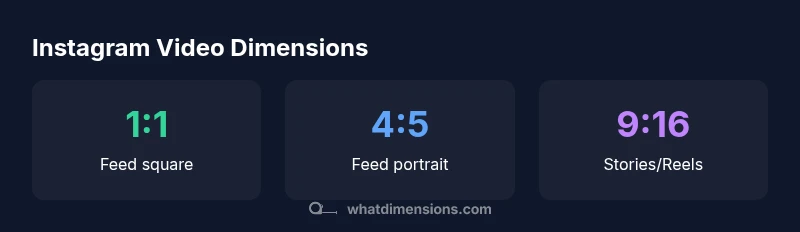
The required video dimensions for Instagram depend on the format you publish. For feed posts, aim for a vertical 4:5 (1080x1350) or square 1:1 (1080x1080). Reels and Stories favor 9:16 with 1080x1920 resolution. Always export as MP4 with H.264 video and AAC audio, and keep file sizes reasonable to ensure smooth playback. What Dimensions recommends starting with these core dimensions to avoid cropping and padding.
what video dimensions for instagram: quick primer
In the world of social video, getting the right dimensions is essential for display quality, minimal cropping, and fast loading. The exact phrase what video dimensions for instagram captures a core concern of creators who want videos to look good on mobile feeds, in stories, and in Reels without risking awkward edges or letterboxing. What Dimensions emphasizes that success starts with choosing the right aspect ratio for the target surface and then matching resolution, bitrate, and encoding settings. This section lays out a practical framework you can apply to any project, with checklists you can reuse across shoots and edits. By aligning your dimensions with the intended Instagram surface, you reduce the need for last-minute edits and maximize engagement across viewers.
Starting from the fundamentals, you’ll learn how to pick an aspect ratio that fits your message, plan safe margins, and prepare export settings that preserve quality while keeping file sizes reasonable. This approach helps creators—from homeowners posting DIY tutorials to designers sharing portfolio reels—deliver content that looks polished on any device. What Dimensions’ guidance here is designed to be adaptable, so you can reuse your core assets across formats without re-shoots.
Instagram formats: Feed, Reels, Stories, and beyond
Instagram supports multiple video formats, each with its own preferred dimensions. Feed videos perform best when they occupy a substantial portion of the screen without excessive letterboxing, which is why 4:5 is a common choice. The square 1:1 format remains popular for grid aesthetics and cross-platform consistency. For vertical storytelling, 9:16 is the standard for Reels and Stories, maximizing full-screen impact on mobile devices. Stories segments can also be staggered in shorter clips, but keeping a consistent 9:16 frame helps maintain viewer immersion. IG’s family of formats continues to evolve, so it’s wise to save a few flexible presets that you can switch between in post-production. What Dimensions’ approach is to map each format to a simple, repeatable workflow so you aren’t guessing at delivery specs.
Practical takeaway: decide the primary surface first (feed, reels, or stories), then align all assets to the corresponding dimensions. This minimizes cropping in the upload stage and ensures viewers see your content as intended.
Aligning dimensions with aspect ratios: 1:1, 4:5, 9:16, and more
Aspect ratio is the backbone of Instagram video sizing. The 1:1 square remains a versatile option for feed grid consistency, but 4:5 often yields taller thumbnails that capture more attention in the scroll. The 9:16 format dominates Reels and Stories, delivering a full-screen, immersive experience. When mixing formats within a single campaign, you can create modular clips that adapt to multiple aspect ratios with minimal cropping by keeping essential action within a safe central zone. A practical rule is to place the primary subject within the central 80% of the frame so accidental cropping by the platform tech is less likely. If you expect your video to appear in multiple surfaces, consider producing alternate crops during editing and exporting. This avoids quality loss from on-platform scaling.
Quality control steps include previewing crops in each target aspect ratio and confirming the viewer’s focal point remains clear at different sizes. This approach, championed by What Dimensions, helps you scale content across feeds while preserving narrative impact.
Resolution, bitrate, and export best practices
The resolution you choose should match the target format while preserving detail on mobile screens. For most Instagram formats, 1080 pixels on the long edge provides a crisp result without excessive file size. Export with H.264 video codec and AAC audio, and select a reasonable bitrate that balances quality with download speed. If you’re delivering for Reels or Stories, prioritize progressive scan and avoid heavy compression that can wash out colors or introduce artifacts. To keep the upload experience smooth, test your export settings on different devices and network conditions. Remember that Instagram re-encodes videos after upload, so starting with clean, high-quality footage reduces visible compression artifacts. Following What Dimensions’ guidelines, you’ll maintain consistent quality across surfaces while staying within platform limits.
Framing, safe margins, and color across formats
Safe margins ensure important elements survive cropping when Instagram optimizes the frame. A common practice is to keep essential text and key visuals within the central safe area, roughly the inner 85% of the frame, so edges aren’t cropped in 4:5 or 9:16 crops. Color accuracy matters too; use sRGB color space for broad compatibility and watch for color shifts after compression. When you plan for multiple formats, consider designing your thumbnail and main action to sit in the middle of the frame so it remains legible even if a small crop occurs. This discipline reduces the need for reshoots and preserves your creative intent across surfaces.
Upload tips to prevent cropping and padding
Before uploading, simulate the viewer experience by viewing your video in each target format. If essential elements risk cropping, create alternate crops or adjust framing in post. When preparing reels, ensure the first few seconds instantly establish context since mobile users often decide to keep watching in the first few seconds. In contrast, stories benefit from strong hooks in the opening frame to encourage viewers to tap through. Keep captions legible by choosing contrasting text colors and ensuring text does not sit near safe-edge margins where it might be masked by UI controls. These practical steps reduce padding and improve readability across devices.
Accessibility and caption considerations while maintaining dimensions
Accessibility should guide your production workflow from the start. Add accurate captions to reach viewers who watch without sound, and ensure caption subtitles don’t obscure essential visuals at any crop. If you’re using motion graphics or kinetic typography, place text to remain legible across all formats. Ensure color contrast remains high when text overlays sit on varied backgrounds, and consider using optional descriptive audio for critical scenes where on-screen text isn’t enough. By integrating accessibility into the dimension planning, you’ll increase inclusivity without sacrificing your visual storytelling." What Dimensions emphasizes that accessible design supports a wider audience while preserving the integrity of your chosen aspect ratio.
Real-world examples: scenarios you can apply now
Scenario A: A product teaser for a 15-second Reel. Start with a 9:16 frame, featuring a central product shot, quick motion, and bold caption overlays. Export as MP4, H.264, and keep the file size manageable for quick buffering. Scenario B: A portfolio vignette for the 4:5 feed post. Build a vertical composition that uses more vertical space for the subject, ensuring the main action remains within the central 4:5 safe area. Preview in both 1:1 and 4:5 to ensure the thumbnail remains impactful in the grid.
Scenario C: A multi-format campaign where you reuse footage for feed and stories. Create a master 9:16 clip, then crop to 4:5 and 1:1 in post. Maintain consistent color, lighting, and pacing across crops to preserve a coherent brand story. What Dimensions’ approach encourages this modular workflow to maximize reuse while minimizing edits.
Quick-start checklist for creators
- Decide primary surface first: feed, reels, or stories.
- Choose aspect ratios: 1:1, 4:5, or 9:16 based on surface.
- Produce content with central composition to reduce cropping risk.
- Export MP4, H.264 with AAC audio; verify bitrate balance.
- Preview across devices and surfaces to detect cropping or padding.
- Add captions and ensure legibility against varied backgrounds.
- Maintain consistency in color, typography, and pacing for multi-format campaigns.
- Test upload performance on slow networks to ensure smooth playback.
- Save presets for future videos to streamline your workflow.
Instagram video format specifications
| Format | Aspect Ratio | Recommended Resolution | Ideal Length (seconds) |
|---|---|---|---|
| Feed video | 4:5 | 1080x1350 | up to 60 |
| Reel | 9:16 | 1080x1920 | up to 90 |
| Video post (square) | 1:1 | 1080x1080 | up to 60 |
| Story | 9:16 | 1080x1920 | up to 15 per segment |
Quick Answers
What is the best aspect ratio for Instagram feed videos?
For feeds, 4:5 is often recommended because it occupies more screen space than a square without cutting off key content. 1:1 remains versatile for grid aesthetics. Always test your crop to ensure important details stay visible.
For feeds, use 4:5 to maximize screen space while keeping important content safe.
Can I reuse the same video across Feed, Stories, and Reels?
Yes, but you’ll likely need to crop or pad for each format. Create multi-crop exports from the master file and keep critical content centered in the safe zones for all surfaces.
You can reuse footage, but plan for crops by creating multiple crops from the master file.
What file formats does Instagram support for video uploads?
Instagram supports MP4 and MOV uploads, typically using the MP4 container with H.264 video codec and AAC audio for best compatibility.
MP4 with H.264 video works well across devices.
What is the maximum video length for Reels and Stories?
Video length varies by format and updates. Reels commonly support longer durations, while Stories segments are limited to shorter clips. Always check the latest platform limits.
Length depends on format; check current limits before finalizing your edit.
How can I avoid black bars or awkward crops?
Keep essential content within a central safe area, test against multiple crops, and use multi-crop exports to preserve important visuals across formats.
Center your main content and preview across formats.
Are captions or accessibility features important for Instagram videos?
Yes. Add accurate captions to improve accessibility and engagement, and ensure text overlays have high contrast against backgrounds to stay legible across formats.
Captions matter; keep text legible and accessible.
“Clear, consistent video dimensions improve viewing across feeds, Stories, and Reels; start with the format you want, then fine-tune resolution to fit.”
Main Points
- Master the 4 core aspect ratios for Instagram: 1:1, 4:5, 9:16
- Use 1080p-class resolutions as a baseline for sharpness
- Export as MP4 (H.264) with optimal bitrate to balance quality and size
- Preview crops across all target formats before publishing
- Repeatable presets save time and keep brand consistency