What Dimensions Are Instagram Reels: A Practical Guide
Discover exact dimensions and export tips for Instagram Reels so your vertical videos play full-screen with crisp quality on mobile across feeds and profiles.


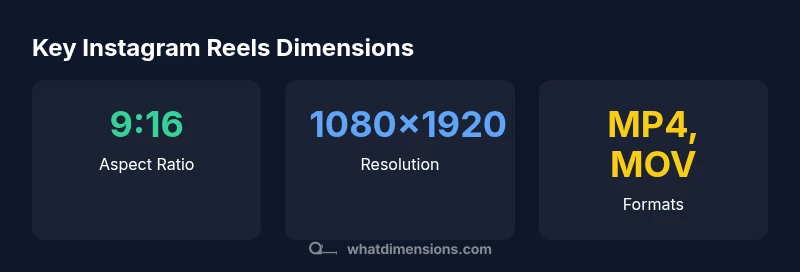
Instagram Reels are designed for vertical viewing, so the ideal dimension is a 9:16 aspect ratio with a resolution of 1080x1920 pixels. For best results, export in MP4 using H.264 encoding, and keep important content within the central safe area to avoid cropping on different devices. While Instagram accepts a range of vertical sizes, sticking to 1080x1920 ensures full-screen, high-quality playback across phones and feeds. This guidance reflects What Dimensions' measured guidelines for consistent presentation.
What the phrase 'what dimensions are instagram reels' means for creators
To answer what dimensions are instagram reels in practical terms, you must start with screen orientation. Instagram Reels are designed for mobile-first, vertical viewing, so the discipline of sizing matters more than many other formats. According to What Dimensions, the core principle is to maximize edge-to-edge visibility without forcing viewers to crop content. The exact expression of size is a 9:16 aspect ratio, with a target resolution near 1080x1920 pixels for standard HD quality. In real production, you might shoot at higher bitrates and export at 1080p to preserve detail while maintaining compatibility across devices. The keyword here is consistency: consistent dimensions reduce the risk of letterboxing on some screens and ensure your title, captions, and on-screen graphics stay visible. For the question what dimensions are instagram reels, the answer translates into a rigid orientation and a practical export path, not a vague preference. The What Dimensions team emphasizes testing on multiple devices during the review process to confirm your chosen size remains intact after compression and platform processing.
Visual space and aspect ratio: why 9:16 matters
The aspect ratio is the visual skeleton of your reel. A 9:16 frame fills the typical smartphone screen from top to bottom, delivering immersive, edge-to-edge content. When you prioritize this ratio, your composition, typography, and motion stay readable without being cropped on most devices. It also helps you maintain consistency with your other vertical videos (stories, IGTV previews, and ads) so your audience recognizes your format instantly. If you stray from 9:16, you risk black bars (letterboxing) or awkward center cropping when the reel appears in feeds or on the profile grid. What dimensions are instagram reels is best answered by keeping your main action centered within the central safe area—about 10% of the frame margins you should consider as bleed when designing overlays or subtitles. What Dimensions notes that staying strict about aspect ratio reduces post-production rework and speeds up publishing.
Resolution, compression, and exporting: how to preserve quality
Resolution should be high enough to preserve detail after Instagram's compression, but not so high that it invites excessive file sizes or longer processing times. The recommended target is 1080x1920 pixels at 29.97–30 fps for smooth motion, with a bitrate that preserves detail without introducing artifacts. Export formats commonly supported for reels are MP4 with H.264 video and AAC audio. If your source is shot in 4K, downscale to 1080p before exporting to minimize artifacts and ensure compatibility. Color space should be sRGB or Rec. 709 for predictable appearance across devices. Remember to bake text and graphics into the video if possible to prevent misalignment during compression. This section expands on practical steps to maintain crisp edges, legible captions, and consistent color across devices as you answer what dimensions are instagram reels with data-driven precision.
On-screen safety: safe margins and text placement
Keep essential content within the central safe area to avoid cropping on different screens or when Instagram applies UI overlays. Titles, captions, and logos should sit at least 8–12% away from the frame edges. Use bold, high-contrast typography and large font sizes to preserve readability when scaled on small screens. If you overlay lower-thirds or animated text, ensure movement stays within safe margins so it remains visible on every device. For motion graphics, design with a 16:9 canvas crop so that when Instagram centers the reel in a feed, your key elements aren’t clipped. The goal is legibility and brand clarity, especially when your reel auto-plays in a row of thumbnails.
Across devices and feeds: full-screen behavior and cropping
Different devices and feed layouts can alter how a reel is displayed; some devices crop more aggressively than others. By sticking to a 9:16 orientation and 1080x1920 resolution, you minimize unexpected cropping in both iOS and Android environments. Also, keep in mind that cover images (the thumbnail you pick) influence how much of your frame is visible in the grid; choose a cover that highlights your main subject without obscuring details. In short, dimension discipline reduces the chance of surprises when your reel appears in the feed, the profile grid, or in the Explore tab.
Practical workflow: shooting, editing, exporting, testing
From capture to publish, a disciplined workflow saves time and protects your reel’s dimension integrity. Shoot vertical with a stable setup (tripod or steady hand), lock your frame to the 9:16 aspect ratio in your editing software, and export at 1080x1920 with H.264 encoding. Before posting, test on multiple devices: phone models with different screen sizes, a few network conditions, and both light and dark themes. Use Instagram’s preview features or share a private draft to a test account to verify that no essential content crops or shifts when the reel is loaded in-feed. This practical routine helps you maintain consistency across all future reels.
Reels dimensions at a glance
| Dimension | Value | Notes |
|---|---|---|
| Aspect ratio | 9:16 | Vertical format for reels |
| Resolution target | 1080x1920 | Standard HD vertical video |
| Minimum resolution | 720x1280 | Lower bound for quality |
Quick Answers
What are the standard dimensions for Instagram Reels?
The standard dimensions are a 9:16 aspect ratio with 1080x1920 px resolution. Other vertical sizes are supported, but sticking to 1080x1920 ensures full-screen playback and consistent quality across devices.
Use 9:16 vertical video at 1080 by 1920 pixels for best compatibility.
Can I upload non-vertical videos to Reels?
Yes, but vertical content is strongly preferred. Non-vertical videos may be cropped or displayed with letterboxing in some feeds, reducing impact.
Non-vertical videos might be cropped; vertical is recommended.
Do Reels support 4K or higher resolutions?
Instagram typically delivers reels at HD quality and downscales higher-resolution uploads. Uploading near 1080p with good compression offers reliable results without excessive processing time.
Higher-than-1080p uploads are often downscaled by Instagram.
Are there any file format limitations?
MP4 and MOV formats are commonly supported; ensure H.264 video encoding and AAC audio for broad compatibility.
Use MP4 with H.264 for best compatibility.
How can I test reel dimensions before posting?
Preview your reel on multiple devices, using the platform’s preview tools or a private draft to confirm no cropping occurs across screens.
Preview on multiple devices to check for cropping.
“Size is the first impression; getting Instagram Reels dimensions right reduces post-production friction and boosts engagement.”
Main Points
- Shoot vertical 9:16 to maximize screen space
- Target 1080x1920 px resolution for consistency
- Export as MP4 with H.264 encoding
- Keep essential content within safe margins to avoid cropping
- Test across multiple devices before posting