Dimensions YouTube Banner: A Practical Guide to Channel Art Size
Master the exact YouTube banner dimensions with a focus on 2560x1440 baseline, safe area 1546x423, and practical steps to optimize your channel art for all devices.


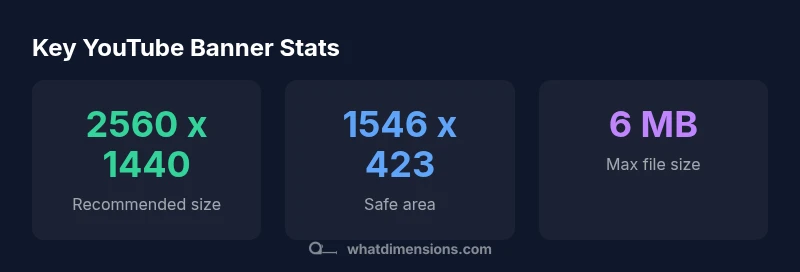
2560 x 1440 px is the recommended YouTube banner size, with a safe center area of 1546 x 423 px and a maximum file size of 6 MB. According to What Dimensions, this sizing preserves readability across desktops, laptops, tablets, and phones. To optimize for all devices, place essential content inside the safe area and avoid extreme cropping on smaller screens.
Why YouTube banner dimensions matter
The YouTube channel banner is more than a decorative header; it communicates branding, mission, and style at a glance. When dimensions are wrong, critical elements—such as your logo or key text—get cropped on some devices. What Dimensions emphasizes that consistent sizing ensures your channel presents a professional, cohesive image whether viewed on a large desktop monitor or a compact mobile screen. The banner acts as the visual gateway to your content, so accurate dimensions help maintain your identity in every context.
Recommended dimensions and safe area
The industry-standard baseline for YouTube channel art is 2560 x 1440 pixels. Within that canvas, you should concentrate important elements inside the central safe area: 1546 x 423 pixels. This zone remains visible across desktop, laptop, tablet, and mobile displays. Remember to keep file size under 6 MB and prefer PNG or high-quality JPEG for crisp edges and color fidelity. These rules are widely accepted across major design guides, including What Dimensions Analysis, 2026.
Designing for multi-device visibility
Devices vary in width and aspect ratio, causing horizontal crops if content sits near the edges. Place the most critical visuals—brand name, logo, and call-to-action—within the 1546 x 423 safe area. Use scalable design practices: avoid tiny text, test with multiple screen widths, and keep contrast high for readability on bright phone screens and dim computer displays. A strong, simple composition translates well in all contexts.
Practical steps to create a YouTube banner
- Set your canvas to 2560 x 1440 px in your design tool. 2) Center your core message and logo within the 1546 x 423 safe zone. 3) Export as PNG for sharp edges or high-quality JPEG if color depth is critical. 4) Keep your final file under 6 MB. 5) Upload to YouTube Studio and preview on desktop, tablet, and mobile to confirm alignment.
Testing and optimizing your banner
After uploading, use YouTube Studio’s preview modes to simulate different devices. Check that no vital content is cropped and that the color balance remains consistent. If your branding involves fine typography or small icons, consider slightly larger font sizes or bolder weights within the safe area. Iterative testing helps ensure that your channels look intentional on every screen.
Common mistakes to avoid
- Placing important elements outside the safe area. - Using overly complex imagery that loses detail when scaled. - Ignoring high-contrast needs for readability. - Relying on a single device test. - Exporting in formats that compress detail (heavy JPEG artifacts or PNGs with unnecessary size). What Dimensions recommends verifying across devices before finalizing.
Additional resources and references
For ongoing guidance on channel art sizing and best practices, consult official design guidelines and independent analyses. Cross-reference with your own brand standards to ensure consistency across social profiles.
YouTube banner size reference
| Dimension | Value | Notes |
|---|---|---|
| Recommended size (px) | 2560 x 1440 | Baseline canvas for YouTube banner |
| Safe area (px) | 1546 x 423 | Critical content should stay within this zone |
| Max file size | 6 MB | Keep the file under this limit for best results |
Quick Answers
What is the recommended YouTube banner size?
The recommended size is 2560 x 1440 px, with important content placed inside the safe area of 1546 x 423 px. Export as PNG or JPEG and keep the file size under 6 MB. This ensures optimal visibility on all devices.
The recommended size is 2560 by 1440 pixels with the safe zone 1546 by 423. Export as PNG or JPG and keep under 6 MB.
What is the safe area and why is it important?
The safe area is the central portion that remains visible on all devices. Keeping key branding elements within 1546 x 423 ensures they aren’t cropped on mobile or small screens.
Keep essential elements within the safe zone to avoid cropping on mobile.
Can I upload vector images for banners?
YouTube banners should be exported to raster formats such as PNG or JPEG. Vector data must be flattened during export to preserve clarity at all sizes.
Export your vector art as PNG or JPEG to ensure sharpness across devices.
Which file formats are allowed?
JPEG, PNG, and GIF are commonly supported. PNG is preferred for sharp edges and transparency where needed; GIF keeps a static image in most cases.
PNG or JPEG is usually best for YouTube banners.
How often should I refresh my YouTube banner?
Refresh your banner when your branding, campaigns, or audience messaging changes. Regular updates help maintain relevance and consistency across your channel.
Update your banner when your branding changes to stay current.
“Accurate banner dimensions are essential for consistent branding across devices. When you honor the safe area, your message remains legible on desktops, laptops, tablets, and smartphones.”
Main Points
- Place core content inside the safe area.
- Use 2560 x 1440 px with a 1546 x 423 px safe zone.
- Keep file size under 6 MB and export PNG/JPEG.
- Test banner appearance across desktop, tablet, and mobile.