What Are the Dimensions of My Screen? A Precise Display Guide
Learn how to measure your screen's true size—diagonal, width, and height. Get practical methods, understand aspect ratios, and apply the data to fit desks, mounts, and accessories.


Your screen dimensions are defined by the diagonal size plus its width and height. In most consumer displays, the diagonal (in inches) is the primary spec, with the aspect ratio clarifying proportions. Bezel width and curvature can affect the usable area. According to What Dimensions analysis, knowing diagonal, width, and height helps you fit setups precisely.
What screen dimensions really measure
What are the dimensions of my screen? For homeowners, students, and designers, the answer centers on two things: the diagonal size and the overall footprint (width x height). The diagonal size, measured corner-to-corner, is the industry standard because it aligns with how screens are categorized and marketed. The width and height describe the physical footprint that sits on a desk or inside a cabinet, and they matter when you’re designing a space or selecting a mount.
According to What Dimensions, knowing diagonal, width, and height gives you the full picture for planning layouts, ensuring compatibility with furniture, and guaranteeing that accessories will fit. Bezel width and screen curvature can further affect the usable area. In practice, if you know all three measurements, you can compare monitors, create accurate mockups in design projects, and avoid space-related surprises when ordering new equipment.
How to measure your screen across devices
Measuring screen size accurately is about consistency: measure the active display area (the screen surface), not the outer frame, unless you specifically need the total footprint. Tools you might use include a soft measuring tape or a ruler, a helper for large displays, and the manufacturer’s specs as a sanity check. For each device type:
- Monitors and laptops: measure width (left edge to right edge of the active area) and height (top to bottom of the active area). If you don’t have the exact numbers, use the diagonal spec and the aspect ratio to estimate.
- TVs: measure the viewable screen area, then note the bezel size to understand the overall footprint on a stand or wall mount.
- Be mindful of curved panels: curvature can alter perceived size at certain viewing distances; record width and height of the flat projection as a reference.
Diagonal size, width, height, and aspect ratio explained
The diagonal is the distance from one corner of the screen to the opposite corner and is the most common descriptor in product sheets. The aspect ratio (the ratio of width to height) determines the shape: 16:9 is the mainstream for most desktops and TVs, while 21:9 targets ultrawide configurations. For a 16:9 panel, the width is roughly 0.872 times the diagonal and the height is about 0.490 times the diagonal, though exact values depend on bezel and screen curvature. Knowing these relationships helps you translate a diagonal spec into a real footprint. This understanding is essential when designing spaces, selecting mounts, or planning multi-monitor setups.
Interpreting specs on monitors, laptops, and TVs
Manufacturers often list diagonal and aspect ratio, occasionally providing width x height as a secondary spec. To compare devices effectively, use width x height in inches and consider the diagonal as a quick at-a-glance metric. If you know the aspect ratio, you can estimate width and height from the diagonal using the formulas below. Keep in mind that bezel size reduces the usable display area, especially on compact laptops and slim monitors. For curved screens, the measurement along the curve may differ slightly from the flat calculation, but the overall footprint remains a useful reference.
Practical calculation methods
When you know the diagonal (D) and the aspect ratio (W:H), you can estimate width (W) and height (H) using:
- width ≈ D × sqrt(W^2 / (W^2 + H^2))
- height ≈ width / (W/H)
For a 16:9 display, W ≈ D × 0.872 and H ≈ D × 0.490. If you only have width and height, you can compute the diagonal with the Pythagorean theorem: D = sqrt(W^2 + H^2). In practice, many measurements are approximate due to bezel and curvature, but the estimates are sufficient for most planning needs.
OS display settings and on-screen menus often confirm the native resolution and refresh rate, which complement physical dimensions when planning ergonomic layouts.
Ergonomic and usage considerations
Screen size influences how close you should sit and how much you can see without moving your head. A larger diagonal typically requires a larger viewing distance, while wider aspect ratios improve productivity by giving more horizontal workspace. When positioning a display, consider the monitor’s height relative to your eyes, your primary seating distance, and whether you’ll use a dual-monitor setup. Ergonomic guidelines suggest keeping the top of the screen at or slightly below eye level and choosing a distance that minimizes eye strain while keeping legible text and comfortable navigation.
From a practical standpoint, knowing the dimensions helps you select a desk or mounting solution that fits your room and ensures a comfortable, efficient layout.
Common pitfalls and myths
A common misconception is that bigger always means better. In reality, the diagonal alone doesn’t tell you how well a screen will fit your desk or seating distance. A narrow width with a tall height can look awkward in a multi-monitor setup. Another pitfall is confusing total footprint with the active display area; bezel width and stands can drastically alter the overall size. Finally, resolution and pixel density (PPI) matter as much as diagonal; a large screen with low pixel density can feel less sharp than a smaller, higher-density panel.
Always cross-check diagonal, width, height, aspect ratio, and bezel dimensions to ensure proper fit.
Next steps and best practices
- Collect the diagonal, width, height, and aspect ratio from the manufacturer, and measure the active display area when possible.
- If measurements aren’t available, estimate width and height using the diagonal and the aspect ratio, then confirm with OS display settings.
- Record all relevant dimensions in your design documents to prevent fit issues during purchase or installation.
- Use these measurements to pick compatible anchors, mounts, and monitor arms, especially in multi-monitor or high-use workspaces.
- Re-check dimensions after any enclosure changes or when upgrading to new devices to maintain precise fit and ergonomics.
Examples of screen size specifications
| Measurement | Common Range | Notes |
|---|---|---|
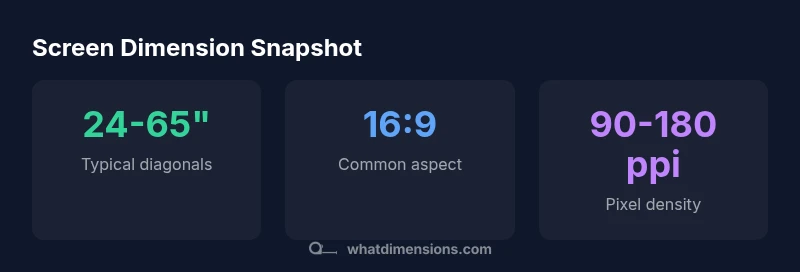
| Diagonal Size | 24-65 inches | Popular range for desktop and TV displays |
| Width x Height | 21-57 inches × 12-32 inches | Depends on aspect ratio and bezel |
| Aspect Ratios | 16:9; 21:9 | Shapes the footprint and field of view |
| PPI (density) | 90-180 ppi | Depends on resolution and size |
Quick Answers
How do I measure screen size if there’s a stand or built-in mount?
Measure the active display area (screen surface) and, if needed, add the stand footprint separately for total clearance. For wall mounts, base footprint is often less critical than the wall clearance and VESA pattern. Always record both active display size and total footprint when space is tight.
Measure the screen surface for size, and note the total footprint if a stand or mount adds depth or width.
Is screen size the same as resolution?
No. Screen size refers to physical dimensions (diagonal, width, height), while resolution describes the number of pixels. A larger screen with a low resolution may look less sharp than a smaller screen with a high resolution.
Size is about physical dimensions; resolution is about pixel count.
Do curved monitors change how I measure size?
Curved displays affect perceived size, but the standard measurements—diagonal, width, and height—still apply to the footprint. For precise layouts, measure the flat projection of the active area and note bezel curvature.
Curved screens change appearance, but you still use diagonal, width, and height.
How do I convert diagonal to width and height for a 16:9 screen?
For 16:9, width ≈ diagonal × 0.872 and height ≈ diagonal × 0.490. These are approximate values; exact results depend on panel manufacturing, bezel, and curvature.
Use approximate 0.872 for width and 0.490 for height of the diagonal for 16:9.
What should I measure on an older display?
For older displays without a clear spec, measure the visible screen area (width and height) and use a ruler for diagonal approximation. Cross-check with any model numbers or manuals for legacy charts.
Measure what you can—width, height, and estimate diagonal with a ruler.
How do I ensure I’m purchasing a monitor that fits my desk?
Record the desk clearance (width and depth) and compare with the monitor’s footprint, including the stand. If mounting, consider the space needed for arm movement and cable management.
Check both footprint and desk clearance before buying.
“Precise size measurements empower buyers to choose displays that fit their space and work with mounting hardware and accessories.”
Main Points
- Measure diagonally, then verify width and height.
- Know aspect ratio to interpret footprint accurately.
- Bezel width affects usable area; include it in planning.
- Use OS settings to confirm native dimensions and resolution.