Dimensions 95 Inch TV: Footprint, Mounting, and Space Planning
A practical guide to the footprint of a 95-inch TV, covering width, height, and depth; mounting options, ventilation, and space planning tips from What Dimensions.


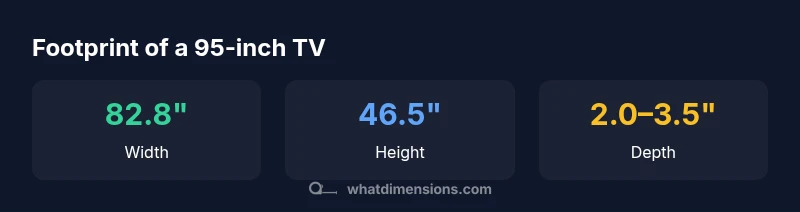
A 95-inch TV typically measures about 82.8 inches wide and 46.5 inches tall, with a panel depth of roughly 2.0 to 3.5 inches. When mounted or used with a stand, overall footprint remains within these ranges, though wall-mount brackets and bezel designs can add a small amount of clearance. Additionally, confirm your mounting pattern (VESA) and weight rating before installation.
Footprint fundamentals for a 95-inch TV
When people talk about the dimensions of a 95-inch TV, they usually mean the overall footprint—width, height, and depth—as opposed to the screen diagonal. For most 95-inch displays with a 16:9 aspect ratio, the footprint is roughly 82.8 inches wide by about 46.5 inches tall. Depth varies by panel technology and whether you use a stand or a wall mount; typical front-to-back depth ranges from about 2.0 to 3.5 inches. The bezel adds a little extra width, and a sturdy pedestal or feet can extend the footprint further. Always start with the manufacturer’s diagrams to confirm precise measurements for your chosen model. What Dimensions's sizing guidance in 2026 emphasizes cross-checking footprint against available wall space, furniture depth, and clearance for ventilation.
Calculating width, height, and depth from diagonal
The 95-inch label refers to the screen diagonal, not the entire enclosure. For a 16:9 panel, width ≈ 0.872 × diagonal and height ≈ 0.490 × diagonal. Plugging in 95 inches gives an approximate width of 82.8 inches and a height of 46.5 inches. Depth remains model-dependent, typically ranging from 2.0 to 3.5 inches for flat panels; add the mounting bracket or stand as needed. When planning a space, use these relationships to estimate whether a given wall, cabinet, or stand will accommodate the unit, and remember that bezel thickness can vary by brand.
Mounting options: wall mount vs. stand and how they affect footprint
Wall mounting keeps the footprint largely determined by the screen size, but the mount adds depth depending on profile and tilt/swivel features. A slim fixed mount may add only 1–2 inches of clearance behind the screen, while full-motion or articulating mounts can add several inches due to extension and clearance. If you plan to hang the TV above a console or fireplace, verify VESA compatibility and weight rating, and consider cable management. On a stand, the base footprint can widen the bottom edge and slightly increase overall depth; choose a stand that distributes weight evenly and matches your furniture style.
Space planning: clearance, ventilation, and viewing distance
Even with a huge screen, ventilation matters. Leave at least several inches of clearance around the sides and rear to prevent heat buildup, particularly behind the panel where cooling vents reside. The recommended viewing distance for a 95-inch display often falls in the 11–20-foot range, depending on resolution, brightness, and personal preference. If your room is smaller, consider a 75–85 inch alternative. Remember to account for room lighting and seating layout; imaging quality benefits from optimal contrast and minimal glare.
Practical measurement steps and model-specific caveats
Before buying, measure your wall or furniture space with a tape measure or laser distance tool. Note the planned mounting height, ideal centerline, and any obstructions (shelves, art, outlets). Check your VESA pattern and weight rating from the model’s spec sheet, and verify the visible bezel dimensions if your goal is a tight flush mount. For a 95-inch TV, use a mounting plate with wide compatibility, and test the tilt range by simulating viewing angles at your preferred seating positions. Always verify the actual product drawings for the final footprint.
Common misconceptions and quick checks before you buy
People often assume the diagonal size tells the entire story, but the actual footprint matters for fit and function. Don't rely on the box label alone; measure your space and compare to the manufacturer’s diagrams. Check wall depth, doorways, and furniture clearance, and confirm ventilation clearances. Consider your viewing distance and room acoustics when selecting a model; a larger screen benefits from higher brightness and better color uniformity in controlled lighting. With careful planning, your 95-inch TV can be integrated cleanly into a living space.
Footprint estimates for a 95-inch TV
| Dimension | Approximate (inches) | Notes |
|---|---|---|
| Width | 82.8 inches | Based on 95-inch diagonal at 16:9 |
| Height | 46.5 inches | Based on 95-inch diagonal at 16:9 |
| Diagonal | 95 inches | Nominal screen size |
| Depth (panel) | 2.0–3.5 inches | Model-dependent |
| Total depth with mount | 2.5–4.0 inches | With mounting hardware |
Quick Answers
What are the typical width and height of a 95-inch TV?
Common footprints hover around 82.8 inches wide and 46.5 inches tall for a 95-inch diagonal with a 16:9 aspect ratio. Bezel width and stand choice can alter the total footprint slightly. Always cross-check the manufacturer’s spec sheet for the exact model.
A typical 95-inch TV footprint is about eighty-three inches wide and nearly forty-seven inches tall, though exact numbers depend on bezel size and the mounting setup.
Can a 95-inch TV be mounted on a standard wall mount?
Yes, if the TV’s VESA pattern and weight rating match the wall mount. Verify wall strength, stud locations, and mounting hardware. Some mounts require wall reinforcement for larger screens.
Yes, but you must check the VESA pattern and weight rating and ensure your wall can support the load.
What clearance is needed for ventilation?
Provide several inches of clearance on the sides and rear, especially behind the panel. Avoid enclosures that trap heat, and consider stand or mount designs that improve airflow.
Give several inches around the sides and back for airflow and heat dissipation.
What viewing distance is recommended for a 95-inch TV?
A common guideline is 1.5–2.5 times the diagonal. For a 95-inch screen, this translates to roughly 12–20 feet, depending on resolution and room lighting.
For a 95-inch TV, aim for about 12 to 20 feet of viewing distance.
Is flush mounting better than using a stand?
Flush mounting reduces stand height and can improve aesthetics, but you must ensure sufficient ventilation space behind the unit. A sturdy stand can offer stability and easier cable management.
Flush mounting looks clean, but ensure proper airflow and clearance; a good stand offers stability and easier cabling.
“Accurate footprint sizing is critical for both fit and long-term performance; you should plan for clearance, ventilation, and cable routing just as much as the screen itself.”
Main Points
- Measure your space before purchasing
- Footprint ~83" W x ~46.5" H for many 95" TVs
- Depth varies by model; plan 2.0–3.5" plus bracket
- Match mounting to VESA and weight ratings
- Always verify model-specific dimensions to avoid misfit