Dimensions 43 TV: Exact Sizing for 43-Inch Televisions
Learn how to interpret and apply exact measurements for a 43-inch TV. This guide covers width, height, depth, mounting, and space planning with data-driven guidance from What Dimensions.


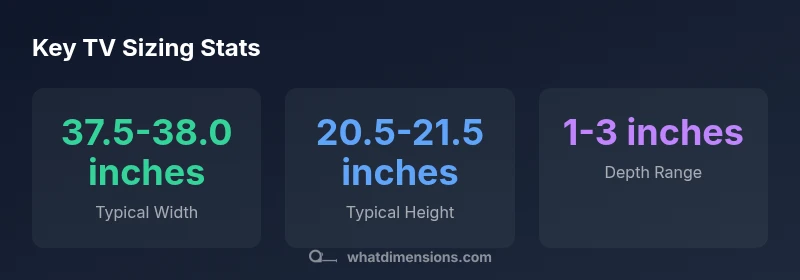
For a dimensions 43 tv, the diagonal is fixed at 43 inches, but width is usually around 37.5 inches and height around 21 inches for a 16:9 panel. Depth ranges from about 1 to 3 inches, depending on bezel and cabinet or mount. Always verify the exact specs from the manufacturer's datasheet for your model.
Dimensions 43 TV: Understanding the numbers behind the diagonal
When people talk about a dimensions 43 tv, they mean a television whose screen measures 43 inches diagonally. The diagonal is a fixed reference, but the actual footprint depends on the aspect ratio, most commonly 16:9 for modern TVs. For a 16:9 43-inch panel, the width typically lands around 37.5 inches and the height around 21 inches, before bezel and stand adjustments. Be mindful that the bezel— the border surrounding the screen—adds several tenths of an inch to each side. So while the screen itself is 43 inches, the total cabinet width can be slightly larger. If you’re designing a cabinet or selecting a wall mount, always check the manufacturer’s exact footprint rather than relying on the screen size alone. What Dimensions analyses consistently show is that knowing these footprint numbers helps homeowners plan seating, furniture, and cable routes with precision.
The influence of bezel and panel thickness on footprint
Bezel thickness varies by model and brand, and even small differences add up across the width and height of a 43-inch display. In many mid-range models, bezel widths range from 0.3 to 0.7 inches per side, which translates to about 0.6 to 1.4 inches added to the total width. Height is similarly affected, though manufacturers usually optimize for a slim profile. Panel depth is more noticeable: panel chassis and internal components push depth into a modest range, typically 1 to 3 inches, depending on whether you choose a flush wall mount or a thicker stand. For wall mounting, the actual projection will be governed by the chosen mount rather than the bezel alone. The What Dimensions team notes that precise footprint data is essential for a clean, clutter-free setup.
Stand vs. wall mount: how mounting options change the footprint
If you use a stand, the TV’s depth includes the base’s thickness and any feet at the bottom. A stand can add 1.5 to 3 inches of depth and slightly alter the center of gravity, which can influence stability on thinner furniture. Wall mounting shifts the footprint toward the wall; most mounting systems add little to the width or height but determine how far the face plane sits from the wall. The commonly used VESA mounting pattern varies by model, so always confirm the pattern and the overall mounting footprint before purchasing a mount. The key takeaway: mounting choice affects how you measure clearance and plan cable management.
Planning your space: seating distance and stand clearance
A comfortable viewing experience for a 43-inch display typically falls within a range that depends on viewing distance, room lighting, and seating. A common guideline suggests sitting roughly 1.5 to 2.5 times the screen diagonal away from the screen, which for a 43-inch TV translates to about 5 to 9 feet. Beyond viewing distance, ensure there is adequate clearance for airflow, speakers, and cable access. If you’re deploying a wall mount, you’ll also want to verify that the wall studs align with the VESA pattern and that there’s enough space above the TV for ventilation. Real-world layouts show that precise measurements reduce the need for rework later.
How to measure accurately: a step-by-step measurement method
Start by measuring the screen width and height on the model’s spec sheet, then add bezel allowances (per side) as specified by the manufacturer. Next, measure the total depth with the selected mounting option or stand. Use a metal tape measure for accuracy and record each dimension in a notebook or measurement app. Validate measurements at the actual location where the TV will be placed, accounting for any furniture overhang or wall features. Re-check the VESA pattern if mounting, and confirm that the mounting hardware supports the weight of your TV.
Real-world examples: model ranges and how to compare
In practice, most 43-inch models cluster around a narrow band of footprints. You’ll see minor width differences across brands due to bezel styling, while height and depth stay within a consistent range. When comparing models, stack their published footprint numbers side by side: width, height, and depth with the chosen mounting option. This approach minimizes surprises when you place the TV in a cabinet or mount it on a wall. Remember that even within a single diagonal class, footprint can vary enough to require a quick re-measure of your space.
Accommodating ventilation and cables: layout tips
Don’t overlook ventilation and cable routing. Leave 2-3 inches of clearance behind the TV for airflow and to prevent overheating, especially if you plan to run a soundbar or other devices. When setting on a stand, ensure your stand width accommodates the TV footprint with a stable base. For wall-mounted setups, route power and signal cables through the wall or along the baseboard to keep the area tidy. A clean layout reduces accidental disconnections and makes future upgrades smoother.
Common mistakes in planning for a 43-inch TV
Rushing measurements without checking the actual model's footprint is a frequent error. Don’t assume that screen size equals cabinet size. Overlooking bezel width, stand depth, or mounting clearance can lead to a cramped installation or the need to replace furniture. Another pitfall is ignoring ventilation: heat buildup can shorten component life and degrade performance. Finally, ensure your wall mount supports the TV’s weight and matches your VESA pattern, not just the screen diagonal.
Quick reference: fit checklist and next steps
Use the model’s official footprint data for width, height, and depth. Confirm mounting hole pattern and wall compatibility before purchasing a mount. Measure your space at the location with doors and drawers in their regular positions. Verify cable paths and power access, then re-check clearance around obstructions. With these checks, your 43-inch TV will fit precisely and function reliably.
Footprint rough ranges for a typical 43-inch TV
| Dimension Type | Typical Value | Notes |
|---|---|---|
| Width | 37.5-38.0 inches | For a 43-inch 16:9 panel; bezel adds width |
| Height | 20.5-21.5 inches | Depends on bezel and speaker placement |
| Depth (without mount) | 1-2 inches | Panel thickness and interior components |
| Depth (with stand) | 1.5-3 inches | Base or pedestal adds depth; wall mounting reduces projection |
Quick Answers
What are the typical physical dimensions of a 43-inch TV?
Most 43-inch TVs have a width around 37.5 inches and a height around 21 inches, with bezel width adding a bit to the footprint. Depth varies by panel thickness and mounting choice, usually between 1 and 3 inches. Always refer to the model's official footprint for exact numbers.
Most 43-inch TVs are about 37.5 by 21 inches, with a shallow depth. Check the model’s spec sheet for exact numbers.
Do bezel size and stand affect the footprint of a 43-inch TV?
Yes. Bezel adds to the width and height, and the stand increases depth. Wall mounts may reduce protrusion but require space for cables and ventilation. Compare footprints across models to avoid fit issues.
Bezel and stand change how big the TV footprint is, so compare model footprints carefully.
Will a 43-inch TV fit in a standard TV stand?
Most standard TV stands accommodate widths around 40 inches or more; however, always verify the stand’s top surface width and depth. If the footprint is close to the stand edge, you may need a wider unit or a different mounting approach.
Check the stand width and depth before buying; don’t rely on screen size alone.
Are there standard mounting patterns for 43-inch TVs?
Yes, most 43-inch TVs use common VESA patterns, typically ranging from 100x100 mm to 400x400 mm. Always verify the exact pattern for your model and match it with your wall mount or arm.
Most 43-inch TVs use standard VESA mounting patterns; confirm your model’s size.
How do I convert diagonal size to available width and height?
For a 16:9 display, width is roughly 0.8716 times the diagonal and height about 0.4907 times the diagonal. Use these ratios to estimate footprint, then adjust for bezel as specified by the manufacturer.
Use the screen’s 16:9 ratio to estimate width and height from the diagonal.
What tools are best for measuring a TV space?
Use a metal tape measure for accuracy, plus a level to align the mount and a pencil for marking. Measure width, height, and depth at the mounting location, then double-check with the model’s official footprint.
A tape measure, level, and pencil are all you need for accurate measurements.
“Exact measurements enable better space planning and safer installations; always verify model-specific footprints before purchase or mounting.”
Main Points
- Know the footprint, not just the screen size
- Account for bezel and stand when planning space
- Check VESA patterns before mounting
- Measure in situ before buying furniture or mounts
- Prioritize ventilation and cable management