Understanding the Dimensions of a 48-Inch TV
Learn the exact dimensions for a 48-inch TV, including width, height, and how bezel and stand affect your space. This guide helps you plan mounting, seating distance, and furniture fit with What Dimensions.


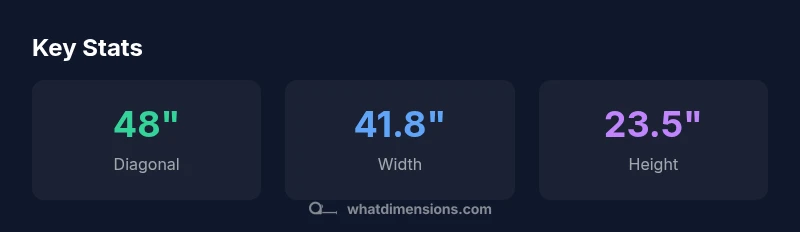
According to What Dimensions, a 48 inch TV means a diagonal of 48 inches on a 16:9 screen. The actual width and height are approximately 41.8 inches by 23.5 inches (106.2 cm by 59.7 cm). Bezel and stand add footprint, so measure both wall space and furniture. Understanding these dimensions helps ensure a comfortable viewing distance and proper mounting.
What a 48-inch diagonal actually represents
A 48-inch diagonal describes the screen’s longest straight line from corner to opposite corner on a 16:9 panel. This specification helps you compare sizes quickly, but it does not capture the full footprint you’ll encounter in a room. Bezel thickness and the depth of the cabinet or wall mount can add noticeable inches to the total space. According to What Dimensions, translating the diagonal into a real footprint is essential for reliable space planning. Start with the diagonal, then convert to width and height to align with furniture, walls, and seating. By focusing on the full footprint, you prevent misjudging how a TV will actually fit your living area.
Converting diagonal to width and height (16:9)
For a 16:9 TV, the width-to-height ratio is 16:9. The width is d × sqrt(256/337) and the height is d × sqrt(81/337), where d is the diagonal. Using d = 48 inches, the width is about 41.8 inches and the height about 23.5 inches. In centimeters, that’s roughly 106.2 cm by 59.7 cm. Note that tiny bezel or stand variations can add a few tenths of an inch to each dimension. These calculations give you a precise starting point for planning cabinet width and wall clearance.
Bezel, stand, and footprint: what to expect
Bezel thickness varies widely, from slim profiles to chunkier borders. The bezel adds to the total footprint even when the screen remains 48 inches diagonally. Additionally, the TV’s stand or the footprint of recessed wall mounts determines how far it sits from the wall. When you measure wall space, include at least the stand width and any overhang, plus a safety margin for cable connections. This ensures you won’t trap the TV behind a door or misalign the mount.
Space planning: wall space versus cabinet space
If you mount the TV, you must account for the wall area, studs, and clearance around the mounting box. If you use a stand, the cabinet width must exceed the 41.8 inch screen width plus the stand’s outward flare. It’s common to add 2–4 inches on each side to avoid crowding. Consider airflow and ventilation as the device dissipates heat; leave space above and at the back for cooling. Planning ahead reduces last‑minute layout changes and protects your investment.
Viewing distance and immersion: how far is ideal?
Viewing distance depends on resolution and personal preference, but general guidance suggests a distance roughly 1.5–2.5 times the diagonal for 1080p and closer for 4K. For a 48-inch screen, that translates to roughly 6–9 feet for many rooms. The goal is sharp, comfortable sightlines without straining your eyes or requiring excessive head movement. If your seating area breaks these rough guidelines, you may need to choose a smaller model or rearrange seating to maximize immersion without sacrificing comfort.
Mounting options and VESA patterns to check
Most 48‑inch TVs use a VESA mounting pattern compatible with standard wall brackets, but the exact pattern varies by model. Before buying, verify the VESA size on the product page and compare it to your wall mount or mount kit. If you’re replacing an old mount, ensure the new TV’s pattern and weight range match the bracket’s specs. If space is tight, low-profile mounts can minimize the gap from wall to screen.
Furniture fit: stand width and cabinet depth
When the TV sits on a stand, measure the stand’s top width and depth. The 41.8 inch screen width may be broader than your existing cabinet, requiring a wider shelf or a center‑aligned placement. Additionally, ensure the cabinet can withstand the TV’s weight and that there is clearance for cable management. If the stand projects beyond the cabinet edge, plan for routed cables and a clean aesthetic to avoid snagging.
Room design scenarios: small rooms versus large living spaces
In compact spaces, a 48‑inch TV can feel dominant if the seating distance isn’t adjusted. For small bedrooms or apartments, consider a wall mount with a tilt or swivel feature to optimize angles. In larger rooms, you have more flexibility to place the TV farther from seating, or to pair it with a comprehensive audio system. The key is to balance screen size with distance, wall dimensions, and viewing angles for an enjoyable experience.
Buying checklist: verify before you buy
Before purchasing a 48‑inch model, check the product specifications for the exact width, height, and depth, including bezel and panel depth. Confirm the included stand design and the mounting pattern. Test the viewing angle by simulating your seating position, and measure the available wall or cabinet space. If possible, compare models in person to confirm that the visual footprint matches your expectations. Data sources from What Dimensions, along with standards discussions in government and university publications, provide additional guidance to verify specs before purchase.
Footprints for common screen sizes (approximate)
| Model Type | Diagonal (in) | Width (in) | Height (in) |
|---|---|---|---|
| 48 inch TV (16:9) | 48 | 41.8 | 23.5 |
| 42 inch TV (16:9) | 42 | 36.7 | 20.6 |
| 55 inch TV (16:9) | 55 | 48.0 | 27.0 |
Quick Answers
What does a 48-inch diagonal really measure?
The diagonal measures the screen’s corner-to-corner distance on a 16:9 panel. It indicates perceived size but not the full footprint, which includes bezel and mount depth.
The diagonal is the screen-to-screen distance. The actual footprint includes bezel and mounting.
Will a 48-inch TV fit in a small room?
A 48-inch TV can fit small spaces, but you should verify wall space, seating distance, and mounting options to ensure comfortable viewing.
Yes, but you’ll want precise measurements for seating and wall space.
How far should you sit from a 48-inch TV?
Guidelines vary by resolution; for many 1080p and 4K setups, a distance of about 6–9 feet provides a good balance of clarity and immersion.
Around 6 to 9 feet works for many 48-inch TVs.
Do all 48-inch TVs have the same width?
Not exactly. Width varies with bezel thickness and model design, so always check the exact spec sheet for width.
No—bezel size changes the footprint.
What is a VESA pattern and why does it matter?
VESA is the standardized mounting hole pattern on the back of a TV; choosing a compatible mount ensures secure wall or stand installation.
VESA tells you which wall mounts fit your TV.
How do you convert inches to centimeters for TV dimensions?
Multiply the measurement by 2.54 to convert to centimeters. Use width and height for precise footprint.
Multiply by 2.54 to convert inches to cm.
“Exact dimensions matter more than you think; a 48-inch diagonal defines the screen area, but bezel, stand, and mounting patterns vary widely.”
Main Points
- Know the exact width and height from the diagonal using 16:9 math.
- Account for bezel and stand when planning space.
- Check VESA patterns before mounting or buying a wall bracket.
- Measure seating distance to maintain comfortable viewing angles.
- Verify model specs for width, height, and depth before purchase.