TV Dimensions 50 Inch: Exact Size Guide
Learn exact measurements for a 50 inch TV, including width, height, depth, and mounting clearance. What Dimensions guides homeowners and designers to choose furniture and stands with confidence.


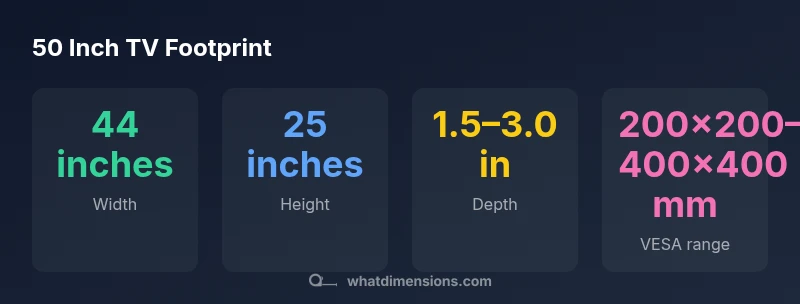
Most 50 inch TVs have a footprint around 44 inches wide and about 25 inches tall, with a depth typically between 2 and 3 inches for slim panels and a bit more with external mounts or soundbars. Exact measurements depend on bezel width, stand design, and mounting pattern, so always check the manufacturer’s spec sheet before buying a stand or TV cabinet. This upfront awareness helps you avoid misfits in furniture and wall setups.
Understanding what tv dimensions 50 inch really mean
The label tv dimensions 50 inch refers to the diagonal measurement of the screen. In practical terms, it translates into a footprint on a table or wall, but the bezel, stand design, and mounting method all contribute to the final size you physically interact with. For homeowners and designers, translating a diagonal into actual width and height helps ensure the TV fits the intended space and that seating remains comfortably aligned. According to What Dimensions, precision in these measurements matters most when planning a living room, dorm, or studio apartment. This section will unpack tv dimensions 50 inch and explain how to interpret the footprint across different configurations, including stands, wall mounts, and soundbar integrations.
Footprint fundamentals: width, height, and depth
When you translate a 50 inch diagonal into concrete numbers, you’ll typically see a footprint near 44 inches wide and about 25 inches high. Depth varies more widely: ultra-slim panels hover around 1.5–2.5 inches, while models with deeper bezels or integrated soundbars can exceed 3 inches. These ranges reflect common industry practice rather than a single universal specification. The important takeaway is that the screen’s diagonal is only part of the story; the bezel, stand, and mount add tangible width and depth. Planning for a full room setup means accounting for airflow, cable routing, and safe clearance around the cabinet edge.
Bezel, stands, and wall mounts modify the footprint
Bezel width determines how much extra material surrounds the screen. A slim bezel reduces extra width and height, while a bezel-heavy design adds measurable inches to both axes. Stand design can widen the footprint if the base flares outward, and some mounts shift the screen forward, affecting depth. Wall-mount configurations remove the cabinet footprint entirely but require precise VESA compatibility and wall tilt considerations. Understanding these nuances helps you select a TV that fits exactly where you want it, without overhanging furniture or cramped viewing angles.
How to measure space accurately before you buy
Begin with a tape measure and step-by-step plan: measure the intended wall or console area, including width and height clearances and the space behind for cable management. If you’re using a stand, measure the stand width and depth as well, since some bases extend beyond the screen’s footprint. For wall mounting, verify the VESA pattern matches the mount and check the wall stud layout. Don’t forget to allow additional clearance for ventilation and soundbars, especially if you plan to attach speakers or a centered soundbar that broadens the footprint.
Planning furniture and seating around a 50 inch TV
A 50 inch TV typically suits mid-sized rooms and can be the anchor for a compact entertainment setup. When selecting a media console, consider a width that leaves at least 6–12 inches of space on each side for ventilation and decorative balance. If you’re placing the TV above a fireplace or a low cabinet, ensure the seating distance follows common viewing guidelines: roughly 1.5 to 2.5 times the diagonal, which means around 75–100 inches (6–8 feet) is a comfortable range for a 50 inch screen depending on resolution and seating layout.
Common mistakes and how to avoid them
Avoid assuming the diagonal alone defines fit. Always check the complete footprint as listed by the manufacturer, including width, height, depth, and mounting options. Skipping this check can lead to a cramped cabinet, misaligned seats, or clearance issues around vents and outlets. Create a simple footprint diagram on paper before purchase, or use the TV’s official spec sheet to compare against cabinet, stand, and wall dimensions. When in doubt, choose slightly larger furniture with better ventilation and re-check clearance after setup.
Footprint variations by common 50 inch TV configurations
| Model Type | Typical Width | Typical Height | Typical Depth | VESA Range |
|---|---|---|---|---|
| Slim LED | 44–45 in | 24–26 in | 1.5–2.5 in | 200x200 mm–400x400 mm |
| Bezel-heavy LCD | 44–46 in | 25–27 in | 2.5–3.5 in | 300x300 mm–600x400 mm |
| LED with external soundbar | 44–45 in | 25 in | 3–4 in | 400x400 mm–600x400 mm |
Quick Answers
What is the standard width of a 50 inch TV?
Most 50 inch TVs are about 44 inches wide, but actual width can vary with bezel size and mounting options. Always confirm the exact spec from the model sheet.
Most 50 inch TVs are around 44 inches wide; check the model sheet for the exact width.
How deep is a typical 50 inch TV?
Depth commonly ranges from 1.5 to 3 inches for slim panels; units with larger bezels or integrated soundbars can be deeper.
Depth usually falls between 1.5 and 3 inches, depending on the model.
Do bezel size and stand affect the footprint?
Yes. Bezel width adds to width and height, while stand bases can widen the footprint. Wall mounts often reduce visible footprint but require proper mounting.
Bezel and stand can change footprint; wall mounts can change how much you actually see of the space.
How should I measure for a stand or cabinet?
Measure the stand’s width and depth, add ventilation space, and compare to the TV’s footprint. Don’t forget cable clearance and any soundbar width.
Measure the stand area and add space for ventilation and cables.
Is mounting a TV different from using a stand?
Mounting uses a VESA pattern and requires wall compatibility. Stands depend on base design and can introduce additional width or depth.
Yes—mounting relies on VESA patterns while stands add footprint from the base.
Can a 50 inch TV fit in a small space?
Yes, with careful planning. Choose a compact stand, ensure ventilation, and use a wall mount if space is tight, but always verify the footprint.
It can fit with careful planning and the right mount or stand.
“A careful measurement plan avoids mismatches between TV footprint and furniture, ensuring a clean, safe setup.”
Main Points
- Check actual specs for width, height, and depth.
- Expect about 44