Dimensions 36 Inch TV: What You Need to Know
Learn how to interpret the dimensions of a 36 inch TV, including width, height, bezel, and mounting considerations. This What Dimensions guide covers measuring space, choosing mounts, and optimizing viewing distance.


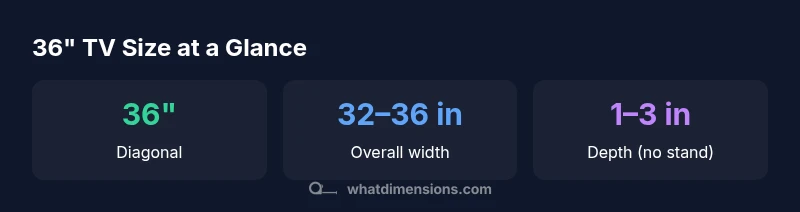
A 36 inch TV has a 36 inch diagonal with an approximate screen width around 31.0–32.5 inches and overall exterior width of roughly 32–36 inches depending on bezel. Depth ranges from 1–3 inches without a stand and about 7–9 inches with a stand. For comfort, aim for a viewing distance of roughly 4.5–7.5 feet and place the screen at eye level when seated.
Dimensions 36 inch TV: Understanding the Basics
Understanding the dimensions of a 36 inch TV is essential for planning layout, seating, and mounting. The phrase dimensions 36 inch tv commonly refers to the diagonal screen size, but the overall footprint also depends on bezel thickness and the chosen mounting solution. A 36 inch diagonal typically implies a width around 31.0–32.5 inches for the screen area, with total exterior width depending on bezel design. Bezel thickness varies by model, and a thinner bezel reduces the overall footprint while preserving image area. For many rooms, this size offers a balanced balance between screen presence and wall space. In practical terms, think about how much wall space you have, where your seating sits, and how the TV will be mounted or supported.
Screen size, aspect ratio, and bezel considerations
Most 36 inch TVs use a 16:9 aspect ratio, which provides a wide, cinema-like picture without harsh letterboxing. The diagonal measurement alone doesn’t tell the full story; bezel width and cabinet depth influence how much wall space the unit actually occupies. Modern sets trend toward slim bezels, which helps keep the overall footprint compact while preserving viewing comfort. If you’re upgrading, compare models not just by diagonal, but by bezel width, cabinet depth, and mounting compatibility. A thinner bezel means your wall display will feel larger without needing more wall space.
How to measure your space for a 36 inch television
Before purchasing, measure the wall area and the seating distance. Start by marking the ideal eye level height when seated, typically around the center of the screen. Then measure wall width to ensure the TV fits with room to spare for ventilation and cable management. If mounting, confirm a compatible VESA pattern and the wall’s stud layout. Add two to three inches of clearance on each side for ventilation and any wall panels or soundbars. Finally, translate the diagonal size into a practical footprint by comparing the width and height ranges to your room’s proportions.
Mounting options: wall mount vs stand
Choosing between wall mounting and a stand depends on room layout and daily use. Wall mounts save space and create a clean look, but require precise mounting and ventilation. Stand options add flexibility for tilt and swivel, but increase the footprint slightly. For wall mounting, verify VESA compatibility and weight rating, and consider hidden cable routing. If using a stand, check the stand width and depth so it doesn’t collide with furniture or seating.
Viewing distance and seating arrangements for optimum comfort
Optimal viewing distance for a 36 inch TV typically falls in the 4.5–7.5 feet range from the screen center to the seating eye level. Sitting too close can reduce perceived image quality, while sitting too far can diminish detail. For 4K content, you can sit closer without noticing pixel structure, whereas 1080p sources benefit from a slightly greater distance for sharpness. Adjust seating so that the screen fills about 30–40 degrees of your field of view for immersive but comfortable viewing.
Exterior dimensions vs screen real estate: comparing models
Remember that the advertised screen size is the diagonal figure, not the total footprint. Bezel thickness and the cabinet profile contribute to the overall width, height, and depth. Always check the product’s exterior dimensions in the specs and compare them to your wall or cabinet space. If possible, obtain a cardboard scale or a tape measure mock-up to visualize fit before purchasing.
Setup considerations: connectivity and placement
Place power outlets, HDMI ports, and other inputs within easy reach of the intended position. Leave space behind the TV for ventilation to prevent overheating, especially on wall mounts. If you install a soundbar or a stand-mounted shelf, ensure the arrangement doesn’t obstruct sensor areas or remote control signals. Cable management helps maintain a clean look and reduces tripping hazards in living spaces.
Approximate exterior dimensions for 36 inch TVs
| Dimension | Value | Notes |
|---|---|---|
| Screen diagonal | 36 inches | Core spec |
| Bezel-inclusive width | 32-36 inches | Varies by model |
| Height (with bezel) | 18-20 inches | Model dependent |
| Depth (no stand) | 1-3 inches | Rear depth varies |
| Depth (with stand) | 7-9 inches | Stand adds footprint |
Quick Answers
How does bezel size affect external width?
Bezel thickness adds to the TV’s overall width. Thinner bezels reduce footprint, but the total width still depends on the cabinet and mounting hardware.
Bezel size adds to the TV’s width; thinner bezels shrink the footprint, but always check the product specs.
What is the recommended viewing distance for a 36 inch TV?
For 4K content, aim for about 4.5 to 7.5 feet from the screen center. For 1080p, consider slightly farther distances to improve perceived sharpness.
For a 36 inch TV, aim roughly between 4.5 and 7.5 feet away for a comfortable, sharp image.
Can a 36 inch TV be wall-mounted on standard studs?
Yes, provided the wall mount is rated for the TV’s weight and you use proper stud anchors. Verify the VESA pattern and ensure adequate clearance for ventilation.
Yes, with a proper wall mount and correct mounting hardware you can wall-mount a 36 inch TV.
Are 36 inch TVs suitable for bedrooms or living rooms?
A 36 inch TV is versatile for bedrooms and smaller living spaces. In larger rooms, consider a larger diagonal for cinematic immersion, but a 36 inch can still deliver excellent detail on 4K.
Yes—great for bedrooms and smaller living rooms; for big spaces, a larger diagonal may feel more immersive.
What should I compare beyond screen size when buying?
Look at bezel width, mounting options, wall distance, ventilation, HDR capability, and input/output availability. These factors influence footprint, setup ease, and picture quality.
Check bezel, mounting options, ventilation, HDR, and ports in addition to size.
How do 4K sources impact perceived image on a 36 inch screen?
On a 36 inch 4K TV, pixels are small enough that most viewers perceive high detail from typical seating distances. For 1080p sources, the image may appear crisper when viewed slightly farther away.
4K looks very sharp on a 36 inch TV up close; 1080p looks best from a bit farther away.
“Accurate size planning starts with understanding both the screen area and the overall footprint. Be mindful of bezel, mounting, and space clearance to ensure a comfortable, scalable setup.”
Main Points
- Know the footprint beyond the diagonal size
- Plan for bezel width when measuring space
- Choose wall mount or stand based on room layout
- Use 4.5–7.5 feet as a general viewing distance
- Always verify exact exterior dimensions in product specs