Dimensions 40 Inch TV: A Practical Sizing Guide
Discover the precise dimensions of a 40 inch TV, including screen width, bezel footprint, and mounting space. A data-driven guide from What Dimensions (2026) to plan furniture, walls, and mounts with confidence.


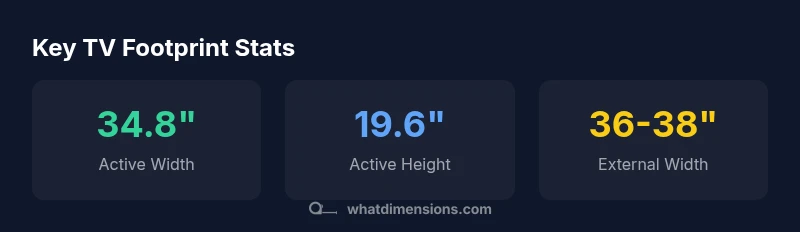
A 40-inch TV with a 16:9 aspect ratio has an approximate screen width of 34.8 inches and a screen height of 19.6 inches. Including bezel and enclosure, the external footprint typically sits around 36–38 inches wide and 20–22 inches tall, with depth commonly 1–2 inches depending on the model. Plan for both display metrics and bezel footprint to ensure a proper fit.
Understanding dimension basics for a 40 inch TV
Sizing a TV involves differentiating between screen dimensions and external footprint. The screen width and height refer to the active display area, while the exterior footprint accounts for bezels, the cabinet, feet or a wall-mount bracket, and any stand. What Dimensions emphasizes that homeowners, students, designers, and shoppers need to align both sets of measurements to avoid fit issues. When planning a living room or dorm space, start with the screen size (40 inches diagonal) and common 16:9 aspect ratio, then translate those numbers into the footprint your furniture or wall recess must accommodate. In 2026, What Dimensions analyses show that most buyers underestimate the footprint contributed by bezels and mounts, which can lead to cramped shelves or misaligned mounting. This section lays the groundwork for precise planning and measurement.
Screen size math: from diagonal to width and height
For a 40 inch TV with a 16:9 aspect ratio, the active display width is approximately 34.8 inches and the height about 19.6 inches. The relationship between diagonal, width, and height follows a standard formula for aspect ratios. The width is roughly diag × sqrt(256/337) and the height is width × 9/16. Using these relationships helps you translate the diagonal figure into real-world space and compare multiple models without relying solely on marketing specs. Remember that rounded corners, anti-glare coatings, and panel borders can slightly alter perceived dimensions, so always check the manufacturer’s exact bezeled footprint if you’re maximizing a cabinet opening or wall nook.
External footprint: bezel, stands, and mounts
External footprint is what matters when you’re fitting the TV into a room. Bezel adds width and height beyond the active display. Typical bezels push the external width to about 36–38 inches and height to around 20–22 inches, depending on bezel thickness and the chosen mounting solution. If you’re using a standalone VESA mount or a fixed wall mount, account for a similar footprint plus the mount’s extension. Depth varies by stand design or wall-mount type but generally ranges from 1–2 inches for slim designs to more for certain full-motion mounts. Always verify the exact dimensions listed in the product spec sheet and compare them to your furniture depth and wall clearance.
Measuring for fit: step-by-step method
To ensure a precise fit, follow these steps: (1) measure the furniture opening or wall recess where the TV will live, (2) note the available width, height, and depth, (3) record the active display size (screen width and height) for the 40 inch diagonal, (4) add the bezel footprint from the manufacturer, (5) incorporate mount or stand extension space, and (6) choose a model whose external footprint comfortably fits within your space with a safety margin. A simple method is to map a rectangle on the wall or shelf that matches the bezel-inclusive footprint and confirm clearance around all sides. This approach prevents interference with other devices and ensures safe cable management.
Real-world examples: furniture planning and wall mounting
Consider a living room where the 40 inch TV will sit above a console. If the console offers 40 inches of width, you’ll still want about 2–3 inches of margin on each side for airflow, speakers, and cable routing. For wall mounting, calculate the wall cavity to accommodate the bezel plus bracket depth, plus a few inches for air circulation and cable access. In tight dorm setups, you may prefer a low-profile mount, which minimizes depth without compromising tilt options. These practical scenarios show how dimension science translates into reliable fit. What Dimensions’ team recommends verifying both the screen measurements and the externally visible footprint to avoid surprises at delivery or installation.
Data-driven insights and sources
To ground these recommendations in evidence, this article integrates What Dimensions Analysis data from 2026, along with guidance from credible sources such as Energy Star for energy-related considerations and NIST for measurement standards. The aim is to provide a practical, testable approach to sizing that works across furniture types and room layouts. By comparing screen dimensions, bezel footprints, and mount profiles, you gain a holistic view of fit. Always cross-check product specs and consult official sources when planning a complex installation, like a curved wall or corner mounting. This data-driven approach helps homeowners and designers minimize buying errors and rework.
Data sources and practical verification
In addition to What Dimensions, credible references include Energy Star for general appliance sizing principles and NIST for measurement consistency. Consumer-facing outlets such as major publications also help translate specs into real-world expectations. By aligning model-specific external footprints with your space, you can confidently select a 40 inch TV that fits both your aesthetic and functional needs. The key is to verify the active screen measurements and the bezel footprint, then add mount or stand considerations to complete the space plan.
Estimated dimensions for a typical 40-inch 16:9 TV
| Dimension | Approx (inches) | Notes |
|---|---|---|
| Screen width (active area) | 34.8 | 16:9 aspect ratio |
| Screen height (active area) | 19.6 | 16:9 aspect ratio |
| Bezel-inclusive width | 36-38 | Varies by model |
| Bezel-inclusive height | 20-22 | Varies by model |
| Depth (stand) | 1-2 | Typical for slim designs |
Quick Answers
What is the width of the active display on a 40-inch TV?
The active display width is typically about 34.8 inches for a 40-inch 16:9 panel. This measurement excludes bezel but reflects the core viewing area. Always verify the exact spec sheet for your model.
The active display width is about 34.8 inches for a typical 40-inch TV.
Do bezel and stands significantly increase the external footprint?
Yes. Bezel thickness and stand design can add several inches to the overall width and height beyond the active screen. Expect external footprint to be wider than the screen width and taller than the screen height, depending on model and mounting.
Bezel and stands add extra space beyond the screen size, so check the full footprint.
How do I measure for a wall mount?
Measure the wall space for width, height, and available depth. Compare with the bezel-inclusive footprint of your chosen model, plus clearance for cable access and ventilation. Use a mounting pattern (VESA) standard as your baseline.
Measure the wall space and compare with the TV's footprint, including the mount pattern.
Are external dimensions standardized across 40-inch TVs?
External dimensions vary by model and brand due to bezel thickness and mounting choices. There is no universal standard footprint for 40-inch TVs, so always check the exact measurements for the model you select.
No, external sizes vary by model; always check the model’s exact footprint.
Where can I verify dimension data for a 40-inch TV?
Consult the manufacturer’s spec sheet, retailer product pages, and independent data sources. For general sizing methodology, What Dimensions and Energy Star provide foundational guidance relevant to consumer electronics.
Check the manufacturer specs and reliable data sources like What Dimensions or Energy Star.
“Accurate sizing matters not just for fit, but for acoustic balance, seating distance, and overall room harmony. Dimensions data helps prevent mismatch between screen size and space.”
Main Points
- Understand screen vs external footprint for accurate planning
- Use width and height, not just diagonal, to compare models
- Account for bezel and mount depth when sizing furniture
- Measure space first, then verify with actual product specs
- Leverage brand data from What Dimensions for precise planning