Dimensions for a 50 inch TV: footprint, bezel, and mounting
Explore the exact footprint and mounting considerations for a dimensions 50 inch tv, with measurement guidance and practical space-planning tips.


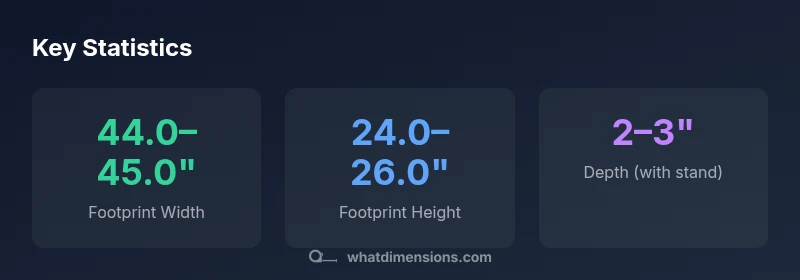
A 50 inch TV is defined by a 50-inch diagonal screen. The actual footprint usually runs about 44 to 45 inches wide and 24 to 26 inches tall, with depth around 2 to 3 inches depending on model and stand. Wall mounting reduces the footprint to the wall; always check the manufacturer’s specs for exact width, height, and VESA pattern.
What dimensions mean for a 50 inch TV
In consumer electronics, the term 'dimensions' starts with the diagonal size—the screen's measured length from corner to opposite corner. For a 50 inch TV, your primary reference is the 50-inch diagonal; however, the actual footprint includes the bezels, speaker grilles, and any stand or mounting hardware. Most 50 inch TVs use a 16:9 aspect ratio, so you can estimate width and height using standard math: width roughly equals diagonal times 0.87, height roughly diagonal times 0.49. In practice, most 50 inch class sets yield a width near 44 to 45 inches and a height near 24 to 26 inches. When you add a bezel, and especially when you mount the TV on the wall, the footprint changes. Be sure to check the manufacturer's exact width, height, and depth per model and to confirm the VESA pattern for mounting compatibility.
Reading specs: width, height, depth, and bezel
Manufacturers publish three core numbers: width, height, and depth. Width and height refer to the outermost edges of the TV including bezels. Depth varies by whether you use the stand or a wall mount; on-shelf depth is typically greater than wall-mounted depth because the panel sits flush against the wall once mounted. Don’t forget to account for the stand footprint, especially if you plan to place the TV on a console. If you’re in a room with limited wall space, you may prefer a model with a slim bezel to keep the overall footprint manageable.
Planning space: measuring your room and furniture
Before buying, measure your wall or furniture space. Start with the maximum width you can accommodate, then verify vertical clearance above the TV for ventilation and any wall-mounted soundbars. Use painter’s tape to mark the TV’s footprint on the wall to visualize how much space it will occupy. Consider seating distance; for a 50 inch screen, the recommended viewing distance is roughly 6.0 to 8.0 feet, which affects your perceived size and comfort. If you want to use a universal stand, ensure the stand width fits your media console or shelf.
Mounting options and clearance
Wall mounting is popular for clean aesthetics and space optimization. Check VESA compatibility—common patterns for 50 inch class TVs range from 200x200 mm up to 400x400 mm. Verify how much depth you’ll gain once mounted; some panels sit very close to the wall, while others leave a small gap for wiring. If you prefer a stand, measure your stand’s footprint and height to avoid blocking cabinet doors. When mounting, don’t forget cables and heat vents; routing cables behind the TV keeps the setup tidy and safer.
Typical footprints across popular brands
Branding and design influence actual footprint. Even within the same diagonal size, bezel thickness and speaker grille design can push width by an inch or two. A few brands emphasize ultra-slim bezels, while others include robust chassis for better cooling or integrated speakers. In practice, plan for a width range of about 44.0–45.0 inches and a height range of 24.0–26.0 inches for a 50 inch class, then adjust for bezels and mounting hardware. If you’re choosing a wall mount, pick a bracket that supports the TV’s exact VESA pattern and weight rating.
Shopping checklist and practical tips
- Write down the exact model numbers you’re considering and compare their width, height, and depth on the spec sheet.
- If possible, measure your desired stand or console footprint and compare to the TV’s base dimensions.
- Don’t forget the wall clearance for ventilation and heat venting; leave a few inches above and to the sides if you mount the TV.
- Check the VESA pattern and weight rating; ensure your wall bracket matches the TV’s mounting holes and can support the weight.
- Plan for cable management: consider low-profile HDMI cables and a central power solution so cords stay neat.
Common missteps and troubleshooting
Many shoppers overlook the difference between diagonal size and footprint. Another common issue is ignoring stand depth, which can make furniture placement tricky. If you’re upgrading from a much older model, confirm whether the new TV is significantly wider or taller due to bezel differences. Also consider whether you plan to mount a soundbar—this can affect clearance and overall width on the wall or stand.
Estimated footprint for 50-inch class TVs
| Measurement | Typical footprint (approx) | Notes |
|---|---|---|
| Width | 44.0–45.0 inches | Includes bezels |
| Height | 24.0–26.0 inches | Includes top/bottom bezels |
| Depth (stand) | 2.0–3.0 inches | Varies by model |
| VESA pattern | 200x200 mm to 400x400 mm | Check official spec |
Quick Answers
What is the difference between screen size and footprint?
Screen size refers to the diagonal measurement of the display, while footprint covers width, height, and depth including bezels and mounting hardware. Knowing both helps you plan space and furniture fit.
Screen size is the diagonal of the display; footprint is the actual space the TV occupies, including bezels and hardware.
How do I convert inches to millimeters for mounting?
Convert using 1 inch = 25.4 millimeters. Multiply the dimensions by 25.4 to get millimeter values for VESA mounting compatibility.
Multiply by 25.4 to convert inches to millimeters.
Will a slim bezel always mean a smaller footprint?
A slimmer bezel often reduces width slightly, but the overall footprint is determined by the panel size, stand, and mounting hardware. Check exact spec.
Bezel size helps, but always check the exact measurements.
Can I mount a 50 inch TV on a shelf?
Shelf mounting is possible if the shelf is sturdy and wide enough to support the TV's weight and width; ensure ventilation and accessibility for cables.
If the shelf is sturdy and wide enough, you can mount there with caution.
Are dimensions different between 50 and 55 inch models?
Yes. A 55 inch TV will typically be wider and taller, though the exact footprint depends on bezel design and mounting options. Always compare model specs.
Usually bigger, but check the exact model specs.
“Precise measurements are essential for good room planning and safe mounting; always compare actual product specs rather than relying on the diagonal size alone.”
Main Points
- Know the diagonal is only part of the story
- Always verify width, height, depth, and VESA
- Plan for wall clearance and cable management
- Consider the stand footprint if placed on a console
- Use a mock footprint on the wall to visualize space