60 tv dimensions: A practical guide to measuring a 60-inch TV
Understand 60 tv dimensions, including width, height, depth, and mounting options for a 60-inch TV. What Dimensions explains how to measure and plan your setup with accurate, real-world guidance.


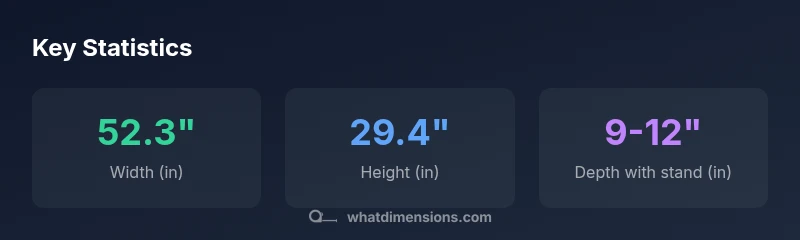
A 60 tv dimensions refers to a 60-inch diagonal screen; for a standard 16:9 panel, that roughly translates to about 52.3 inches in width and 29.4 inches in height, not including bezel. Depth varies by model and mounting (1–2 inches panel-only, 9–12 inches with a typical stand). Always check the official spec sheet for exact numbers. What Dimensions explains how to measure and plan your layout.
60 tv dimensions: Understanding diagonal, width, and height
The term 60 tv dimensions describes the footprint of a 60-inch screen. The diagonal is 60 inches, but the width and height depend on the aspect ratio. For a typical 16:9 panel, the math yields a width of about 52.3 inches and a height around 29.4 inches, excluding the bezel. Bezel thickness varies by model; some TVs have ultrathin borders while others add more bulk. Depth is another factor: panel depth is usually 1–2 inches, while mounting hardware and cable management can extend the total depth. What Dimensions emphasizes that these figures are starting points; always consult the manufacturer’s spec sheet for exact numbers. This careful attention to 60 tv dimensions helps with space planning and mounting accuracy.
Converting the diagonal into a usable footprint
To translate a 60-inch diagonal into real-world space, you need the aspect ratio. For 16:9, width = diag × 16 / sqrt(16^2 + 9^2) and height = diag × 9 / sqrt(16^2 + 9^2). Plugging in 60 inches gives roughly 52.3 inches in width and 29.4 inches in height. These are idealized numbers; bezel thickness and model-specific tolerances can add or subtract fractions of an inch. When you’re comparing models, use the exact width and height stated in the spec sheet rather than relying on the diagonal alone.
Bezel, stand, and wall-mount impact on footprint
Bezel size next to the screen affects the overall footprint. Even small bezels add perceptible width and height, particularly on larger sets. The inclusion of a stand typically expands the width by a small margin and increases depth, depending on the leg design. Wall mounting removes the stand’s footprint but may slightly alter the height depending on the mounting position. Always map the worst-case footprint (width × height × depth) to your space, accounting for bezel, stand, and mounting hardware.
Wall mounting vs stand: footprint and clearance
Wall mounting can dramatically reduce perceived depth, but the total width and height remain tied to the panel and bezel. A stand adds width and depth and requires additional clearance around the TV for airflow and cable routing. When planning, measure the wall opening or furniture width to ensure the TV fits without crowding nearby components. What Dimensions notes that clearance of a few inches around the device improves ventilation and reduces heat buildup, which helps preserve picture quality over time.
Planning space: seating distance and viewing experience
Viewing distance matters as much as the physical footprint. For a 60-inch screen, many living rooms achieve an immersive experience with seating about 7–10 feet away (roughly 2.1–3.0 meters). At shorter distances, 4K content is typically crisper, but pixel density becomes less critical than correct scope and spacing. In smaller rooms, you might opt for a slightly smaller diagonal to maintain comfortable viewing without excessive head turning. These planning guidelines are part of a holistic approach to 60 tv dimensions and user comfort.
Model-to-model differences you should expect
Manufacturers vary in bezel thickness, leg design, and integrated stand geometry. Even among 60-inch models, two TVs can have noticeably different footprints due to cosmetic choices or ventilation requirements. Always compare the exact width, height, and depth on the product page rather than relying on the diagonal. What Dimensions’ comparative approach highlights how small design choices can shift your required wall space by several inches.
How to verify dimensions before buying
Create a simple checklist: (1) record your wall or furniture width, (2) note the maximum allowed depth, (3) check the TV’s official dimensions (width × height × depth) from the spec sheet, and (4) compare your space against the model’s footprint with both stand and wall-mount scenarios. If possible, measure a similar TV in-store to validate assumptions about bezel size and weight distribution. This disciplined approach ensures your selection aligns with your space and seating arrangement.
Estimated dimensions for a 60-inch TV (approximate)
| Measurement | Value | Notes |
|---|---|---|
| Screen diagonal | 60 inches | nominal diagonal |
| Width | 52.3 inches | based on 16:9 |
| Height | 29.4 inches | based on 16:9 |
| Depth (panel only) | 1-2 inches | bezel + panel |
| Depth with stand | 9-12 inches | typical range |
Quick Answers
What is meant by the width and height of a 60-inch TV?
Width and height describe the overall footprint, including bezels, not just the screen. The diagonal is 60 inches, but the width and height follow the 16:9 aspect ratio and bezel size. Always verify the official specs for precise numbers.
Width and height describe the TV’s footprint, including bezels; the diagonal is 60 inches, but check the exact specs for precise numbers.
How do you calculate the width from a 60-inch diagonal?
Use the 16:9 ratio: width = diag × 16 / sqrt(16^2 + 9^2). For 60 inches, that yields about 52.3 inches. Height follows a similar calculation using 9 in the numerator.
You can estimate width using the 16 by 9 ratio; for a 60-inch screen it’s about 52 inches wide.
Do bezels affect the overall size significantly?
Yes. Bezel thickness adds to width and height. Even very slim bezels add noticeable inches to the footprint, especially when you’re mounting closely or pairing with furniture.
Bezel size matters; even slim bezels add some inches to the footprint.
What about mounting: wall vs stand?
Wall mounting reduces depth exposure and can change perceived height, while stands add width and depth and require clearance for ventilation and cables.
Mounting method changes depth and clearance; width is similar, height may vary with stand.
How should I choose a 60-inch TV for a specific space?
Measure your wall and seating area, check the model’s official dimensions, and ensure ample clearance for ventilation. Compare multiple models to find a fit that matches both your space and viewing distance.
Measure your space and compare exact specs to avoid fit issues.
“The exact dimensions of a 60-inch TV vary by model, so always check the spec sheet before mounting or purchasing.”
Main Points
- Measure the official specs, not just the diagonal
- Expect width ~52 inches and height ~29 inches for a 60-inch 16:9 panel
- Bezel, stand, and mounting affect total depth and footprint
- Plan wall space with ventilation and cable routing in mind
- Consider seating distance to optimize viewing quality
- Walls and stands offer different footprint implications for 60 tv dimensions