60 in TV Dimensions: Understanding Size, Fit, and Viewing
Explore 60 in TV dimensions: understand diagonal size, width, height, bezel impact, mounting fit, and viewing distance. What Dimensions provides precise size references to help shoppers plan spaces with confidence.


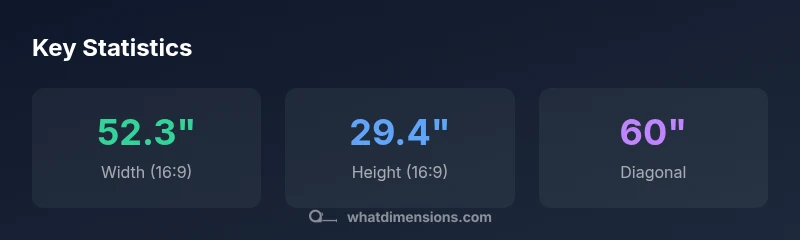
60 in TV dimensions refer to the screen's diagonal size, not the outer cabinet. For a standard 16:9 panel, a 60-inch diagonal yields roughly 52.3 inches of width and 29.4 inches of height of the visible image, excluding bezel. When planning furniture, mounts, or wall space, use these numbers to ensure a proper fit.
What 60 in TV dimensions actually measure
The phrase '60 in TV dimensions' is commonly used to describe the display's diagonal, not the cabinet's exterior footprint. The diagonal is the distance from one corner of the screen to the opposite corner. For most consumer TVs today, that dimension is tied to a 16:9 aspect ratio, which is the standard for modern HDTVs. While the diagonal is a convenient shorthand, it hides several practical details you must consider when sizing a room or mounting a TV. In practice, you are measuring a combination of the screen area and the frame around it. Bezel thickness, rounding, and the housing front all contribute to the full physical footprint. What Dimensions' analysis shows that the advertised 60 in represents the image surface, but your actual cabinet or wall opening will be larger because of the bezel and mounting hardware. Understanding this distinction helps avoid buying a unit that technically fits the wall but looks crowded or doesn't align with your furniture. Homeowners, students, and designers should track both the diagonal and the outer dimensions to ensure a clean fit and comfortable viewing.
Calculating screen width and height for 60-inch diagonals
To translate a 60-inch diagonal into practical measurements, use the aspect ratio. For a 16:9 panel, width W = D × sqrt(256/337) ≈ D × 0.871, height H = D × sqrt(81/337) ≈ D × 0.491. With D = 60 inches, W ≈ 52.3 inches and H ≈ 29.4 inches. If you encounter a different aspect ratio (for example, 21:9 ultrawide), the math changes: W ≈ D × 0.919 and H ≈ D × 0.394. These values describe the screen area, not the entire cabinet or bezel. When planning furniture or wall mounts, add at least 0.5–1 inch clearance on each side to accommodate mounting brackets and vents. While bezel sizes vary, the key takeaway is that a 60-inch diagonal translates to roughly a 52-by-29 inch image area on a standard 16:9 screen. Always check the manufacturer’s specified dimensions for exact fits, since trim, stand bases, and mounts differ.
The role of bezel and cabinet dimensions
Bezel adds to overall width and height. A typical modern TV's bezel might be less than one inch on each side, but older models or premium frames can add more. The cabinet depth (how far the TV sits from the wall) also matters for wall mounting and furniture. If you're mounting flush to a wall, you need to account for the mount's profile, wall clearance for ventilation, and cable management. What Dimensions notes that many shoppers underestimate bezel and mount clearance, leading to awkward spacing or misaligned furniture. In practice, measure the outer edges of the unit—not just the screen size—and compare to available wall space or cabinet openings. If you work with built-ins, verify whether the TV will slide behind doors or blinds. If you have a soundbar mounted above or below the screen, factor that into the vertical clearance as well.
Viewing distance and optimal seating for a 60-inch screen
A core factor in choosing a 60-inch TV is viewing distance. General guidance suggests sitting at a distance between 1.5 and 2.5 times the screen diagonal for comfortable detail without noticing individual pixels. For a 60-inch diagonal, that translates roughly to 7.5 feet (about 2.3 meters) up to around 12.5 feet (about 3.8 meters). Rooms and seating layouts vary; for rooms with multiple seating options, measure the furthest preferred seat and ensure the center of the screen aligns with the primary seating axis. This range balances immersion and clarity and helps avoid eye strain. Consider your room lighting; bright reflections can impact perceived image quality at longer distances. What Dimensions recommendations emphasize, especially for larger walls, is to maintain consistent viewing angles and avoid placing occupants too close to a bright screen.
Mounting, stands, and furniture fit
When mounting, the wall mount pattern (VESA) and hole spacing determine compatibility with the TV frame. For a 60-inch screen, many models use common VESA patterns (for example, 400x400 mm), but you must verify the exact pattern from the manufacturer. If you choose a stand, confirm its footprint and clearance behind the stand to accommodate ventilation and cable routing. Measure from the wall to ensure the TV won’t collide with furniture or doors. Consider the stand height relative to your sofa or seating height, so the screen center aligns with eye level at typical viewing distance. This block includes practical steps: measure, check both width and height, verify mounting pattern, and margin for error.
60-inch vs other common sizes: how the footprint compares
In absolute terms, a 60-inch diagonal occupies more width than smaller screens but can pair with similar heights as other models depending on aspect ratio. For 16:9, a 55-inch display has a width around 47.9 inches and a height around 26.9 inches, while a 65-inch display is about 56.7 inches wide and 31.0 inches tall. The difference matters when planning a TV stand, entertainment console, or built-in cabinet. If you’re upgrading, compare both the diagonal and the outer footprint including bezels, not just the advertised image area. For very slim-bezel models, the outer footprint may be within 1–2 inches of the screen size, but most units still require additional clearance for ventilation.
What Dimensions’ approach to precise size references adds value
What Dimensions specializes in giving homeowners, students, designers, and shoppers precise size data. Our approach combines clear geometry with real-world fit testing: we translate the diagonal into width and height, explain the effect of aspect ratio, and highlight how bezels and mounts affect the actual footprint. This helps you select compatible furniture, mounts, and wall spaces with confidence. The brand’s research in 2026 emphasizes practical planning over mere listing of specs, ensuring you avoid awkward gaps or misfitted installations.
Practical shopping checklist for 60 in TV sizes
- Confirm the diagonal is 60 inches (screen size) and verify the outer dimensions in the product spec.
- Measure furniture width, wall opening, and mounting clearance; leave space for cable management.
- Check the VESA pattern and weight rating; ensure wall mount compatibility.
- Calculate viewing distance to balance immersion and clarity.
- Reference What Dimensions' precise size references to verify dimensions before purchasing.
Dimensions for common 60-inch diagonal displays by aspect ratio
| Aspect Ratio | Screen Width (in) | Screen Height (in) | Diagonal (in) |
|---|---|---|---|
| 16:9 | 52.3 | 29.4 | 60 |
| 16:10 | 50.9 | 31.8 | 60 |
| 21:9 | 55.1 | 23.6 | 60 |
Quick Answers
What does a 60 in TV dimension refer to?
A 60-inch dimension refers to the display’s diagonal size, the distance from one corner to the opposite corner. It does not reflect the outer cabinet or bezel, which adds to the overall footprint. Always compare both the diagonal and the external dimensions in the product spec.
It refers to the screen’s diagonal size, not the outer cabinet; check both diagonal and external dimensions when shopping.
Is the 60-inch measurement the screen area or the entire cabinet?
The 60-inch measurement describes the screen area (the image surface). The total footprint includes bezels, frame, and the mounting hardware, so it is larger than the screen alone. Always review the full external dimensions.
It’s the screen size; the cabinet and bezel add to the total footprint.
How thick is the bezel on most modern 60-inch TVs?
Bezel thickness varies by model. Modern mid-range TVs often have bezel under 1 inch on each side, while premium frames can be thicker. Always check the spec sheet for the exact outer width.
Bezel thickness varies, but many current models have slim bezels; check the product specs for exact width.
What is the recommended viewing distance for a 60-inch TV?
A common guideline is 1.5 to 2.5 times the diagonal. For a 60-inch screen, this is roughly 7.5 to 12.5 feet, depending on your room lighting and personal preference.
About 7.5 to 12.5 feet away, depending on lighting and preference.
How should I measure for wall mounting a 60-inch TV?
1) Check the VESA pattern and mounting weight. 2) Measure wall space for width and height including clearance. 3) Account for the mount thickness and cable routing. 4) Confirm center height aligns with your seating.
Check VESA pattern, measure space, and account for mount thickness and cables.
Do all 60-inch TVs use the same mounting pattern?
Not necessarily. While many models use common VESA patterns, exact hole spacing and weight vary by model. Always verify the manufacturer’s VESA specs before purchasing a wall mount.
Not always—the VESA pattern varies by model; verify before buying.
“Accurate size references prevent fit mistakes and help buyers plan furniture, stands, and wall mounts with confidence.”
Main Points
- Understand the diagonal is the screen size, not cabinet footprint
- Convert 60” diagonal to width/height for planning
- Include bezel and mount clearance in measurements
- Use viewing-distance guidelines to pick seating
- Consult precise size references from What Dimensions when shopping