New Instagram Dimensions in 2026: A Practical Size Guide
Learn the latest new instagram dimensions for 2026 across feed, stories, and reels. This in-depth guide covers square, portrait, and landscape formats, plus vertical formats for stories and reels, with practical sizing tips from What Dimensions.


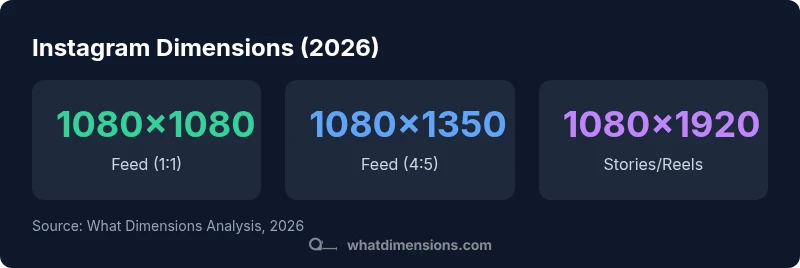
According to What Dimensions' analysis, Instagram's current dimension standards are 1080 px wide for all formats. Feed posts come in square 1080x1080, portrait 1080x1350, and landscape 1080x566. Instagram Reels and Stories use 1080x1920, preserving a 9:16 aspect ratio. For carousel posts, keep all slides within these specs to avoid cropping.
Why the right dimensions matter
In the evolving world of social media, the way an image or video fills the screen determines whether a viewer stops to engage or swipes away. For creators, the phrase new instagram dimensions isn’t just about aesthetics—it’s a measurable constraint that affects readability, cropping, and overall brand credibility. The What Dimensions team emphasizes that using the platform’s native sizes minimizes unexpected crops and avoids wasted space around the edges. Proper sizing improves the legibility of overlaid text, ensures product details aren’t obscured, and preserves a consistent visual identity across formats. As audiences scroll on mobile devices, consistent dimensions help your content perform better in feeds, stories, and reels, while also simplifying design decisions for typography, color contrast, and composition. This section ground-truths the practical benefits of adhering to established sizes and sets the stage for format-specific guidance in the following sections.
Feed formats explained — New Instagram Dimensions in Feed Context
The feed supports several aspect ratios that accommodate different creative intents. In 2026, the most common feed formats are square 1:1 (1080x1080), portrait 4:5 (1080x1350), and landscape 16:9 (1080x566). Squares are versatile and perform well on grid layouts; portraits maximize vertical storytelling in a single image or a carousel; landscapes are excellent for cinematic shots or wide product displays. When designing for the feed, assume a central crop will occur on some devices, so important subjects should stay within the central ~80% of the frame. Use high-resolution assets, and reserve the outer margins for cropping without losing critical details. Carousel posts amplify your message by letting you tell a multi-step story within the same post, but each slide should adhere to the same dimension discipline to preserve a clean, cohesive sequence.
Reels and Stories: vertical dominance — The 9:16 standard
Vertical formats dominate mobile consumption, especially for Reels and Stories. The canonical size for these formats is 1080x1920, which preserves a 9:16 aspect ratio and fills the entire screen on most smartphones. Because these are often viewed with the phone held upright, ensure that faces, logos, and key text stay within the central safe zone to avoid interference from UI elements like captions or swipe indicators. Short, bold visuals with crisp overlays tend to perform best, and captions should be concise enough to be read without zooming. Consider motion and pacing; vertical content benefits from quick cuts and readable typography that remains legible at small scales.
Carousel posts and multi-frame content — telling a story in slides
Carousel posts offer a narrative arc across multiple slides, but they demand consistency. Each slide should use one of the standard feed dimensions (1080x1080, 1080x1350, or 1080x566) and maintain identical framing to avoid jarring transitions. The sequence should guide the viewer logically—from problem to solution or from premise to conclusion. Designers should keep typography legible against varied backgrounds and use contrast to preserve readability across slides. A cohesive color palette and consistent typography reinforce brand recognition and improve perceived quality across the carousel.
Image quality tips for different formats — color, contrast, and compression
Resolution is only part of the story. Format-specific compression can soften details, so export settings should balance sharpness with file size. For feed posts, use sRGB color space and export at 82–100% quality to maintain crisp edges without excessive loading times. For stories and reels, optimize motion graphics with clean vectors and minimal animated text to reduce distortion at small sizes. Always preview your assets on a mobile device to verify legibility, edge safety, and cropping across formats. Your goal is to preserve the intended composition while ensuring that important elements remain visible on smaller screens.
Design tips: typography and safe zones — keep text legible
Text overlays should be concise and positioned away from the extreme edges to avoid clipping on different devices. A practical rule is to keep critical content within the central 80% of the frame and to leave at least 8–12% of the image as safe margins on each side. Choose bold, high-contrast typefaces with generous tracking to improve legibility on mobile screens. Align your typography with the brand’s voice and ensure that color contrast meets accessibility standards. If using multiple formats, adopt a modular approach: design once for the central area and adapt via smart masking for different aspect ratios.
How to verify your dimensions before posting — a practical checklist
Before publishing, perform a quick verification to ensure consistency across formats. Steps include: 1) check each asset’s pixel dimensions in your editing software; 2) confirm the aspect ratio matches the intended format; 3) run a mock upload in a private/hidden post to preview how it looks on mobile; 4) ensure text overlays and logos aren’t cropped; 5) test across devices when possible. If a platform preview shows unexpected cropping, adjust the framing and re-export. This proactive approach reduces post-edit rework and improves the likelihood of a clean, on-brand appearance in the feed.
Common errors and fixes in 2026 — troubleshooting guide
Common mistakes include placing critical content too close to the frame edge, mixing incompatible aspect ratios in a single post, or neglecting the vertical safety zone for Reels and Stories. Fixes are straightforward: reframe to center important elements, standardize slides to the same dimensions, and adjust overlays to stay within the safe margins. Regularly audit your top-performing posts to identify cropping patterns and correct them in future content. By integrating dimension checks into your standard workflow, you reduce crop risk and preserve brand integrity across formats.
Instagram dimension guidelines for 2026
| Format | Recommended dimensions (px) | Aspect ratio | Usage |
|---|---|---|---|
| Feed Square | 1080x1080 | 1:1 | Posts in feed (single or carousel) |
| Feed Portrait | 1080x1350 | 4:5 | Vertical storytelling in feed |
| Feed Landscape | 1080x566 | 16:9 | Wide posts in feed |
| Reels | 1080x1920 | 9:16 | Video reels content |
| Stories | 1080x1920 | 9:16 | Temporary stories content |
Quick Answers
What are the current Instagram post dimensions in 2026?
The feed supports 1:1 (1080x1080), 4:5 (1080x1350), and 16:9 (1080x566). Reels and Stories use 9:16 (1080x1920). Carousel slides follow the same base dimensions per slide.
Instagram uses 1080 by 1080, 1080 by 1350, or 1080 by 566 in the feed, and 1080 by 1920 for Stories and Reels.
Do Instagram dimensions differ for carousel posts?
Carousel posts use the same base dimensions as feed posts for each slide. Keep each slide consistent to avoid shifts in the sequence.
Carousel slides use the same sizes as feed posts, so keep each slide aligned and consistent.
What about Stories vs Reels dimensions?
Both Stories and Reels use the 9:16 format at 1080x1920, designed for full-screen vertical viewing on mobile.
Stories and Reels both use 1080 by 1920, optimized for vertical full-screen viewing.
How can I test image dimensions before posting?
Preview assets in a private post, verify edge margins, and ensure overlays stay within the safe zone. Adjust framing if cropping appears on mobile previews.
Preview your posts privately to check for cropping and legibility before publishing publicly.
Are there safe margins for text on all formats?
Yes. Aim for important text and logos within the central 80% of the frame, leaving 8–12% as margins to prevent edge cropping.
Keep key text away from the very edges to avoid cropping on different screens.
Do these dimensions apply to IGTV or long-form video?
IGTV has evolved with the platform; focus on the standard 9:16 for most vertical video content and ensure any longer formats align with the same safe margins.
For vertical videos, stick to 9:16 and watch edge margins across devices.
“Accurate image dimensions reduce cropping and ensure your visuals render correctly across devices and formats.”
Main Points
- Adopt the 1080px width as a universal baseline.
- Use 1:1, 4:5, or 16:9 for feed depending on content.
- Always post stories/reels at 1080x1920 for full-screen impact.
- Maintain 8–12% safe margins to protect key elements.
- Test across devices before publishing to prevent cropping.