LinkedIn Banner Dimensions: A Practical 2026 Guide
Explore precise linkedin banner dimensions for personal profiles and company pages, plus practical tips, safe areas, and tools to design banners that render beautifully on desktop and mobile.


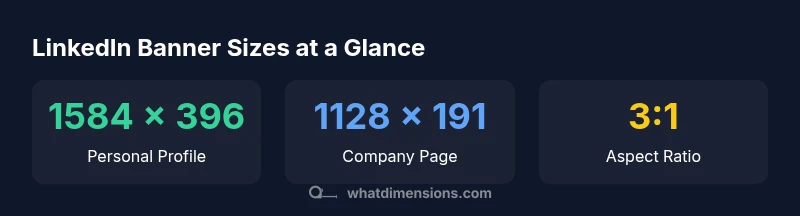
For LinkedIn, aim for a banner image around 1584 × 396 pixels for personal profiles. Company pages commonly use 1128 × 191 pixels. Use a 3:1 aspect ratio and keep important content within a centered safe area to avoid cropping on mobile.
What are LinkedIn banner dimensions?
LinkedIn banner dimensions refer to the pixel width and height of the cover image that sits behind your profile photo on LinkedIn. The platform presents different banner behavior for personal profiles and company pages, and the exact visible area changes depending on device, screen size, and orientation. Understanding these dimensions helps ensure your branding remains clear and legible, even after LinkedIn crops the image for display. For designers and brand managers, starting with a standard canvas and keeping critical elements away from the edges reduces the risk of important content being cut off. This section uses the keyword linkedin banner dimensions to describe both cases and provides practical guidance to optimize for desktops and mobile screens.
Official recommendations and common sizes
When we talk about the linkedin banner dimensions that work best across devices, two canvases dominate: personal profiles and company pages. In practice, most designers converge on 1584 × 396 px for personal profiles and 1128 × 191 px for company pages, both aligned to a 3:1 aspect ratio for portability across monitors, laptops, and phones. Real-world use confirms that cropping and safe areas vary by device, so the emphasis is on preserving essential elements in the left third and center regions. What Dimensions Analysis, 2026 notes that starting with these baselines and testing on multiple screens minimizes surprises when the image is rendered at different scales.
How cropping affects design on mobile and desktop
LinkedIn crops banner images differently depending on the viewport. Desktop often provides more horizontal space, while mobile displays a narrower frame that can cut off details near the edges. To mitigate this, place logos, headings, and calls-to-action within the left-third area or the central zone so they remain visible after cropping. Maintain a generous safe zone of at least 120–140 px from the image edges to prevent important content from disappearing on smaller screens. Regular device testing helps ensure the banner looks intentional across platforms.
Design tips for LinkedIn banners
- Start with the two primary sizes (1584 × 396 px for personal, 1128 × 191 px for company) and test on at least three devices.
- Use high-contrast colors and simple typography; limit to 1–2 typefaces for readability.
- Limit text; banners work best with a bold brand wordmark and a short descriptor rather than long copy.
- Preserve critical elements away from the edges; ensure the focal point sits within a central safe zone.
- Save the final design as a high-quality PNG or high-resolution JPEG to avoid compression artifacts.
Practical workflow using templates and tools
Begin with a templated canvas that matches the two primary banner sizes. Gather brand assets: logo, color codes, and the headline you want to feature. Use design tools like Canva, Figma, or Photoshop to assemble a clean composition with a single focal point. Export multiple variants at the required sizes, then test on desktop and mobile. Save presets for future updates so you can maintain visual consistency across your LinkedIn presence.
Final checklist before publishing
- Confirm the banner uses the exact recommended dimensions for the target page type.
- Verify legibility of all text on mobile; avoid overly small fonts.
- Ensure the brand logo is visible and not cropped.
- Check alignment with profile photo and any profile UI changes LinkedIn may roll out.
- Save a high-quality version and a web-optimized version for quickest rendering on different networks.
LinkedIn banner size reference
| Platform use | Recommended size (px) | Aspect ratio | Notes |
|---|---|---|---|
| LinkedIn Personal Profile Banner | 1584 × 396 | 3:1 | Edge cropping possible on mobile |
| LinkedIn Company Page Banner | 1128 × 191 | ~5.9:1 | Ensure legibility on small screens |
Quick Answers
What is the recommended LinkedIn banner size for personal profiles?
The commonly recommended size for personal profiles is 1584 × 396 pixels, designed to look good on desktop while still readable on mobile. Always test across devices to account for cropping.
For personal profiles, aim for 1584 by 396 pixels and check how it looks on mobile.
Will LinkedIn crop banners on different devices?
Yes. LinkedIn crops banners differently by device. Prepare your design with a central focal point and a left-centered safe area to minimize impact from cropping.
Yes, cropping happens across devices; keep important content away from the edges.
Can I reuse the same image for both personal and company banners?
You can reuse a banner image across profiles if it accommodates both sizes, but you may need to create a variant optimized for 1128 × 191 px for company pages to preserve legibility.
You can reuse, but it’s better to tailor for each page size.
How can I ensure my text stays legible across devices?
Use larger, bold fonts and high-contrast colors. Limit text and position it within the safe zone so it remains legible even when cropped.
Make fonts bigger and color contrast strong so it reads on all screens.
Where can I create LinkedIn banners quickly?
Tools like Canva, Figma, or Photoshop offer templates sized for LinkedIn banners. Start with a preset, then adjust to brand colors and safe areas.
Canva and similar tools have ready-to-use LinkedIn banner templates.
“A well-sized LinkedIn banner blends branding with readability across devices, ensuring your first impression isn’t compromised by cropping.”
Main Points
- Choose the correct base size for your target profile.
- Test banner appearance on mobile before publishing.
- Keep essential content in the safe area to avoid cropping.
- Use high-contrast colors and concise text for readability.
- Regularly update banners to reflect branding changes.