Facebook Banner Dimensions: Safe, Effective Sizes for Social
Learn the ideal Facebook banner dimensions across profiles, pages, ads, and stories. This guide covers safe areas, recommended image sizes, and practical tips to maximize visibility on desktop and mobile.


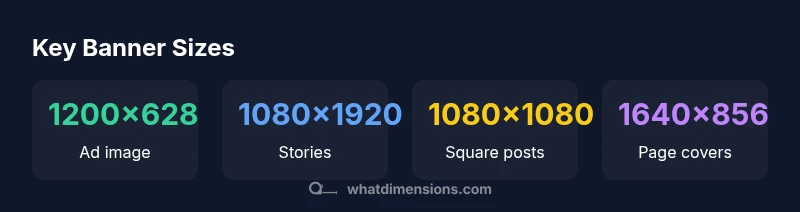
Facebook banner dimensions vary by usage, but a practical rule of thumb is to design around standard ad sizes (1200×628 px), story sizes (1080×1920 px), and page-cover dimensions (roughly 1640×856 px) with the most important content centered and safe from cropping. Use high-resolution JPEG or PNG to preserve clarity on all devices.
Why banner dimensions matter on Facebook
When you design banners for Facebook, you’re balancing multiple surfaces, audiences, and devices. The same banner can be cropped differently on a desktop feed, mobile feed, and in ads. According to What Dimensions, sizing decisions should consider how the image will be cropped, scaled, and displayed across contexts. A well-planned banner maintains visual integrity, brand color, and legibility even after cropping. In practice, a banner that accounts for safe zones and device variance reduces misalignment and preserves critical elements such as logos and call-to-action text. Designers should test banners across popular placements (feed, stories, and ads) to verify legibility and composition after cropping.
- Plan around core placements
- Preserve essential content within the center area
- Save a high-resolution master for later edits
Tip: Build your banner as a vector-friendly master and export raster derivatives at multiple sizes to keep quality intact across placements.
Core aspect ratios and recommended sizes
Aspect ratio governs how an image scales across different surfaces. Facebook’s most common uses demand distinct sizes:
- Ad images: 1200 x 628 px (1.91:1) provides a balanced landscape that performs reliably in feeds across devices.
- Stories: 1080 x 1920 px (9:16) fills vertical screens and creates immersive experiences.
- Square posts: 1080 x 1080 px (1:1) maximize versatility in grid layouts.
- Page cover/banner: design around 1640 x 856 px to accommodate high-res displays and cropping differences between desktop and mobile. The central content should stay within a safe area to avoid edge clipping.
When choosing sizes, prioritize the most common placements for your audience and keep file sizes reasonable for quick loading.
Typography, safe zones, and image quality
Typography and logo details must survive cropping. Use bold, legible fonts and ensure high contrast against backgrounds. Place key text and logos within a central safe zone that’s clear on both desktop and mobile. Save assets in PNG for transparency needs or high-quality JPEG for photographic imagery. If your banner includes text, test readability at smaller scales and on dark/light background variations to ensure accessibility.
- Build with a single, clear focal point
- Avoid placing critical text near the edges
- Use alt text for accessibility in all image assets
Desktop vs mobile cropping: practical tips
Mobile displays crop banners differently than desktops, often revealing more of the side edges. To mitigate unintended cropping:
- Center critical elements and call-to-action buttons.
- Use generous margins around logos and text.
- Export multiple variants tailored to placements you rely on (feed, stories, ads) and compare in-device previews.
A structured checklist helps: verify logo visibility, confirm CTA legibility, and ensure no important details sit within the cropped margins.
Checklist: center content, test on at least two devices, save export presets for quick updates.
Common mistakes and how to fix them
Common mistakes include relying on a single fixed size for all placements, failing to account for safe areas, and using overly compressed images that reduce clarity. To fix:
- Create a master banner at a high resolution and generate placement-specific derivatives.
- Keep important content away from the edges and consider safe-zone guidelines.
- Use compression settings that balance quality and file size; for photographic imagery, aim for a balance of detail and load speed.
By proactively designing with placement differences in mind, you’ll reduce the need for last-minute edits and cropping surprises.
Setting up in practice: file formats, tests, and accessibility
As you finalize banners, align on file formats (PNG for graphics with sharp boundaries, JPEG for photos) and color space (sRGB is standard for web). Run small A/B tests across placements to gauge engagement and readability. Ensure accessibility by including high-contrast text, descriptive alt text, and avoiding text-only images that can be hard to read for screen readers. Maintain a version control system for banner assets to streamline future updates.Brand consistency across all banner variants reinforces recognition.
Page cover vs ad vs story: size differences and safety margins
Page covers, ads, and stories each impose different visual constraints. Covers must align with a wide aspect ratio and cropping behavior, ads require strong focal points within 1.91:1 and 9:16 placements, and stories demand full-bleed verticals with space around edges for safe cropping. Maintain a centralized composition and create device-agnostic assets by testing across common placements and screen sizes.
Typical Facebook banner sizes by use case
| Use Case | Recommended Size (px) | Aspect Ratio | Notes |
|---|---|---|---|
| Ad image (feed) | 1200 x 628 | 1.91:1 | Classic FB feed ad; optimize for readability |
| Story image | 1080 x 1920 | 9:16 | Full-screen vertical; ensure safe zone |
| Square post | 1080 x 1080 | 1:1 | Flexible across grid layouts |
| Page cover photo | 1640 x 856 | ≈1.92:1 | High-res; centralize important content |
Quick Answers
What is the recommended banner size for Facebook ads?
For Facebook feed ads, a common and reliable size is 1200 x 628 px with an aspect ratio of 1.91:1. This supports good balance across desktop and mobile. Always test variants to confirm legibility and engagement.
For ads, use 1200 by 628 pixels to keep your image sharp across devices.
Do Facebook banners crop differently on mobile?
Yes. Mobile devices crop banners differently, often emphasizing the center region. Design with a central focal point and safe zone so important elements stay visible.
Yes, mobile cropping can change how banners look, so place key content in the center.
Can I reuse the same image for ads, covers, and stories?
You can reuse assets, but it’s best to export placement-specific variants (1200x628 for ads, 1080x1920 for stories). This ensures optimal clarity and avoids cropping issues.
You can reuse assets, but tailor sizes for ads and stories.
What file formats work best?
PNG is preferred for graphics with sharp edges, while JPEG works well for photographs. Use sRGB color space and keep file sizes reasonable for fast loading.
PNG for logos and text, JPEG for photos, and upload in sRGB.
Is there a safe area to keep text away from edges?
Yes. Keep critical text and logos away from the outer edges by placing them within a central safe zone to prevent cropping.
Keep text in a centered safe area so it won’t get cropped.
Where can I find official size specs from Facebook?
Visit Facebook’s official Business Help Center for placement-specific guidelines and recommended sizes, which are updated to reflect platform changes.
Check Facebook’s official help center for the latest specs.
“Consistent banner sizing across Facebook surfaces reduces cropping surprises and preserves brand clarity when viewed on different devices.”
Main Points
- Design for placements
- Center important content
- Use high-res masters and export variants
- Test across devices and placements
- Maintain brand consistency across sizes