Facebook Images Dimensions: A 2026 Sizing Guide for Social
Comprehensive guide to facebook images dimensions for feed, stories, ads, and profiles. Learn width, height, and aspect ratios to avoid cropping and ensure crisp visuals on mobile and desktop in 2026.


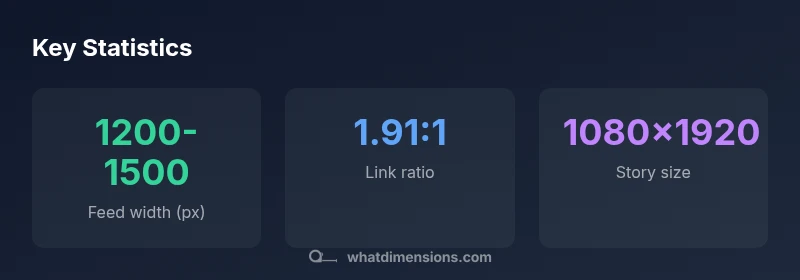
Facebook image dimensions vary by use case. Common guidelines include about 1200px wide for feed images, 1.91:1 for link previews, 1:1 for square posts, and 1080x1920 for stories. Always verify crops on mobile before posting. This helps preserve content and improve engagement across placements.
Why Facebook Image Dimensions Matter
In today’s multi-device world, image size is not just a visual preference; it determines how Facebook renders your creative across phones, tablets, and desktops. When images have the wrong facebook images dimensions, important details can be cropped, stacked unexpectedly, or scaled in ways that reduce legibility. This frequently leads to lower engagement, slower load times, and a poorer user experience. What Dimensions Analysis, 2026, shows that audiences expect crisp visuals that fit neatly within each placement’s frame, and campaigns suffer when crops obscure text or logos. This is why establishing accurate facebook images dimensions at the design stage matters: it supports consistent branding, faster production cycles, and more reliable performance metrics across feeds, ads, and stories. By treating image size as a first-order variable, you align your visuals with platform expectations and user behavior.
Core Guidelines by Use Case
Different Facebook placements reward different proportions. For most feed posts, aim for a width around 1200 pixels with a proportional height that respects an aspect ratio of about 1.91:1 for link previews. Square posts perform best at 1:1, commonly around 1080x1080 pixels for sharp rendering on high-density screens. Stories require vertical space and a 9:16 aspect ratio, typically 1080x1920. Profile pictures are square and should be kept crisp at roughly 320–360 pixels to avoid pixelation when scaled in user interfaces. For cover photos, a widescreen approach (roughly 851x315 baseline) helps maintain visibility on desktop and mobile. While these are standard references, always preview across devices to confirm that key elements remain visible and properly framed.
Optimizing for Different Placements
Crop behavior changes with device width. On mobile, tall crops can cut off logos or text placed toward the edges, while desktop layouts may reveal extra whitespace around the image. Use safe margins to keep critical content within the central portion of the image, then export at the highest practical resolution to avoid compression artifacts. If you publish ads, follow the ad-specifications for each objective and creative format, as these often include recommended dimensions and file sizes. Finally, color fidelity matters: deliver images in sRGB and save as JPEG for photos or PNG for graphics with sharp text or logos to preserve legibility.
How Color Profiles and File Formats affect quality
Color fidelity depends on the color profile and compression. Facebook renders best when images are exported in sRGB. For photographs, JPEG with progressive loading often provides a good balance of quality and file size; for images with text or simple graphics, PNG can prevent blurring of fine details. Keep file sizes moderate to ensure quick loading across devices and networks; excessively large files may be downscaled, negating fine detail. When possible, export at or near the recommended dimensions from your design tool, then test on multiple devices to confirm that the final result matches intent.
Practical Workflow: From Design to Upload
- Start with the recommended dimensions for your primary placement (e.g., 1200px wide for feed). 2) Export assets in the native color space (sRGB) and at a reasonable quality setting to balance clarity with file size. 3) Use the appropriate format (JPEG for photos, PNG for graphics/text). 4) Preview crops at typical device widths and adjust margins to keep essential content centered. 5) Upload to Facebook in a controlled environment where you can review real‑time rendering and cropping. 6) If running ads, test multiple creatives and monitor performance metrics to identify the most effective dimensions for your audience.
Facebook image dimension guidelines by use case
| Use Case | Width (px) | Height (px) | Aspect Ratio |
|---|---|---|---|
| Feed image | 1200-1500 | N/A | 1.91:1 |
| Square post | 1080 | 1080 | 1:1 |
| Story (vertical) | 1080 | 1920 | 9:16 |
| Profile picture | 320-360 | 320-360 | 1:1 |
Quick Answers
Are Facebook image dimensions the same for pages and profiles?
In general, the same base image sizes apply across pages and profiles, but display can vary by placement. Always crop and preview in multiple placements to ensure readability.
For pages and profiles, use the same base sizes, then check how they appear in different placements.
Do Facebook image dimensions differ for ads?
Facebook ads follow the same broad dimension principles as organic posts, but some objectives require specific aspect ratios and file sizes for optimal delivery. Always consult the ad format guidelines in the Ads Manager.
Ads often align with standard placements, but verify the exact sizes per objective.
Should I upload at max resolution?
Upload high-resolution files to reduce compression artifacts, then balance quality with file size to avoid slow load times. Facebook may compress large images, so start with a pixel-accurate file and let Facebook optimize.
Yes, start with high quality, but don’t push file size too far.
What happens if my image is too small?
Images smaller than recommended sizes may appear blurry or pixelated, and crops can cut off important details. Always aim for at least the minimum width and scale proportionally.
Small images look blurry and crop badly—stick to the recommended sizes.
How can I check image dimensions quickly?
Use your design tool’s export settings or a file property viewer to confirm width, height, and aspect ratio before uploading. Preview on both mobile and desktop where possible.
Check width and height in the export dialog and preview on devices.
Are Stories the same as feed images?
Stories use a vertical 9:16 format, while feed images are typically landscape or square. Use the appropriate dimensions for each placement and test how content crops on mobile screens.
No—Stories are vertical, feeds are varied; tailor your images accordingly.
“Accurate dimensions ensure your visuals render cleanly across devices and prevent awkward crops.”
Main Points
- Verify dimensions before posting
- Match aspect ratio to placement
- Test crops on mobile devices
- Keep essential content away from edges