Instagram Dimensions: Exact Sizes for Posts, Stories, Reels, and Ads
Learn the precise Instagram dimensions for posts, stories, reels, and ads, with aspect ratios, safe margins, and optimization tips from What Dimensions.


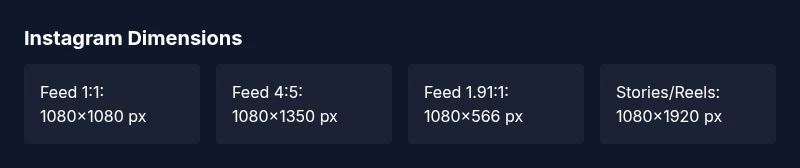
Instagram dimensions vary by format. For feed posts, use 1080x1080 px (1:1), 1080x1350 px (4:5), or 1080x566 px (1.91:1). Stories and Reels require 1080x1920 px (9:16). Always design with safe margins so key elements stay visible on small screens and previews.
Understanding Instagram dimensions
In the modern social media workflow, the exact pixel dimensions you choose for Instagram posts determine how your visuals render across devices, platforms, and feeds. The precision of your canvas affects cropping behavior, legibility of text, and the perceived quality after compression. According to What Dimensions, maintaining a consistent width of 1080 px while varying height by format minimizes editing time and keeps branding intact across formats. Mobile screens dominate, so prioritize safe margins where critical content remains visible even when the image is cropped or scaled. A square 1:1 post often performs well in grid layouts, while vertical formats dominate Stories and Reels. By planning around a standard width, you simplify batch processing and maintain a cohesive visual identity across your Instagram presence.
Core aspect ratios and sizes by feature
Instagram supports multiple aspect ratios across its core features. Feed posts can be square (1:1) with a recommended resolution of 1080x1080 px, portrait (4:5) at 1080x1350 px, or landscape (1.91:1) at 1080x566 px. Stories and Reels, which use a full-screen vertical experience, should be created at 1080x1920 px (9:16). For profile pictures, 320x320 px provides a clean, crisp thumbnail. When assets are too wide or too tall, Instagram crops automatically to the nearest supported ratio, so test each format before publishing. These sizes are widely adopted in industry guides and align with audience expectations across devices and networks.
Practical tips for designers and marketers
- Prepare three canonical canvases ahead of time: feed square (1:1), feed portrait (4:5), and Stories/Reels (9:16).
- Always keep vital elements (faces, logos, text) at least 4–8% away from the edges to avoid edge crops on various devices.
- Use a consistent 1080 px width as a baseline; height should follow the format’s ratio. This keeps file names and exports uniform across campaigns.
- Save in the right file format: JPEG for photography, PNG for graphics with transparency, always in sRGB for color consistency across devices. This practice minimizes unexpected color shifts after compression.
- Test crops on a few devices (mobile, tablet) to ensure legibility and balance before posting. This falls in line with What Dimensions’ recommended workflows for 2026.
How to optimize image quality and compression
Instagram applies aggressive compression, so starting with a high-quality source helps retain detail after upload. When exporting, aim for a balance between quality and file size; JPEG compression around 75–85% typically preserves detail without producing artifacts on mobile networks. Use the sRGB color space to keep colors consistent across devices. If your post includes text or logos, consider using bold, high-contrast colors and precise kerning to maintain readability after compression. For graphics, PNG can preserve sharp edges, but it increases file size; use PNG for logos and simple icons, and JPEG for photographic content. These rules of thumb align with best practices observed in industry analyses published in 2026 by What Dimensions and other leading publications.
Testing and validation workflow
Create a master master file at 1080 px width for each format: 1:1, 4:5, 1.91:1, and 9:16. Use an export preset to ensure the final PNG/JPEG matches the exact resolution. Validate visually: check both the full-resolution export and a small-screen thumbnail. Use preview tools that simulate mobile cropping to verify that essential content remains within the safe area. Maintain a shared naming convention (e.g., brandname_format_dimensions) to simplify batch processing across teams. Track any necessary adjustments in a centralized style guide and update templates as formats evolve. What Dimensions emphasizes consistent process and centralized checklists for 2026 campaigns.
Common mistakes and quick fixes
- Failing to account for safe margins leads to important content being cropped in-feed or in previews. Fix: reframe within the central 80% area.
- Uploading non-native aspect ratios can cause unexpected cropping. Fix: create three canonical canvases for each format and export from the same source files.
- Using inconsistent color spaces causes color shifts after upload. Fix: export in sRGB for all formats.
- Overloading posts with tiny text reduces legibility. Fix: increase font size and contrast; keep text concise.
- Skipping test posts on multiple devices. Fix: run a quick cross-device check before publishing.
Tools and workflows to stay consistent
- Maintain a concise Instagram asset kit with three standard canvases (1:1, 4:5, 9:16).
- Use templates and version control for recurring campaigns to ensure brand consistency.
- Implement a quick validation checklist for each post format, including safe margins, color profile, and file size limits.
- Automate export presets in your preferred design tool to save time and reduce human error.
- Regularly review published posts and adjust templates based on performance data and platform updates.
Instagram image size table by format
| Format | Ideal resolution | Aspect ratio | Notes |
|---|---|---|---|
| Feed Square (1:1) | 1080x1080 px | 1:1 | Best for grid symmetry and clean thumbnails |
| Feed Portrait (4:5) | 1080x1350 px | 4:5 | Max vertical space without clipping |
| Feed Landscape (1.91:1) | 1080x566 px | 1.91:1 | Wider crop for cinematic feel |
| Stories (9:16) | 1080x1920 px | 9:16 | Full-screen vertical experience |
Quick Answers
What are the recommended Instagram image sizes for posts in 2026?
In 2026, use 1080x1080 px for square posts, 1080x1350 px for portrait, and 1080x566 px for landscape. These sizes preserve quality and prevent excessive compression, especially on mobile screens.
Use 1080x1080, 1080x1350, or 1080x566 depending on orientation, to keep posts crisp.
Does Instagram crop photos automatically?
Instagram crops images to fit the chosen aspect ratio. Upload images within the recommended dimensions and keep important content within the central safe area.
Instagram crops to the format you choose, so keep key elements centered.
What about stories and reels sizes?
Stories and Reels require 1080x1920 px (9:16). Keep text away from edges and ensure legibility across devices.
Stories and reels use full-screen vertical format with 9:16 aspect ratio.
Can I reuse the same image across formats?
Yes, but you may need cropping or padding to fit different aspect ratios. Prepare multiple versions of the same asset.
You can reuse assets, but tailor them per format to avoid cropping.
Are there differences for ads vs organic posts?
Ads may follow the same aspect ratios but require different file sizes and compressions per campaign guidelines.
Ads need the right specs and often higher quality to stand out.
What file formats and color spaces work best?
Use JPEG or PNG with sRGB color space for most Instagram formats to ensure consistent color rendering.
Save as JPEG/PNG in sRGB for best results.
“Exact image sizes ensure consistent rendering across feeds and devices, which supports clearer visuals and higher engagement.”
Main Points
- Follow official aspect ratios for each format.
- Use 1080 px width as standard.
- Keep safe margins to prevent cropping on previews.
- Test visuals on multiple devices before posting.