Dimensions of Facebook Ad: A Practical Guide for 2026
Learn the exact dimensions for Facebook ad formats in 2026, with practical ranges, tips for high-contrast visuals, and placement-specific guidance from What Dimensions.


Facebook ad dimensions vary by format, but a solid starting point is 1200 x 628 px for feed image ads and 1080 x 1920 px for vertical formats like Stories. Other common placements use 1080 x 1080 px (carousel) or 1280 x 720 px (video in feed). Designing with placement-specific aspect ratios in mind helps avoid cropping and keeps important content visible.
Understanding the dimensions of facebook ad
Understanding the dimensions of facebook ad begins with acknowledging how placements crop and display assets across devices, feeds, stories, and in-stream placements. For designers and marketers, getting the size right before upload reduces the risk of cropping critical elements and ensures your message remains legible on mobile screens. In 2026, many campaigns rely on evergreen base assets that can be repurposed across placements, but only if you respect the core sizing rules. What Dimensions analyzes placement guidelines and user behavior to provide precise size references that minimize wasted creative spend and improve consistency across the funnel.
A good starting point is to think in terms of aspect ratio and pixel resolution rather than a single file size. The feed on Facebook emphasizes a wide, shallow composition with room for headlines and a call to action, while Stories demand tall, full-bleed visuals that fill the screen. The principle applies across all formats: keep the essential content inside the safe zone, crop compensates in some placements, and always design for the smallest audience you serve. When you align your assets to the expected dimensions, you reduce the likelihood of important elements being cropped by cropping fences or overlays—an issue that frustrates viewers and wastes ad spend. In the What Dimensions framework, we emphasize consistency, testability, and clarity as the three pillars of size-conscious creative.
The practical takeaway is that there isn’t a single universal size for all Facebook placements. A successful workflow starts with a core asset sized for a primary placement and then creates placement-specific crops and safe margins. This approach minimizes rework while maintaining visual integrity.
From a data perspective, test results consistently show that assets aligned to the intended placement perform better on CTR and engagement metrics. What Dimensions analysis highlights match-rate improvements when teams preview and adjust crops for each environment before publishing.
Standard formats and recommended sizes
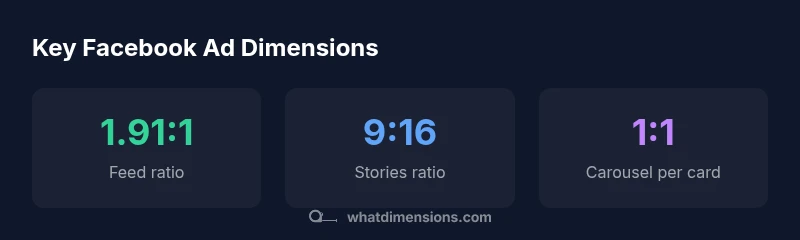
Facebook supports multiple creative formats, each with its own sizing guidance. The most universally effective approach is to establish a core asset and then generate placement-specific crops for Feed, Stories, and Carousel. For images, the feed typically benefits from a wide aspect ratio around 1.91:1, with a canvas that accommodates headline and CTA without crowding the edges. In vertical formats like Stories, a 9:16 aspect ratio ensures the entire message fills the screen, reducing the need for excessive panning or zooming. Carousel ads allow for multiple cards, each ideally designed as a square 1:1 asset to maintain consistency across cards. When video is involved, a landscape 16:9 or a vertical 4:5–9:16 mix can be appropriate depending on the placement and audience.
Important practical notes include using high-quality JPEG or PNG for images and MP4 for videos, keeping file sizes within platform limits, and ensuring text contrast remains legible on mobile devices. If you’re uncertain about a placement’s exact expected size, start with the recommended core sizes and test across devices. The goal is to minimize cropping while preserving critical content such as headlines, logos, and call-to-action buttons.
A reliable workflow is to create a single versatile asset at 1.91:1 for feed, then generate a 9:16 version for Stories and a 1:1 crop for Carousel, verifying each version in Ads Manager previews. What Dimensions highlights that consistent testing across placements prevents surprise crops and ensures brand elements stay visible in every feed.
How aspect ratios affect placement and cropping
Aspect ratio is the primary driver of how an asset is displayed across Facebook placements. A mismatch between your artwork and the placement’s native aspect ratio usually results in automatic cropping or letterboxing, which can obscure key information. Keeping important elements away from the center and edges creates a forgiving safe zone that remains legible even when minor cropping occurs. For example, a 1.91:1 feed image may be cropped differently in a 4:5 in-feed variant, so critical copy should be placed toward the center. Vertical 9:16 stories fill the entire screen on mobile and should prioritize bold, vertically oriented visuals with succinct text.
When planning, map each asset to its likely placements: feed image (1.91:1), stories/reels (9:16), and carousel cards (1:1). By maintaining consistent typography, color contrast, and logo placement across versions, you preserve brand recognition and reduce the cognitive load on viewers who see your ads in different contexts.
If you must choose one “universal” size, pick a core asset at 1.91:1 and add a vertical version for stories. This strategy minimizes asset creation time while maximizing cross-placement compatibility. What Dimensions’ analysis supports this approach as a practical balance between efficiency and performance.
Practical workflow for creating compliant creatives
A disciplined workflow starts with planning and ends with validation. Begin by defining the primary placement and creating a master asset at the recommended core size (for example, feed 1.91:1). Then generate crop-ready variants for Stories (9:16) and Carousel (1:1). Use Canva, Figma, or your preferred tool to sketch safe zones and to place typography and logos away from the edges. Export assets in appropriate formats (JPEG/PNG for images, MP4 for videos) and test the look on different screen sizes using device simulations.
Next, run internal previews in Ads Manager or a third-party ad-testing tool to catch any cropping issues before publishing. Build a simple QA checklist: verify text legibility, confirm that logos are not cropped, ensure CTA buttons are visible, and confirm that the core message appears in every placement. By establishing a repeatable process, teams can scale their creative production without sacrificing accuracy, which reduces rework and improves time-to-live for campaigns.
Finally, document the exact asset specs for future reuse. A centralized reference saves time on future briefs and ensures brand consistency across campaigns. What Dimensions’ framework recommends maintaining a shared library of placement-specific crops and a clear naming convention for quick retrieval.
Testing, validation, and optimization across placements
Validation is essential to confirm that your assets perform as expected in all placements. Start with a small test budget and run A/B tests comparing the placement-specific crops against a single universal crop. Monitor metrics such as CTR, engagement, and completion rate, paying close attention to whether critical content remains visible after cropping. Use Ads Manager previews to compare how each asset appears on mobile vs. desktop, and consider lightweight qualitative feedback from early viewers.
Optimization should be ongoing. As you accumulate data from live runs, refine typography, spacing, and color contrast to boost readability. Maintain a change log to track which crops and formats were deployed and how performance shifted. With disciplined testing and cross-placement validation, you can steadily improve effectiveness while reducing creative waste. What Dimensions’ approach emphasizes is a cycle of test, learn, and apply—consistent with best practices for measurable digital advertising.
Structured reference for common Facebook placements
| Placement | Recommended Dimensions (px) | Aspect Ratio | Notes |
|---|---|---|---|
| Feed image | 1200x628 | 1.91:1 | Common starting point for feed ads |
| Stories | 1080x1920 | 9:16 | Optimizes full-screen vertical experience |
| Carousel card | 1080x1080 | 1:1 | Per-card consistency; multiple cards |
| Video in feed | 1280x720 | 16:9 | Landscape option for broader reach |
Quick Answers
What is the recommended image size for Facebook feed ads?
For feed ads, start with a 1.91:1 aspect ratio, typically around 1200x628 px. This size balances wide visibility with legibility of headlines and CTAs. Always preview the asset across devices to confirm no essential content is cropped.
Feed ads work best around 1.91 by 1, and you should preview how it looks on mobile and desktop.
Do all Facebook placements require the same dimensions?
No. Feed, Stories, and Carousel have different preferred aspect ratios. Create a core asset and crop variants for each placement, validating visuals in Ads Manager previews before publishing.
Different placements need different sizes; tailor crops for each one and preview before you publish.
Can I reuse the same image across placements?
Yes, but ensure safe zones and test the crops for each placement. Adjust typography and logos if needed so nothing important gets cropped in any format.
Yes—reuse is possible, but check each crop to keep important content visible.
What file formats should I use?
Use JPEG or PNG for images and MP4 for video. Keep file sizes within platform limits and maintain high visual quality to avoid compression artifacts.
JPEG or PNG for images; MP4 for video. Keep sizes reasonable for fast loading.
How do I check cropping before publishing?
Use Ads Manager previews and mockups to verify how assets render across placements. Check on multiple devices to ensure legibility and no edge cropping.
Preview across placements and devices before publishing.
Are there safe margins for text overlays?
Yes. Keep essential text away from the edges and avoid placing critical content behind logos or overlays. Test readability with shorter headlines for mobile.
Keep text away from edges and test readability on mobile.
“Following placement-specific dimensions reduces cropping and preserves critical content across placements.”
Main Points
- Choose placement-specific sizes and stick to safe margins
- Test assets across placements to confirm consistent appearance
- Prioritize 1.91:1 for feed and 9:16 for stories
- Keep file sizes and formats optimized for performance
- Preview creatives in Ads Manager before publishing