What size to post on Facebook: sizing guide for 2026
A comprehensive guide to Facebook post dimensions for feed, stories, carousels, and videos in 2026, with practical templates and workflows to keep visuals sharp across devices.


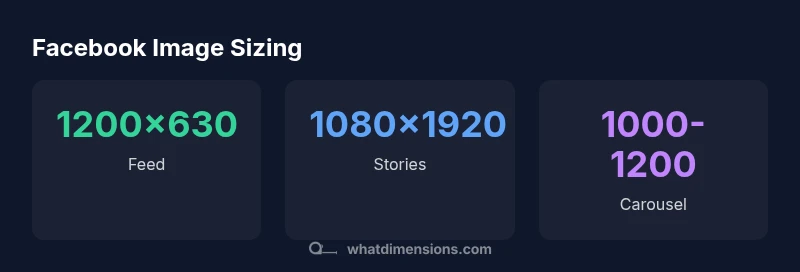
Key sizing for Facebook posts: Use 1200 x 630 pixels for standard feed images (aspect ratio 1.91:1). For Stories, publish at 1080 x 1920 pixels (9:16). Carousel images should maintain 1,000–1,200 px width with consistent aspect ratios; save as JPEG or PNG under 2 MB. These sizes balance clarity, load speed, and platform compression.
Understanding why image size matters on Facebook
Choosing the right image size for Facebook posts is about more than aesthetics. The platform’s feed is a fast-scrolling environment, where first impressions are formed in a fraction of a second. When you align your visuals with Facebook’s recommended dimensions, you minimize cropping, reduce compression artifacts, and improve perceived sharpness on both mobile and desktop. This is especially important when you’re trying to convey a message quickly — you want text, faces, and brand cues to stay visible even at thumbnail scales. The reader should come away with a clear sense of how to determine the best size for different post types without guessing, ensuring that the content remains legible and impactful across devices. If you’re asking: what size to post on Facebook for maximum engagement, the answer starts with the right dimensions and ends with consistent execution across posts.
Recommended sizes for different post types
Facebook supports several post formats, each with its own best-practice dimensions. For standard feed images, aim for 1200 x 630 pixels (1.91:1) to achieve a balanced display on most screens. Stories require full-screen visuals at 1080 x 1920 pixels (9:16) to fill the vertical canvas, while the carousel format benefits from near-square consistency, typically 1000–1200 px width per slide. Video thumbnails also follow a wide 16:9 aspect, commonly 1280 x 720. For link shares that pull in a preview, using 1200 x 628 helps ensure the image remains crisp in the link card. In addition to size, always keep important content away from the edges to avoid cropping when Facebook crops images in various contexts.
Aspect ratios, resolution, and compression explained
Aspect ratio governs how a photo looks when Facebook crops or centers it in the feed. The recommended feed ratio of 1.91:1 maps well to the 1200 x 630 dimension, while Stories use a tall 9:16 canvas. When you upload, Facebook applies compression that can soften textures and blur small text, so starting with a higher resolution closer to the target size helps preserve detail. If your asset is larger than recommended, the platform still compresses; this is why preserving sharp edges, legible typography, and minimal fine detail at the start pays off. Prepare assets in an editing workflow that prioritizes the exact target dimensions and then normalize formats before upload.
File formats, quality, and accessibility considerations
JPEG remains the default for photography due to strong compression efficiency, while PNG is better for graphics with sharp lines or text. Avoid heavy file types like BMP or TIFF for speed and compatibility. Always optimize file size to stay under platform thresholds (commonly 2 MB per image for feed items). Adding descriptive alt text improves accessibility for screen readers and can help with indexing in search. If you work with overlaid text, ensure font size is legible at thumbnail scale and confirm color contrast against various backgrounds.
A practical workflow: from asset to post
Begin with a master asset that fits the largest required canvas (e.g., 1200 x 630 for feed and 1080 x 1920 for stories). Create variations that preserve the key content in the safe zone. Use batch templates for consistent margins, type scales, and brand colors. Save once in the appropriate formats (JPEG for photographs, PNG for graphics) and recheck the file size. Before posting, preview how the image appears in both mobile and desktop views to catch any cropping or readability issues. This workflow reduces last-minute surprises and accelerates posting cadence.
Tools and resources for size consistency
Use design tools with built-in Facebook templates or custom templates that lock the target sizes. Centralized assets and a documented naming convention reduce mix-ups when publishing across multiple pages or campaigns. Consider a lightweight checklist: confirm aspect ratio, confirm safe zone for text, confirm file size, and confirm alt text is present. For teams, a shared library of brand-approved templates speeds up production and keeps visuals aligned with your strategic goals.
Cross-platform considerations and repurposing visuals
Images created for Facebook can often be repurposed for Instagram or LinkedIn with minor crops or dimension tweaks. When repurposing, re-check the safe zones and crop behavior for each platform. Maintaining a consistent visual language—colors, typography, and grid structure—helps your brand feel cohesive even as you publish across channels. If you’re reusing an image, design with modular content blocks so you can re-combine sections without compromising readability.
Case study: small business improving engagement with proper sizing
A local retailer standardized image sizes across feed, stories, and carousels and applied consistent typography, color, and whitespace. Over a three-month period, they reported more efficient production and a noticeable lift in post-visibility and engagement metrics. The key takeaway: align sizes with platform expectations, test on multiple devices, and maintain a consistent creative system so the audience recognizes the brand instantly.
International considerations: language overlays and text bounding
When posting content that includes multilingual text or localized messages, ensure that overlay text remains within a safe bounding box to prevent critical words from getting cropped. Use legible font sizes and contrasting colors to maintain readability on all devices. For global audiences, avoid long sentences in captions that exceed platform text wrapping, and consider adding concise alt text for accessibility. Adapting to different languages while preserving the intended impact requires careful design evaluation of each asset’s final appearance.
Reference dimensions for common Facebook post types in 2026
| Post Type | Recommended Size (px) | Aspect Ratio | Notes |
|---|---|---|---|
| Feed image | 1200 x 630 | 1.91:1 | Balanced crop across devices |
| Stories image | 1080 x 1920 | 9:16 | Full-screen vertical experience |
| Carousel image | 1000–1200 x 1000–1200 | 1:1 | Consistent across slides |
| Video thumbnail | 1280 x 720 | 16:9 | High-quality previews |
| Link share image | 1200 x 628 | 1.91:1 | Crisp previews in link cards |
| Profile cover image | 820 x 312 | Approximately 2.6:1 | Check cropping on mobile |
Quick Answers
What is the best image format for Facebook posts?
JPEG is typically ideal for photos due to strong compression efficiency, while PNG works well for graphics with sharp lines or transparency. Avoid older formats like BMP or TIFF for faster loading.
JPEG works well for photos; PNG is better for graphics with transparency. Avoid BMP or TIFF to keep files mobile-friendly.
Should I crop images before posting to Facebook?
Yes. Pre-cropping ensures that critical content stays visible if Facebook crops the image in the feed or previews. Use a safe zone and check previews on mobile.
Crop your images before posting to prevent important parts from being cut off. Always preview on mobile.
Does Facebook compress images, and how does size affect quality?
Facebook applies compression that can blur fine detail. Upload at recommended sizes to minimize artifacts, and avoid over-sharpening in post-processing.
Facebook compresses images, so start with the right size to preserve quality after compression.
What post types need different aspect ratios?
Feed uses about 1.91:1, Stories use 9:16, and carousels typically use square slides (1:1). Adjust assets so each post type shows content clearly.
Feed, Stories, and Carousel each have their own ratios; tailor your assets accordingly.
Can I reuse the same image across multiple posts?
Yes, but crop or resize to fit each platform’s needs and test in context to avoid awkward crops in feeds.
You can reuse visuals, but adapt crops for each format.
How can I verify image sizes before posting?
Use design templates with fixed canvases, preview on mobile, and check file size before upload to ensure compliance with guidelines.
Use fixed templates and preview on mobile to verify sizes before posting.
“Consistent image sizes reduce cropping surprises and improve engagement, especially in fast-scrolling feeds. Start with platform-recommended dimensions and validate visuals across devices.”
Main Points
- Follow platform-recommended sizes for each post type
- Keep important content within safe zones to avoid cropping
- Compress images thoughtfully to balance quality and speed
- Test visuals on mobile and desktop before publishing
- Use consistent templates to maintain brand cohesion