What Dimensions Is A1? A Practical Guide to A1 Size
Learn the exact measurements of A1 paper (594 × 841 mm), how ISO 216 defines the A-series, and practical tips for printing, layout, and storage from What Dimensions.


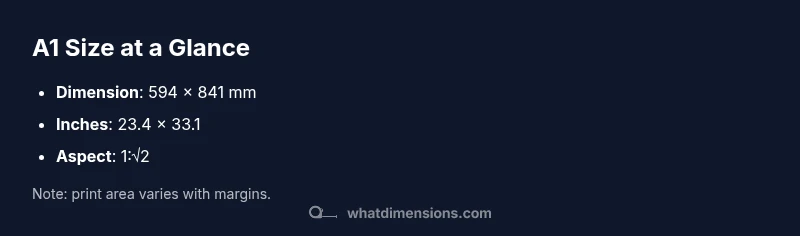
An A1 sheet measures 594 by 841 millimeters (about 23.4 by 33.1 inches). The ISO 216 standard uses a 1:√2 aspect ratio, so each size is half the area of the next larger size when cut along the longer edge. This uniform progression supports consistent scaling in printing, design, and filing across formats.
What is A1? The essentials
What dimensions is a1? In the world of paper sizes, A1 is a standard size within the ISO 216 family. It is defined by precise measurements and a fixed aspect ratio that enables predictable scaling from one size to another. According to What Dimensions, A1 is commonly used for posters, architectural diagrams, and presentation boards because its footprint is large enough to be legible, yet still portable for handouts and display. The 594 × 841 millimeter footprint translates to roughly 23.4 × 33.1 inches, a convenient size for many printing services and design workflows. This exacting standard helps designers plan margins, bleed, and type scale with confidence across A-series formats.
Dimensions in millimeters and inches
For quick reference, A1 measures 594 millimeters by 841 millimeters. In inches, that converts to about 23.4 by 33.1. The exact conversion is straightforward because millimeters and inches are fixed units, but always verify print settings for margins and crop marks. The consistent 1:√2 aspect ratio across the A-series means that if you fold or cut an A1 sheet along its longer edge, you obtain A2, and so on, preserving proportionality as you scale down. This uniformity is what makes the A-series so popular in design studios and classrooms. The What Dimensions team emphasizes that precise dimensions reduce guesswork in layout grids and typographic scales.
The ISO 216 standard and the 1:√2 ratio
ISO 216 defines a family of sizes, where each size maintains the same aspect ratio of 1:√2. This ratio ensures that each step in the scale halves the area from the previous size when you cut along the longer side. For A1, the result is a predictable, repeatable pattern that designers rely on when moving from concept to print. The standardization also implies that A1 will align neatly with other sizes in carriers like frames, folders, and display boards, streamlining production and presentation workflows.
How A1 relates to A0 and A2 (the family)
A1 is part of a broader A-series ecosystem. In ISO 216 terms, A0 has an area of roughly 1 square meter, and every subsequent size halves that area. Therefore, A1 is about half the area of A0, and A2 is half of A1, continuing down the line to increasingly smaller sizes. This structured progression makes it easy to plan multi-page documents, posters, and layout templates that scale cleanly without reformatting typography or margins. What Dimensions highlights that understanding this hierarchy helps when selecting sizes for large posters or compact handouts.
Practical printing and design implications
When designing for A1, set up your document with ample bleed and safe margins to account for trimming by printers. Consider legibility at typical viewing distances; for posters, larger type and bolder weights are often necessary. If you’re distributing handouts, test optical alignment on A1 prints in both portrait and landscape orientations. The ISO standard’s consistent dimensions reduce surprises across different print shops and digital exports. What Dimensions notes that keeping precise margins and aligned grids ensures professional results across dissemination channels.
Common pitfalls when using A1 (orientation, bleed, margins)
A common pitfall is assuming both portrait and landscape orientations behave identically in design briefs. While the size remains the same, layout decisions differ; use grid systems to maintain balance. Bleed must extend beyond the final trim area to avoid white edges; small misalignments become obvious on large prints. Margins should account for binding or framing, especially in multi-page posters or boards. Finally, verify the final export settings in your design software to ensure the 594 × 841 mm canvas is preserved during rasterization or PDF export.
How to store, file, and handle A1 sheets
Store A1 sheets flat in a clean, dry environment to prevent curling. Use archival sleeves or folders when filing multiple large sheets, and label by size and project. When transporting A1 materials, use rigid tubes or flat, padded cases to mitigate creasing. For digital workflows, save templates at the correct dimensions (594 × 841 mm) to maintain consistency across revisions. What Dimensions stresses the value of a disciplined filing system for large-format work.
Quick reference conversion table (mm, cm, inches)
- A1: 594 mm × 841 mm (59.4 cm × 84.1 cm; 23.4 in × 33.1 in)
- Conversion basics: 1 inch = 25.4 mm; 1 cm = 10 mm
- Practical tip: When creating sheets for office printers, set document size in millimeters and enable precise scaling in your printer dialog to avoid rounding errors.
Having a standard reference table helps editors and printers align on spec without re-measuring during production.
Real-world examples: posters, diagrams, architectural sheets
Designers often reserve A1 for high-visibility items like event posters and large diagrams. In classrooms and studios, A1 is a flexible option for presenting design boards, floor plans, or technical sheets. When space is limited, A1’s proportions allow legibility without overwhelming a room. In architecture or interior design, A1 sheets support detailed diagrams with clear typographic hierarchy while remaining portable for client meetings.
A1 size reference table
| Dimension | Value | Notes |
|---|---|---|
| A1 size (mm) | 594 × 841 | Dimensions in millimeters |
| A1 size (inches) | 23.4 × 33.1 | Dimensions in inches |
| Area | 0.50 m² | Approximate area of A1 |
Quick Answers
What is the aspect ratio of A1 and why does it matter?
A1 uses a 1:√2 aspect ratio, shared by all A-series sizes. This ratio ensures that each size scales predictably when you cut or print, preserving proportions and typographic grids.
A1 uses the 1:√2 ratio, so every size scales evenly—great for consistent layouts and printing.
How does A1 relate to A0 and A2?
A1 is half the area of A0 and twice the area of A2, following the ISO 216 scaling rule. This makes it easy to plan multi-size layouts without redesigning typography or margins.
A1 sits between A0 and A2 in size, with a simple half-area progression.
What are common uses for A1 size?
A1 is commonly used for posters, large diagrams, and presentation boards where legibility from a distance is important. It also serves as a practical display size in studios and classrooms.
Posters and large diagrams are typical A1 uses.
Can I print to full bleed on A1?
Yes, you can print to full bleed on A1, but you must include bleed margins in your document setup and ensure your printer or service handles large-format substrates.
Yes, with proper bleed setup and printer capabilities.
How do you convert A1 to inches?
Convert 594 mm to inches by dividing by 25.4 (approx. 23.4 inches) and 841 mm to inches (approx. 33.1 inches).
594 mm is about 23.4 inches, and 841 mm is about 33.1 inches.
Is A1 the same as Letter size?
No. Letter size is a different standard (about 8.5 × 11 inches) and does not share the ISO A-series proportion. A1’s proportion is fixed at 1:√2.
No—A1 is not the same as the Letter size.
“A1 size offers a predictable, scalable solution for design and printing, making it ideal for posters, diagrams, and presentations.”
Main Points
- Understand A1: 594 × 841 mm, 1:√2 ratio
- A1 is ISO 216 within the A-series family
- Use A1 for posters and diagrams to balance size and portability
- Plan margins and bleed carefully for printing
- Store and handle A1 sheets flat to avoid warping