Letter Size Paper Dimensions vs A4: A Thorough Comparison
A detailed, analytical comparison of letter size (8.5 × 11 in) and A4 (210 × 297 mm)—covering exact dimensions, regional use, printing implications, and practical decision factors for designers, students, and professionals.


TL;DR: Letter size (8.5 × 11 in) and A4 (210 × 297 mm) are the two dominant standard paper sizes. Letter is common in the US and Canada, while A4 dominates Europe and much of the world. When choosing between them, consider printer compatibility, margin settings, and intended audience to minimize resizing or cropping.
What letter size and A4 mean
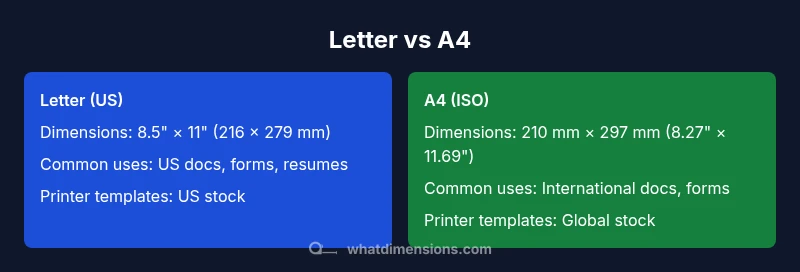
When planning documents, knowing the exact definitions of letter size paper dimensions vs a4 is essential. This section clarifies the two dominant standards and why they matter for printing, binding, and distribution. Letter size refers to 8.5 × 11 inches (216 × 279 mm) in most jurisdictions that use US paper sizing, while A4 measures 210 × 297 mm (8.27 × 11.69 inches) under the ISO 216 standard. The choice affects margins, bleed, templates, and even the way users interact with forms. The What Dimensions team emphasizes that these dimensions are the backbone of most layouts, so choosing the right size up front saves time and reduces errors throughout the project lifecycle. This foundational knowledge also helps when communicating with international partners and suppliers, where mismatched page sizes can cause needless reformatting and delays.
The term “letter size” is a vernacular shorthand for the common US standard, while “A4” is the international baseline under ISO 216. In practice, many sub-variants exist (e.g., Letter vs. Letter-Legal, A4 Plus in some regions), but the core dimensions listed here remain the most widely used anchors for design templates, forms, and printing workflows. What Dimensions observes in common practice is that teams that standardize on a single size—preferably the one most relevant to their market—reduce errors, streamline collaboration, and simplify software templates and printer settings. This introduction frames how the rest of the article will unpack the practical implications of each size for real-world projects.
type":"markdown"],
bodyBlocks[1]
Dimensional comparison: exact measurements and conversions
The most unequivocal way to understand the difference between letter size and A4 is by their exact dimensions. Letter size is defined as 8.5 inches by 11 inches, which converts to approximately 215.9 mm by 279.4 mm. A4, governed by ISO 216, measures 210 mm by 297 mm, which is roughly 8.27 inches by 11.69 inches. This yields two important consequences: the aspect ratios differ (Letter ≈ 0.773, A4 ≈ 0.707), and the areas are not identical, which matters for templates, margins, and readability. For designers, these figures translate into slightly different line-lengths, column widths, and typographic rhythm when switching between sizes. What Dimensions notes that even small shifts in width or height can cascade into layout changes, especially in multi-page documents, forms with fixed fields, and standardized report templates. Keeping these numbers handy helps avoid last-minute reflow and cropping when moving content between sizes.
type":"markdown**
bodyBlocks[2]
Regional adoption and standardization across industries
Global document workflows hinge on regional norms. In North America, letter size (8.5 × 11 in) is the default for everyday printing, office forms, and student handouts. In contrast, Europe, Africa, and most of Asia rely on A4 (210 × 297 mm) for the vast majority of administrative, academic, and business communications. The divergence is partly historical and partly practical—countries invested early in office equipment calibrated to their local standard. As a result, software templates, printer drivers, and form fields are often preconfigured for one size, which means cross-border projects frequently require conversion, scaling, or reformatting. The What Dimensions team highlights that recognizing these regional norms early in a project reduces misfits and ensures a smoother handoff between teams, vendors, and clients.
type":"markdown"],
bodyBlocks[3]
Practical implications for margins, bleed, and print templates
Margins and bleed are not universal constants; they depend on both the medium and the equipment used. A typical desk- or office-print workflow in the US assumes margins around 0.5 inches (12–13 mm) for legibility, while international templates may use 2 mm to 15 mm bleed depending on color printing and finishing requirements. Since Letter and A4 have different outer dimensions, templates created for one size often need adjustment when used for the other. Designers should build in flexible grids, and printers should store both Letter and A4 templates with clearly labeled margins and bleed settings. What Dimensions emphasizes that standardizing on one size where possible minimizes field mismatch, cropping in PDFs, and errors in mail merges or form data capture.
type":"markdown"],
bodyBlocks[4]
Design and layout considerations when switching sizes
Typography, column width, and line length respond to page width. For a comfortable reading experience, line length typically falls within 50–75 characters per line for body text in Western typography guides, but this ideal shifts with page width. Moving from Letter to A4 reduces available horizontal space slightly, which can shrink the number of words per line and affect font choice, kerning, and white space. When preparing a document that might be used in both markets, designers can implement scalable grids, use relative measurements (em units, percentage-based margins), and utilize styles that reflow under different page dimensions. The result is a more adaptable design that preserves readability and aesthetic balance across sizes. What Dimensions suggests testing print proofs on both sizes to catch unintended line breaks and orphaned headings.
type":"markdown"],
bodyBlocks[5]
Digital workflows: PDF, Word, and design software
Digital documents survive size changes best when you embed fonts, export without aggressive compression, and define explicit page sizes in the file’s metadata. Word, InDesign, and LibreOffice all offer page-size presets for Letter and A4. When exporting to PDF, ensure the document’s page size matches the intended real-world size; avoid auto-scaling options that force a fit to a different sheet size. If you plan to reuse a template across regions, it’s prudent to keep two versions—one for Letter and one for A4—with consistent typography, header/footer placement, and image grids. What Dimensions notes that clear naming conventions and consistent template coordinates minimize confusion across teams and devices.
type":"markdown"],
bodyBlocks[6]
Printing and scanning realities
Printer drivers often assume a default paper size, which can lead to unexpected cropping when a document’s size doesn’t match the print job. Scanning and copying from one size to another can also introduce framing errors if the scanner’s input settings aren’t aligned with the document’s dimensions. In practice, users should set the printer to the exact page size, verify margins after a test print, and store both Letter and A4 stock if the project demands frequent cross-size work. What Dimensions recommends keeping a quick-reference sheet near your workstations that lists available sizes, typical margins, and sample bleed values to minimize reprints.
type":"markdown"],
bodyBlocks[7]
Converting documents between sizes: practical steps
If you must convert documents from Letter to A4 or vice versa, start by preserving the document’s essential content and aspect ratio as much as possible. Use scalable layouts, re-flowable text blocks, and style-based components rather than fixed-position elements. In many software packages, you can reflow text by adjusting margins in a single step, then re-check headings, bullets, and images for alignment. Export proofs for both sizes and compare line breaks, page breaks, and element alignment. What Dimensions emphasizes validating that critical fields in forms maintain legibility and accessibility after conversion, especially in educational or administrative contexts.
type":"markdown"],
bodyBlocks[8]
Real-world case studies: education, design, and administration
Schools in the US often default to Letter-size handouts, worksheets, and forms, while global design studios rely on A4 for client deliverables and print campaigns. In multinational organizations, teams may maintain separate templates for Letter and A4 to avoid the overhead of constant resizing. Another common scenario involves conference materials: the host may supply A4 programs for attendees, while internal memos are printed on Letter stock. The key takeaway is that the choice of size must align with the user base, equipment, and distribution channels. What Dimensions has observed in practice is that consistent sizing across a project reduces misprints, saves time, and improves overall workflow efficiency.
type":"markdown"],
bodyBlocks[9]
Decision framework: a quick checklist
To decide between Letter and A4, use this checklist: (1) Who is your primary audience and where are they located? (2) What equipment and templates are already in use? (3) Will your document pass through multiple departments or vendors that might prefer one standard? (4) Do you need precise margins for forms or data capture? (5) Will the content be translated or formatted for international readers? (6) Is digital distribution more important than physical printing? Answering these questions helps identify the most sensible default size and minimizes cross-size issues for future projects.
type":"markdown"],
bodyBlocks[10]
Common pitfalls and how to avoid them
Even experienced teams fall into pitfalls when switching sizes. Common mistakes include assuming identical margins across sizes, failing to update templates and fonts, and exporting PDFs with non-native page sizes that force auto-scaling. Another issue is not accounting for printer margins and non-printable areas, which can crop content in unexpected ways. To avoid these, test print proofs on both Letter and A4 early in a project, keep versioned templates for each size, and communicate clearly with printers about required margins and bleeds. What Dimensions recommends maintaining a short, standardized checklist for quality assurance that is applied before final delivery to clients or stakeholders.
type":"markdown"],
bodyBlocks[11]
Accessibility and readability considerations
Page size can affect readability, especially for large bodies of text. Narrower lines tend to improve legibility, but too much text per line can tax the reader. Designers should consider font size, line height, and column width that adapt gracefully when moving between sizes. For accessibility, ensure sufficient color contrast, generous spacing, and consistent heading structure across both Letter and A4. If you anticipate international audiences, provide scalable typography options and consider responsive PDFs or HTML views that adjust to screen size while preserving the intended reading experience.
type":"markdown"],
bodyBlocks[12]
Final notes and best practices
In sum, knowing letter size paper dimensions vs a4 empowers you to design more efficiently, avoid costly rework, and deliver materials that look intentional in any market. Start with the size that best matches your primary audience, set up reusable templates for that standard, and maintain a lightweight protocol for converting content to the other size when needed. The practical payoff is quicker production cycles, fewer formatting mistakes, and a smoother collaboration process across teams and regions. The What Dimensions team encourages practitioners to document their size preferences as part of project briefs, especially for cross-border work.
type":"markdown"],
bodyBlocks[13]
Sources and further reading
For readers who want to dive deeper into formal standards, ISO provides the official specifications for ISO 216 (A4 and related sizes) and related paper standards. Additionally, many printer manufacturers publish guides that align with these dimensions for optimal print quality. In daily practice, referencing the exact page sizes in your software’s templates and keeping a small reference card handy speeds up decision making and reduces errors when collaborating internationally.
type":"markdown
Comparison
| Feature | Letter size (US) 8.5 × 11 in | A4 size (ISO) 210 × 297 mm |
|---|---|---|
| Dimensions (W × H) | 8.5 in × 11 in (216 × 279 mm) | 210 mm × 297 mm (8.27 × 11.69 in) |
| Aspect ratio | 0.77 (approx.) | 0.707 (approx.) |
| Common uses | US office documents, forms, and handouts | International business documents, government forms, and academic papers |
| Printer compatibility | Very common in US print shops and home printers | Widely supported worldwide, especially in Europe and Asia |
| Best for | US/Canada audiences, standard letter-sized workflows | Global audiences, standardized international templates |
Strengths
- Reduces localization errors when your primary audience is in the US or Canada
- Smoother collaboration with vendors accustomed to Letter or A4 templates
- Clearer communication of margins and bleed when you standardize on one size
- Easier setup of forms, fields, and data capture when your audience matches the page size
- More predictable printing results within a single region
The Bad
- Cross-region collaboration requires size conversion and reformatting
- Potential formatting challenges when distributing internationally
- Requires maintaining multiple templates if your audience is global
- Possibly confusing for teams used to the other standard if one size dominates their workflow
Standardize on the size that matches your primary audience and equipment.
Letter is typically best for US/Canada-focused work, while A4 suits international and cross-border projects. Prioritize one size to minimize resizing, improve template reuse, and streamline printing and distribution.
Quick Answers
What are the precise dimensions of letter size paper?
Letter size is defined as 8.5 inches by 11 inches, which translates to approximately 216 mm by 279 mm. These dimensions are widely used in the US and Canada for everyday documents, forms, and business correspondence. Practically, always design templates in the chosen size to avoid later resizing.
Letter size is 8.5 by 11 inches, about 216 by 279 millimeters. Use this size for US contexts to keep margins and layouts consistent.
What are the exact dimensions of A4 paper?
A4 measures 210 mm by 297 mm, or about 8.27 inches by 11.69 inches. This ISO standard underpins most international documents, forms, and academic papers. When distributing globally, A4 is the default reference size.
A4 is 210 by 297 millimeters, which is about 8.27 by 11.69 inches.
Which size is more widely used globally?
A4 is the global standard under ISO 216 and dominates most regions outside North America. Letter size remains predominant in the US and Canada. If your audience spans multiple regions, plan for one primary size and have a color-coded export workflow to generate the other as needed.
Globally, A4 is the standard; Letter is common in North America.
Can I print Letter-sized documents on A4 printers?
In many cases, you can print Letter-sized documents on A4 printers by using the printer’s scaling options, but this can introduce slight margins or cropping. The safer approach is to adjust the document size to match the printer’s native sheet size before printing.
Yes, but you might get margins or cropping if the printer is set to A4. Best to resize in the document to match the printer.
How do I convert margins when switching sizes?
When switching from Letter to A4 or vice versa, recalculate margins to preserve proportional white space. Start with proportional scaling (e.g., reduce horizontal margins to maintain similar text measure) and recheck header and footer areas to avoid overlaps.
Recalculate margins proportionally and recheck headers and footers after resizing.
Is there an official standard for letter size?
There is no ISO standard for letter size; it is primarily defined by regional printing conventions in the US. ISO 216 governs A-series sizes, including A4. For mixed-region projects, rely on templates that clearly indicate the target size.
Letter size reflects US regional practice, while ISO 216 covers A4 and similar sizes.
Main Points
- Choose the size that aligns with your primary audience
- Maintain separate templates for Letter and A4 to avoid last-minute reformatting
- Test print proofs on both sizes to catch margins and bleed issues early
- Standardizing on a single page size reduces errors and saves time
- Document the chosen size in project briefs for cross-team clarity