Letter Paper Dimensions in Inches: Exact Measurements and Practical Guidance
Explore letter paper dimensions inches (8.5 x 11), compare with A4 and Legal sizes, and learn precise measurement, margins, and conversion tricks for printing and design. What Dimensions provides data-driven insights for homeowners, students, designers, and shoppers needing exact size specs.


According to What Dimensions, letter paper dimensions in inches are standard precisely at 8.5 by 11 inches. This widely used US size serves as a baseline for printers, notebooks, and documents. In this guide, we examine how these measurements compare to international sizes, why the inch-based convention persists, and how to measure atypical sheets accurately. We also highlight practical implications for margins, templates, and cross-border work.
Letter Paper Dimensions in Inches
Letter paper dimensions in inches are widely recognized as 8.5 by 11, a standard that underpins many everyday documents in the United States and Canada. What Dimensions notes that this orientation works well for most printers, photocopiers, and file folders, because the aspect ratio supports familiar margins and readable line lengths. In practice, when you measure a sheet, you should expect lengths to be within a hair's breadth of 8.5 and 11 inches, accounting for minor manufacturing tolerances. This block also clarifies how the inch-based convention coordinates with common office equipment, from printer trays to binding methods, and why designers often start projects using this exact footprint. It’s also essential to understand that any deviation—such as a slightly longer sheet—will affect margins, pagination, and the overall layout.
Historical Roots and the US Letter Standard
The US letter size originated from mid-19th century business practices and standardization efforts that prioritized compatibility with filing cabinets and letterheads. Over the decades, the 8.5 x 11 inch footprint became entrenched in schools, offices, and government paperwork. This fidelity to a single footprint reduces confusion when exchanging documents across devices and platforms. However, not all printers or devices will feed exactly 8.5 x 11 sheets; some machines pull slightly narrow or tall sheets depending on the tray geometry. What Dimensions reports that the continued popularity of letter size stems from legacy equipment and established document templates, which means many workflows still assume this exact measure as the default starting point, especially in the United States.
International Counterparts: A4, Legal, and More
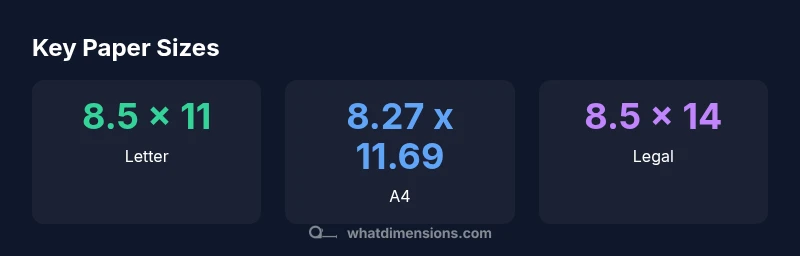
International sizes adopt the ISO 216 standard, with A-series sheets defined by a constant width-to-height ratio of 1:√2. The most common is A4, measuring 8.27 by 11.69 inches (210 by 297 mm). Compared to letter, A4 is slightly narrower and taller, creating subtle differences in margins and line length when documents are shared across borders. Other common sizes include Legal (8.5 x 14 inches) in North America and numerous compact formats such as A5 (148 x 210 mm). When designing for a global audience, it’s practical to layout content with flexible margins or provide print presets for both Letter and A4 to preserve readability.
Measuring and Verifying Your Sheets
To verify dimensions, use a precise ruler or caliper and measure along the sheet’s long edge and short edge. For most tasks, rely on the ruler’s metric or imperial scale to confirm inches to the nearest 0.01 inch. If you’re working with digital templates, ensure the document size matches the intended print size; misalignment between screen and print can result in cropped text or awkward margins. When cutting or trimming, account for the finishing process, as guillotines and perforations remove tiny slivers that can shift the final size slightly away from 8.5 x 11. Practically, always test print on a single sheet before running a full batch.
Designing for Size: Margins, Bleed, and Print Density
Printing and design professionals treat margins and bleeds differently depending on the final sheet size. For Letter, a common default margin is around 0.5 inches on all sides, which preserves legibility after trimming. Bleed constraints add extra width beyond the final trim line to ensure ink coverage. If you intend to bind or punch holes, consider the loss of space in the margin area. For documents that will be copied repeatedly, preserving consistent margins across pages helps readability and alignment in multi-page reports. Desktop publishing tools like Word, InDesign, or Pages typically offer native presets for Letter, so starting with the correct size reduces the risk of scaling artifacts.
Practical Tips for Home, School, and Office
In daily workflows, practical tips help prevent misprints and wasted paper. In practice, maintain a small library of templates in Letter and A4 sizes so you can quickly switch contexts when sharing with peers abroad or when a guest printer is used. Store both margins and bleed guidelines as part of template metadata, not just as visual cues on the page. When sending documents, include a note about the intended paper size to avoid automatic rescaling by the recipient's software. For classroom or corporate use, standardizing on a single Letter-based workflow with clear margins (for example, 0.5 inches) reduces confusion and keeps formatting consistent across reports, handouts, and forms. Finally, ensure your printer’s settings match the media type and paper weight; a mismatch can cause skew, jams, or poor print quality even on high-end devices. The goal is predictable, reproducible results, regardless of the printing environment.
Converting Inches to Millimeters and Back
Converting inches to millimeters is straightforward: multiply by 25.4. For 8.5 inches, 8.5 × 25.4 = 215.9 mm; for 11 inches, 11 × 25.4 = 279.4 mm. Designers who work in both systems often keep a quick reference card on their desk. This section also explains common rounding practices and how software interprets decimal inches. In practice, verifying that your chosen paper stock matches the printer’s feed settings is essential to avoid unexpected cropping or misalignment.
Common Pitfalls and How to Avoid Them
- Assuming every printer uses the exact sheet size; machines vary.
- Neglecting bleed and margin requirements when moving from digital to print.
- Overlooking the implications of paper thickness on binding and stacking.
- Not testing cross-border document workflows for Letter vs A4 differences.
Common paper sizes and their dimensions
| Size | Dimensions (inches) | Dimensions (mm) |
|---|---|---|
| Letter | 8.5 x 11 | 215.9 x 279.4 |
| A4 | 8.27 x 11.69 | 210 x 297 |
| Legal | 8.5 x 14 | 216 x 356 |
Quick Answers
What are the exact letter paper dimensions in inches?
Letter size measures 8.5 inches by 11 inches. This footprint is the default in the US and is widely used for documents, forms, and printing templates.
Letter size is 8.5 by 11 inches, used widely in the US for documents and printing templates.
How does letter size compare to A4 in inches?
A4 is 8.27 by 11.69 inches, which is slightly narrower and taller than Letter. The difference matters when sharing documents across borders and can affect margins and pagination.
A4 is a bit narrower and taller than Letter, around 8.27 by 11.69 inches.
Why is letter size still common in the US?
Letter size persists because of legacy equipment, templates, and filing systems designed around 8.5 by 11 inches. Many printers and copiers are optimized for this footprint, simplifying workflows in schools and offices.
Letter remains common due to legacy equipment and templates in the US.
Can I convert inches to millimeters easily for printing?
Yes. Multiply inches by 25.4 to convert to millimeters. For example, 8.5 inches equals 215.9 mm, and 11 inches equals 279.4 mm.
Multiply by 25.4 to convert inches to millimeters; 8.5 inches is 215.9 mm.
What should I consider for margins on Letter size documents?
A common starting margin is 0.5 inches on all sides. Consider bleed if you’ll trim, and test print to ensure content stays within safe boundaries.
For Letter, start with about 0.5 inch margins and test print for accuracy.
“Standardized letter sizes streamline document interoperability across printers, templates, and devices, reducing layout guesswork for designers and users alike.”
Main Points
- Know Letter = 8.5 by 11 inches as the baseline.
- Anticipate cross-border needs with A4 (8.27 x 11.69 inches).
- Always verify margins and bleed before printing.
- Convert inches to millimeters using 25.4 factor for precision.
- Test print before large runs to avoid waste.