Copy Paper Dimensions: A Practical Guide to Size Standards
What Dimensions explains copy paper dimensions, from US Letter to ISO sizes, with practical tips for printing, design, and storage—helping homeowners, students, and designers choose the right sheet every time.


Copy paper dimensions are defined by several widely used standards. The most common domestic size is US Letter (8.5 by 11 inches), while international printing relies on ISO A4 (210 by 297 mm). For everyday tasks, these two formats cover the majority of copying, printing, and classroom needs, with tolerances and bleed areas affecting final print sizes.
What copy paper dimensions mean in practice
When you search for copy paper dimensions, you are dealing with the physical width and height of sheets used for writing, printing, and copying. In everyday workflows—home offices, dorm rooms, design studios—matching the sheet size to the task minimizes waste and avoids scaling issues. The term 'copy paper dimensions' also implies thickness and weight, but the essential factor for most projects is the flat size of the sheet in its intended units. In the United States, the dominant format is Letter size (8.5 x 11 inches), while most of the world uses the metric-based A-series with A4 at 210 x 297 mm. Understanding these core sizes helps you select paper at the point of purchase and set up printers and software correctly.
The most common size formats
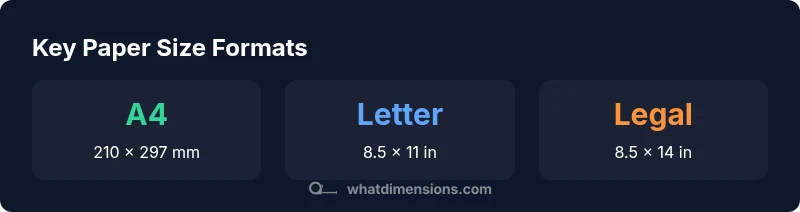
The landscape of paper sizes centers around two broad families. In North America, Letter size (8.5 x 11 inches, 216 x 279 mm) is the default for home printers and offices. In contrast, the ISO A-series is widely used worldwide, with A4 measuring 210 x 297 mm (8.27 x 11.69 inches). Other frequent formats include Legal (8.5 x 14 inches, 216 x 356 mm) and tabloid/ledger sizes (11 x 17 inches). For many projects, choosing between Letter and A4 is the single biggest decision; printers, cut sheets, and feeds are often configured to these standards to prevent scaling or cropping.
ISO 216 vs ANSI: understanding the codes
ISO 216 governs the A-series (A0, A1, A2, A3, A4, etc.) with a consistent aspect ratio of sqrt(2):1. This enables predictable scaling between sizes. ANSI (the U.S. standard) includes sizes like Letter and Legal, which have non-sqrt(2) aspect ratios and are used primarily in North America. The key takeaway: international printing aligns with ISO sizes for cross-border projects, while domestic printing typically relies on Letter or Legal. When you open a document in software or send a file to print, make sure the target size aligns with ISO or ANSI standards as appropriate.
Converting between metric and imperial sizes
Converting between millimeters and inches is straightforward: 1 inch equals 25.4 millimeters, and 1 millimeter equals 0.03937 inches. For quick estimates, you can multiply by 0.03937 or divide by 25.4. Always verify the exact values in your printer driver or PDF setup, since real-world stock tolerances and trimming can introduce small variances. When planning a multi-format project, maintain a conversion table to minimize misalignment between design files and physical sheets.
Bleed, margins, and the print area
For printing projects with color runs or full-bleed images, designers commonly account for a bleed area—typically around 2–3 mm beyond the final trim. This ensures artwork extends to the edge after cutting. Margins, or safe areas, vary by project but are generally set to leave text and important content clear of the trim line. If you are printing handouts or worksheets, it can be helpful to design with a standard margin of at least 5–10 mm to accommodate printer movement and paper curl.
Practical tips for designers, students, and offices
- Always verify the target size before creating layouts; a misstep can cause scaling and wasted ink.
- When submitting print jobs, attach a bleed and specify trim marks if your printer is capable of edge-to-edge printing.
- For international work, begin from A4 as your baseline and adjust margins to fit the project.
- Keep a small reference chart of common sizes (Letter, Legal, A4, A5) handy in your workstation for quick decisions.
- If possible, test print on a sample sheet to confirm that margins, bleeds, and cropping align with your expectations.
Common misperceptions and myths
- ‘A4 is universally the same everywhere.’ Not always; minor tolerances can occur in different production runs.
- ‘Bleed isn’t important for text documents.’ Bleed matters for images and color blocks; text should stay within safe margins.
- ‘Printer drivers always crop correctly.’ Printing software sometimes scales content; always check print previews and settings.
- ‘The biggest sheet is always the best option.’ Bigger sheets can complicate folding, binding, and cutting; choose the smallest practical size for your task.
Measuring and verifying dimensions in practice
A practical approach is to measure a sample sheet with a ruler or caliper to confirm width and height to within a millimeter. Maintain a small conversion table for inches to millimeters and vice versa. When preparing documents, ensure your page size matches your printer’s supported range. If you find discrepancies, check your margins and bleed settings, and re-export with the correct page size. Regularly update templates to reflect any changes in the standard formats you use most.
Common paper sizes and their dimensions
| Format | Dimensions (mm) | Dimensions (in) | Notes |
|---|---|---|---|
| A4 | 210 x 297 | 8.27 x 11.69 | International standard, most common globally |
| Letter | 216 x 279 | 8.5 x 11 | Dominant in North America |
| Legal | 216 x 356 | 8.5 x 14 | Common for legal documents |
| Tabloid | 279 x 432 | 11 x 17 | Wide format for posters and resumes |
Quick Answers
What is the difference between US Letter and A4 sizes?
US Letter is 8.5 x 11 inches (216 x 279 mm) and is common in North America. A4 is 210 x 297 mm (approximately 8.27 x 11.69 inches) and is the global standard under ISO 216. The aspect ratios differ, which affects printing and folding in cross-border projects.
Letter and A4 are the two main sizes you’ll encounter; know which region you’re in to avoid scaling issues.
Are there other standard sizes for printers besides Letter and A4?
Yes. In the US, Legal and Ledger/Tabloid (11 x 17 inches) are common. In many regions, SRA formats are used for professional print workflows. Always check your device’s supported paper list and adjust layouts accordingly.
Besides Letter and A4, you’ll often see Legal or Tabloid in the US, and various ISO sizes elsewhere.
Do all copy paper sizes have the same aspect ratio?
No. ISO A-series shares a sqrt(2) aspect ratio, which allows smooth scaling between sizes. US Letter and Legal do not share this ratio, so scaling between them can alter the layout.
No—A-series keeps a different shape than Letter/Legal, so you can’t freely scale between them without adjusting the design.
How do bleeds affect print sizes and margins?
Bleeds extend artwork beyond the trim edge by a typical 2–3 mm to prevent white edges after trimming. Margins ensure text stays inside the printable area. Always configure bleeds and margins in your print setup.
Bleeds extend edge-to-edge; margins protect important content; set bleeds at 2–3 mm and margins at standard safe spaces.
Where can I find official standards for paper sizes?
Official standards are published by ISO (ISO 216 for A-series) and related organizations. Check ISO’s site or official spec sheets from major publishers for the precise tolerances and naming conventions.
Look up ISO 216 for the A-series and verify with official standard documents.
“Understanding copy paper dimensions is foundational to accurate design and printing; it minimizes waste and ensures content fits exactly on the page.”
Main Points
- Know the two main families: US Letter vs ISO A-series.
- When in doubt, start from A4 for international work.
- Always account for bleed and safe margins in design.
- Convert carefully between metric and imperial units.
- Verify page size in printer settings before printing.