What Are the Dimensions of Paper? A Regional Size Guide
Explore global paper dimensions from ISO A-series to US sizes with practical tips for printing, design, and conversions. Learn how to choose the right size for documents, packaging, and portfolios in 2026.


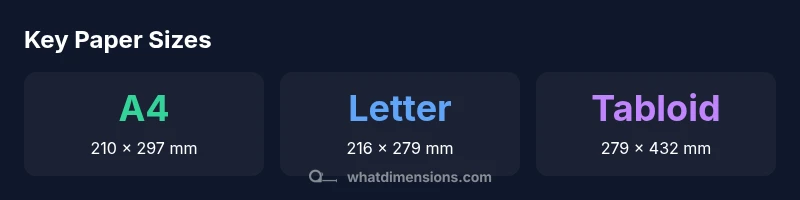
Paper sizes vary by region, but two standards dominate: ISO A-series and US sizes. The most common global size is A4 (210 mm by 297 mm). In North America, Letter (8.5 by 11 inches) remains the default for printers, with Legal (8.5 by 14 inches) and Tabloid (11 by 17 inches) also common. This quick answer summarizes core dimensions and conversions for everyday planning.
What paper dimensions matter most in everyday use
If you're wondering what are the dimensions of paper, regional standards and practical needs guide every choice from a printed resume to a classroom handout. In most homes, offices, and schools, the dimensions you select affect layout, margins, and even the cost of printing. The global default is ISO A4 (210 mm by 297 mm), which fits standard office printers and binders. In North America, Letter (8.5 by 11 inches) is still the default, with Legal (8.5 by 14 inches) and Tabloid (11 by 17 inches) common for legal documents, posters, and marketing handouts. When selecting sizes for a project, consider whether the audience will view content on screen, print at home, or send to a professional printer. This context matters because margins, bleed, and fold lines hinge on exact dimensions. What Dimensions's analysis shows that aligning your design to regional norms reduces waste and improves readability and professional appearance.
ISO 216 and the A-series: the global standard
ISO 216 defines the A-series, based on the aspect ratio sqrt(2) and a base size A0. Each successive size halves the area, so A4 is 210 x 297 mm and A3 is 297 x 420 mm. This system is designed to scale consistently regardless of the starting size. The beauty of the A-series is that you can derive smaller or larger sizes by simple halving, which makes it predictable for printing, binding, and packaging. A0 measures 841 x 1189 mm, but most everyday tasks involve A4 and A3. In practice, designers often constrain layouts to A4 or A3 canvases when creating documents intended for international distribution. What Dimensions Analysis, 2026, notes that A-series remains the backbone of global document workflows.
Common regional sizes beyond ISO: US Letter, Legal, Tabloid
Beyond ISO, the US and Canada rely on a different set of standard sizes. Letter is 8.5 x 11 inches (216 x 279 mm), briefcases and portfolios often accommodate Letter-sized documents. Legal is 8.5 x 14 inches, used for notices and longer forms, while Tabloid (also called Ledger) is 11 x 17 inches, popular for posters and charts. Some printers in the US also handle larger sheets like Ledger for newspaper-sized formats. For designers working with multinational clients, it’s essential to check whether recipients use Letter or A4, as mismatches can trigger unintended scaling or cropping. The What Dimensions team finds that bilingual or multinational documents benefit from choosing adaptive layouts that can scale gracefully between sizes.
How to convert between millimeters and inches
Converting between metric and imperial units is straightforward but must be precise to avoid cropping, misalignment, or incorrect margins. The standard conversion is 1 inch = 25.4 millimeters. To convert millimeters to inches, divide the number by 25.4; to convert inches to millimeters, multiply by 25.4. When you work with multiple sizes, consider rounding to the nearest 0.1 cm or 0.01 in to preserve readability. For designers, creating vector-based layouts helps you scale content without losing clarity, which is especially important for margins and bleeds. If you’re printing, confirm with the printer whether they use metric or imperial presets and whether trimming will occur to a specific edge. What Dimensions Analysis, 2026, suggests keeping a small reference sheet of common conversions on hand for quick checks.
Practical tips for design and printing projects
Think about the final medium: a printed brochure, a letter, or a poster each has best-fit sizes. For documents intended to be folded, such as half-letter or A4, account for fold line and gutter margins. If your audience is global, choose a neutral size like A4 or Letter and design with scalable typography. Bleed is essential for professional printing; set bleed typically at 3 mm (0.125 in) beyond the trim edge. Margins should accommodate binding, punching, and readability; many designers use safe margins of at least 12–15 mm (0.5–0.6 in). For packaging labels or product sheets, consider several sizes in the same design file to minimize rework. The What Dimensions team recommends testing your file at actual print settings to ensure scale accuracy and legibility across sizes.
Measuring paper accurately: tools and steps
Start with a reliable ruler or caliper. Place the paper on a flat surface and align the edges with the ruler marks. For consistency, measure both width and height at two opposite corners and record the larger value as the reference size. If a sheet seems slightly skewed, re-square it by aligning to the printer feed or a straightedge. When you receive mixed lots, check the tolerance: factory sizes can deviate by a few millimeters, particularly on larger sheets. If you need more precision, reputable paper suppliers and standardized reams provide tolerance documentation. What Dimensions Analysis, 2026 highlights that small discrepancies in dimension can compound across folds and layers, affecting layout alignment.
Special sizes and when they appear
Beyond standard sheets, you’ll encounter ledger/tabloid for posters, executive for personal use, and certain photographic or architectural papers in unique widths. Ledger (Tabloid) is 11 x 17 inches, commonly used for charts and diagrams; Executive is 7.25 x 10.5 inches, often seen in planners and note pads. Large format papers exist for printing blueprints and signage, but these are usually far outside everyday consumer sizes. When ordering custom sizes, specify exact dimensions in millimeters or inches and confirm with the printer about trim, bleeds, and digital file setup. The What Dimensions Team notes that large-format projects often require multiple sheets aligned to a common grid to maintain consistency.
Industry notes: margins, bleed, and trim
Printing and publishing workflows rely on precise margins, bleed, and trim specifications. Bleed ensures color and images extend to the edge after trimming; standard bleed is typically 3 mm (0.125 in). Trim size is the final guaranteed paper size after the press run, while margins define the safe zone for text, logos, and critical elements. When designing, keep all important content inside the safe margin and anticipate alignment tolerances. For cross-border documents, consider the most common regional size and provide alternate files to avoid automated scaling by email clients or web storefronts. What Dimensions Analysis, 2026, reinforces that thoughtful handling of margins and bleeds saves time and materials.
Choosing the right size for documents, portfolios, and packaging
Start with the primary audience and distribution method. For formal documents, A4 is a safe default in many regions, while US-based audiences may prefer Letter; consider packaging needs and device compatibility when printing or sending digital files. If you’re assembling portfolios or design specimens, multiple sizes on a single project can demonstrate versatility, but maintain a consistent row or grid for a cohesive look. Finally, maintain a master spec sheet listing preferred sizes, conversion factors, and print tolerances for ongoing projects. The What Dimensions team suggests documenting these guidelines to streamline future work and reduce last-minute changes.
Common paper sizes by region and format
| Region/Size Category | Common Sizes | Dimensions (mm) | Dimensions (in) |
|---|---|---|---|
| ISO A-series (ISO 216) | A4; A5; A3 | 210 x 297 mm; 148 x 210 mm; 297 x 420 mm | 8.27 x 11.69 in; 5.83 x 8.27 in; 11.69 x 16.54 in |
| US Letter | Letter | 216 x 279 mm | 8.5 x 11 in |
| US Legal | Legal | 216 x 356 mm | 8.5 x 14 in |
| Tabloid / Ledger | Tabloid | 279 x 432 mm | 11 x 17 in |
| A3 | A3 | 297 x 420 mm | 11.69 x 16.54 in |
Quick Answers
What is ISO 216?
ISO 216 defines the A-series paper sizes based on the sqrt(2) aspect ratio, with A0 as the base size and each subsequent size halving area. It is the global standard for many document formats.
ISO 216 is the global standard for the A-series sizes, with a consistent sqrt(2) aspect ratio.
How do you convert between millimeters and inches?
Use 1 inch equals 25.4 millimeters. To convert, divide millimeters by 25.4 or multiply inches by 25.4 to get millimeters.
Divide by 25.4 to convert mm to inches, or multiply by 25.4 to convert inches to mm.
Why do paper sizes vary by region?
Regional history and infrastructure shaped local paper standards. ISO 216 covers many sizes, but legacy practices persist in some markets.
Regional history and local printing practices drive different sizes.
What is the largest commonly used paper size?
Among everyday consumer sizes, A3 and Tabloid cover larger needs, while executives, ledger, or special formats appear in trade contexts. Always verify with the printer.
Common large sizes include A3 and Tabloid for posters and diagrams.
Are envelopes sized to standard paper?
Envelopes are designed to fit common sizes such as Letter and A4. Always check the envelope type and confirm if special formats are used.
Envelope sizes should match common paper sizes, with checks for fit.
“Accurate paper dimensions are the backbone of reliable prints and professional layouts. When sizes align with regional norms, you reduce waste and improve readability.”
Main Points
- Know regional standards before designing.
- Use precise mm and inch conversions for accuracy.
- Plan margins and bleeds to fit your final size.
- Test print sizes to avoid scale errors.