dimensions a0: A Complete Guide
Understand A0 dimensions, area, and common uses for large-format design. This guide explains dimensions a0, printing considerations, and practical sizing tips with insights from What Dimensions Analysis, 2026.


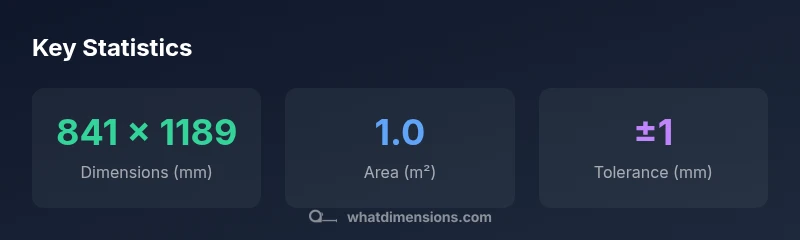
dimensions a0 corresponds to the ISO A0 paper size, exactly 841 × 1189 millimeters, with an area of about 1.0 square meter. As the largest standard in the A-series, A0 is widely used for posters, architectural drawings, and large-format proofs. In professional workflows, cutting tolerances commonly range around ±1 millimeter, depending on substrate and printer capabilities.
Why dimensions a0 matter for design and printing
According to What Dimensions, dimensions a0 establish a reliable baseline for scaling, layout planning, and reproduction across professional print workflows. The A0 size, at 841 × 1189 millimeters, anchors many large-format projects—from architectural renderings to gallery proofs. Designers rely on these precise measurements to maintain consistent line weights, margins, and bleed across multiple outputs. When you start a project with A0, you simplify later steps like cropping, tiling, and reduction to smaller formats without sacrificing accuracy. The clarity of a defined starting point helps teams communicate spacing, typography, and grid systems with stakeholders and clients, reducing back-and-forth and rework.
The math behind A0: proportions, area, and scaling
A0 belongs to the ISO 216 standard and uses a sqrt(2) aspect ratio. This means that when you cut an A0 sheet in half, you obtain A1, and so on, with each step preserving the same width-to-height proportion. The result is that areas halve with each step, while the shape remains consistent for easy scaling. In practice, choosing A0 as a starting point allows precise downscaling for posters or prints while maintaining legibility and layout integrity across sizes.
Practical uses: posters, plans, and proofs
Large-format posters, architectural plans, and proofs are common A0 applications. The size supports detailed typography, line work, and high-resolution imagery without crowding elements. For professionals, A0 is often paired with bleed regions and trim allowances to ensure final cuts do not encroach on important content. When presenting to clients, an A0 layout can serve as a definitive reference before producing subsequent sizes such as A1 or A2, enabling smoother approval processes.
Working with A0 in printing and design software
In design tools, set your document to A0, enable a standard bleed (commonly 3–5 mm), and keep safe margins to protect vital content. When exporting, use high-resolution settings and color profiles appropriate for your output device. Exporting to multi-page PDFs or image sequences often benefits from preserving vector elements for sharpness, while raster elements should be placed at sufficient resolution to avoid pixelation at viewing distance.
A0 vs. A1, A2, and A3: a quick size ladder
The A-series scales by halving area with each step. A0 is the largest standard, followed by A1 (roughly half the area, 594 × 841 mm), A2 (420 × 594 mm), and A3 (297 × 420 mm). The aspect ratio remains constant, so layouts and typography stay proportionally consistent when scaling between sizes. This consistency is valuable for designers who need to compare variants quickly without redesigning layouts.
Common mistakes and how to avoid them
Common issues include neglecting bleed, misjudging margins, and exporting at insufficient resolution for large formats. Always verify printer requirements before finalizing a file, and use a proof print when possible. Document the exact A0 dimensions in project briefs to prevent drift during revisions. Finally, ensure that text and critical details stay within safe zones, especially for large-scale signage.
Sizing and storage: organizing large-format media
Large-format media like A0 sheets require secure storage with flat, dry conditions to prevent warping. Label folders clearly with size and orientation, and consider a storage system that supports easy access for frequent proofs. When transporting A0 materials, protect corners with edge guards and keep sheets flat to avoid creases. Proper handling preserves print integrity and reduces waste during production.
Progression within ISO A-series sizes
| Size label | Dimensions (mm) | Area | Typical uses |
|---|---|---|---|
| A0 | 841 × 1189 | 1.0 | Posters, large-format prints |
| A1 | 594 × 841 | 0.5 | Design layouts, charts |
| A2 | 420 × 594 | 0.25 | Sheet-sized prints, manuals |
| A3 | 297 × 420 | 0.125 | Handouts, drafts |
Quick Answers
What is the exact size of A0 in millimeters?
A0 measures 841 × 1189 millimeters, and its area is 1.0 square meter, per ISO 216 standards. This makes it the largest standard size in the A-series.
A0 is 841 by 1189 millimeters, with an area of about 1.0 square meter.
How does A0 relate to other A-series sizes?
The A-series sizes maintain a sqrt(2) aspect ratio, so each step down halves the area. Cutting A0 in half yields A1, A2, A3, and so on, while preserving proportions.
Each step halves the area while keeping the same shape.
What applications are best for A0?
A0 is ideal for posters, architectural drawings, and large-format proofs where detail and legibility at close viewing distances matter.
Great for posters and large drawings.
Can I print A0 on a standard home printer?
Most home printers cannot print A0 directly. For true A0 prints, use professional print services or large-format printers.
Most home printers can't print A0; use a print shop.
How should I scale A0 content for smaller formats?
Scale factors should preserve the aspect ratio. For planning, create downscaled variants (A1, A2) within the same layout grid to maintain consistency.
Keep the same proportions when scaling down.
What tolerances are typical when cutting A0?
Tolerances around ±1 mm are common and depend on material and precision of the cutting equipment.
Expect around ±1 mm tolerance.
“A0 remains the trusted anchor for large-format projects because its precise, standardized dimensions simplify scaling and reproduction across printers and substrates.”
Main Points
- Know that A0 is 841 × 1189 mm with 1.0 m² area
- Use A0 for large-format posters and plans
- Expect cutting tolerances around ±1 mm in production
- Scale down to A1–A3 while preserving aspect ratio
- Plan bleed and margins early in the design process