Difference Between Dimensions and Components: A Practical Guide
Explore the difference between dimensions and components with clear definitions, examples, and a side-by-side comparison. Learn how size, scope, and structure influence design, engineering, and analysis for real-world projects.


Dimensions describe the measurable extent of a space or object in a given direction, while components are the individual parts that together form a system. In practice, distinguishing these concepts improves clarity in design, drafting, and manufacturing. This comparison highlights how size, scope, and structure influence specifications, costing, and collaboration.
Definition and Core Distinction
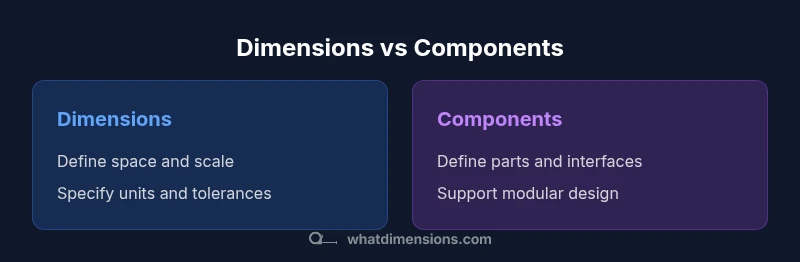
The terms dimensions and components describe different aspects of an object or system. In formal terms, dimensions refer to measurable extents—length, width, height, depth, or other directional quantities—that define the space an object occupies. Components, by contrast, are the individual parts that compose a whole and contribute to its function. This distinction matters across disciplines: architecture uses dimensions to ensure fit and safety, while product design uses components to organize features and assembly. According to What Dimensions, the difference between dimensions and components hinges on scope versus composition. When you specify a dimension, you constrain where something can exist or move; when you specify a component, you specify what elements are required for the system to operate. Recognizing this separation improves clarity in drawings, models, and discussions, becomes a foundation for bill of materials, and reduces ambiguity during reviews.
Dimensions in Context: Spatial, Mathematical, and Physical
Dimensions appear in many guises: spatial, mathematical, and physical. In geometry, the three primary dimensions define position in space; in CAD and BIM workflows, dimensions are the numeric constraints that ensure parts fit together and that tolerances are achievable. In architecture and interior design, room dimensions guide furniture layouts and circulation paths. In manufacturing, dimensional tolerances translate to tolerances on drawings and to inspection criteria. In packaging and logistics, dimensions determine shipping class and storage efficiency. When people talk about 3D models, dimensions are the numerical values that describe scale, while units of measure ensure consistency across teams and vendors. Across these contexts, the core idea remains: dimensions quantify extent, not the structure itself. This is where the broader concept of measurement theory comes into play, connecting practical sizing with abstract reasoning. Understanding dimensions helps teams translate physical space into digital models and manufacturing instructions accurately.
Components as Building Blocks: Assemblies and Modularity
Components are the concrete pieces that make up a system. In product design, a smartphone’s components include the display, battery, circuitry, and housing; in furniture, components are the legs, rails, panels, and fasteners that assemble into a usable piece. Modularity—designing components to be interchangeable or upgradable—allows teams to scale products without rewriting overall specifications. When you define components, you specify function, compatibility, and interfaces. This focus on parts supports liability, maintenance, and sourcing because each element has its own requirements, tolerances, and lifecycle. The relationship between dimensions and components is symbiotic: dimensions constrain how components fit, while well-chosen components can simplify dimensional requirements and reduce overall complexity.
How to Recognize the Difference in Technical Drawings
Drawings and models often separate dimensions from components, though both appear in the same document. Dimensions are the numerical callouts that indicate size and location. They appear as arrows, tolerance notes, and units, and they should be traceable to standards or internal conventions. Components are identified by bill of materials (BOM) references, exploded views, and callouts that show assembly order. In technical drawings, the alignment between dimensions and components is critical: improper tolerances can lead to misfits, excessive waste, or performance failures. Clear conventions—such as labeling each dimension with unit, direction, and tolerance, and tagging components with part numbers—improve communication between designers, engineers, manufacturers, and suppliers.
Case Study: A Furniture Spec Sheet
Consider a bed frame: dimensions define the overall footprint (length, width, height) and critical clearances for use. The bed’s components include headboard panels, side rails, slats, and hardware. A well-crafted spec sheet separates the footprint dimensions from the component list, then ties them together with a BOM that shows which components must fit within the given footprint and which tolerances govern assembly. By doing so, designers can verify that the chosen components will physically fit within the allotted space while ensuring assembly remains practical for production.
Common Confusions and Misconceptions
One common misconception is treating dimensions as interchangeable with components. In reality, a dimension is a property of space, while a component is a functional element. Another pitfall is assuming that tighter dimensions automatically improve performance; overly strict tolerances can raise manufacturing costs without meaningful gains. Conversely, underestimating dimension variability can lead to parts that do not fit or fail under load. Finally, teams sometimes conflate the units used for dimensions with those used for components. Consistency in units and clear cross-references are essential for reliable communication across disciplines.
Practical Guidelines for Designers and Engineers
- Start with a clear scope: decide what needs to be measured (dimensions) and what needs to be built (components).
- Define units, tolerances, and reference standards up front to avoid downstream confusion.
- Use a separate BOM that links each component to its required dimensional constraints and interfaces.
- Employ modular design to minimize tight coupling between dimensions and components, enabling easier updates.
- Validate designs with mockups or prototypes to confirm both fit and function before production.
- Document any deviations or alternative component paths and update drawings accordingly.
- Regularly review specs with cross-functional teams to ensure alignment across design, manufacturing, and sourcing.
Impact on Communication and Documentation
Clear separation of dimensions and components supports clearer communication across teams. When stakeholders talk about space and fit, dimensions provide objective measurements. When they discuss assembly, interfaces, or replacement parts, components define the building blocks. Documentation benefits through consistent terminology, structured drawings, and traceable decisions. Establishing a shared vocabulary reduces rework, accelerates approvals, and improves supplier collaboration by making expectations explicit in both dimensional notes and component specifications.
Pitfalls to Avoid in Specs and Models
Avoid embedding component choices inside dimension callouts; this blurs responsibility for fit versus function. Resist using vague terms like “standard size” without defining the exact dimension and tolerance. Do not assume that one set of components will fit across multiple products without reevaluating the dimensional envelope. Finally, skip last-minute changes in either domain without updating the related drawings, BOM, and assembly instructions. Maintaining traceable links between dimensions and components is essential for quality control and future redesigns.
Quick Checklist for Clear Specifications
- Are dimensions clearly labeled with units and tolerances?
- Are all components listed with part numbers and interfaces?
- Is there a traceable link between each component and its required dimensions?
- Are reference standards and measurement methods documented?
- Have cross-functional reviews been completed before release?
- Is there a process to manage changes to either dimensions or components?
Applying the Difference in Real Projects
In real projects, apply the distinction early in the planning phase. Define the dimensional envelope first to set the spatial constraints, then design components to fit within that envelope, while ensuring they meet performance criteria. Use modular components to accommodate future variants, which simplifies both dimension adjustments and BOM management. Consistently document decisions so future teams can understand why certain dimensions were chosen and why particular components were selected.
Final Reflections: Integrating Size and Structure
Effective design acknowledges that dimensions set the frame in which components operate. By separating these concepts, teams gain clarity, reduce errors, and improve collaboration across disciplines. The practical takeaway is simple: treat dimensions as the language of space and components as the language of construction. In doing so, you create designs that are both precise and adaptable.
Comparison
| Feature | Dimensions | Components |
|---|---|---|
| Definition | A measure of extent in a given direction | The individual parts that form a whole |
| Primary Purpose | Quantify space, location, and scale | Specify function, interfaces, and assembly |
| Primary Contexts | Engineering drawings, CAD, geometry | Product assembly, BOMs, modular design |
| Interdependence | Sets the constraints for fit | Depends on dimensions to fit and interface |
| Typical Outputs | Dimensions with tolerances and units | Parts lists, subassemblies, and interfaces |
Strengths
- Clear distinction between size and structure for precise communication
- Facilitates modular design and scalable systems
- Supports accurate manufacturing, inspection, and sourcing
- Improves collaboration across design, engineering, and production
The Bad
- Requires disciplined documentation to avoid confusion
- Overemphasis on one side can obscure overall system behavior
Dimensions define space; components define what builds the space.
Understanding both concepts is essential for accurate specifications and successful product development. Use dimensions to set the size envelope and components to define how that envelope is built and used. The What Dimensions approach emphasizes explicit documentation to prevent ambiguity.
Quick Answers
What is the fundamental difference between dimensions and components?
Dimensions measure space and extent, while components are the parts that form a system. The distinction helps organize drawings, BOMs, and manufacturing instructions for clear communication.
Dimensions measure space; components are the building blocks. This separation keeps drawings and assembly instructions clear.
Can dimensions influence component design?
Yes. Dimensions constrain how components must fit together. Tighten dimensions too much, and you may need different components; loosen them, and you risk looseness or gaps.
Dimensions set the limits; components must fit within them.
How are dimensions typically listed in technical drawings?
Dimensions are shown with arrows or leaders, include unit marks, and have tolerances that define allowable variation. They anchor the size and location information for manufacturing and inspection.
You’ll see arrows with numbers and units, plus tolerance notes.
Why is it important to separate dimensions from components?
Separating them reduces ambiguity, improves accuracy in manufacturing, and supports easier updates when designs change. It helps teams align on what to measure versus what to build.
Keeps sizing separate from parts, so changes’re easy to manage.
What are common pitfalls when documenting dimensions and components?
Mixing part choices into dimension notes, using vague terms like 'standard size' without specifics, and failing to update related drawings when changes occur.
Don’t mix parts with size notes, and always update related docs.
Main Points
- Define scope with dimensions before selecting components
- Use separate but linked documentation (drawings and BOM)
- Maintain unit consistency and clear interfaces
- Modularity simplifies future changes and variants
- Review specifications with cross-functional teams early and often