Dimensions vs Units: A Practical Comparison
Explore the difference between dimensions and units, with practical guidance on when to use each, how to convert between them, and common real-world pitfalls in measurement.


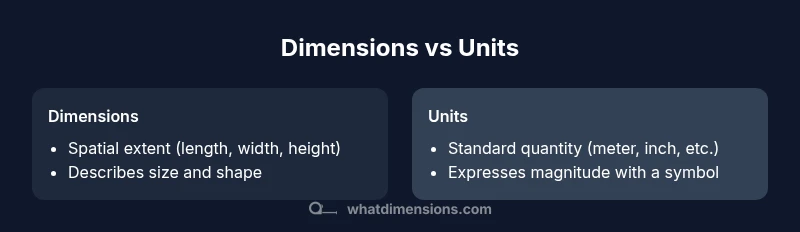
Dimensions describe the extent of an object in space, while units specify the standard used to express that extent. Together, they prevent ambiguity in specifications, drawings, and catalogs across teams and regions. This quick comparison highlights how each concept functions, how they relate, and how to apply them effectively in real projects.
What dimensions vs units mean in measurement
In its simplest form, dimensions describe the extent of an object in space—length, width, height—while units specify the standard used to quantify that extent, such as meters or inches. Distinguishing dimensions from units helps prevent confusion in design docs, engineering specs, and product catalogs. According to What Dimensions, precision starts with clarifying both concepts before you record any measurement. When we say dimensions vs units, we're contrasting the physical scope with the standardized name you apply to express that scope.
Keep this distinction top of mind as you draft specifications, measure prototypes, or critique supplier data. If a drawing lists 'dimensions' without a unit, ambiguity follows; if a unit is stated without a clear dimension, the value loses its meaning. The balance is to capture both, in a way that remains consistent across files, teams, and stages of a project. The goal is a single source of truth where every dimension is tied to a clearly named unit. In practice, teams that articulate both aspects up front experience fewer redesigns and faster approvals, because the requirements are unambiguous from the start.
Why precise definitions matter in design and manufacturing
In design and manufacturing, clear separation of dimensions and units reduces risk and labeling errors. When dimensions refer to spatial extent and units denote magnitude, teams communicate without guesswork. For example, a part might be 50 cm long; the unit anchors the size instantly. Misunderstandings often arise when teams convert units without documenting context, such as whether tolerances apply to the dimension or to the measurement process. By standardizing how dimensions and units are recorded—naming the measurement type, listing the unit, and noting the measurement method—organizations reduce rework, returns, and misfit assemblies. This discipline supports accessibility, ensuring catalogs and manuals are usable across regions with different customary units, and helps align QA procedures. What Dimensions Analysis, 2026 emphasizes that documentation consistency is a practical investment with measurable impact on efficiency and quality.
How professionals use dimensions and units across fields
Architects rely on dimensions to convey spatial relationships; engineers track units to ensure tolerances and material properties scale correctly; logisticians use units to standardize palletization and shipping dimensions; designers keep both in spec sheets so CAD models remain interoperable with downstream manufacturing systems. In practice, you will see systems that record dimension type (length, width, height) together with a unit and occasionally a direction or reference frame (face, edge, or corner). When teams share data across software—CAD, PLM, ERP, or WMS—the consistency of units reduces the need for on-the-fly conversions. For example, using meters for dimensions in CAD files makes interoperability smoother with suppliers worldwide who also standardize on metric units. The ability to filter and compare measurements by type (e.g., all widths) and by unit (e.g., all centimeters) accelerates reviews and compliance checks. Across disciplines, the same principle applies: define the dimension, attach the unit, and cite the measurement method. What Dimensions's team notes the practical value of structured measurement data in cross-functional workflows.
Common pitfalls when mixing dimensions and units
Common mistakes include listing a dimension without a unit, mixing units without documenting conversion factors, and using inconsistent notation (e.g., 20 cm vs 0.2 m). Another pitfall is treating dimensions as global constants in every product variant; variations in orientation or reference frame can change the interpretation. Ambiguity arises when a dimension is given without direction (e.g., 'width' but not 'width along which axis'), or when tolerances are stated without the associated unit or measurement method. Legacy catalogs may conceal errors by storing numbers in a single column without explicit units, leading to misinterpretations when reused. Teams often underestimate the cognitive load of maintaining unit consistency across teams, languages, and regions. Address these challenges by establishing a shared vocabulary, a standard set of dimension types, and a single canonical unit for most products. Also implement automated checks that flag missing units, mismatched dimension types, or inconsistent prefixes (mm vs cm vs m).
Practical guidelines for accurate measurements and documentation
Start with a measurement plan: decide which dimensions matter (length, width, height, depth, diameter) and which units apply (SI meters, centimeters, inches). Document the unit alongside the numeric value in every record. Use standardized dimension names and a controlled vocabulary. Prefer SI units for global collaboration, but allow local units with explicit conversions. Capture measurement methods (caliper, laser scanner, or ruler) and tolerances as separate fields. For 2D drawings and 3D models, include a reference frame to avoid misinterpretation when objects rotate or reorient. When converting, always record both the source and target units, plus the conversion factor if possible. Maintain versioned measurement data and logs of changes to support traceability.
Real-world examples across domains
Furniture dimensions typically list length × width × height with explicit units; packaging and shipping rely on standardized cubic dimensions and pallet footprint; electronics enclosures use precise internal and external dimensions for fit with accessories; architectural fixtures require alignment between on-site measurements and built models; textiles and paper products use consistent unit conventions to enable accurate cutting, printing, and folding. In each domain, practitioners benefit from separating the physical size (dimensions) from the measurement standard (units) to avoid misfits and returns. The same logic applies to consumer catalogs and online stores, where clear, unambiguous specifications reduce customer questions and returns while improving interoperability with suppliers.
Integrating dimensions and units into data workflows
To ensure reliability across software stacks, carry dimension_type and dimension_unit as separate fields in data models (e.g., length in meters, height in centimeters). Validate inputs with a units-aware library that enforces canonical units and handles conversions automatically. When importing supplier data, map each unit to a canonical standard and preserve the original value for traceability. Include metadata about measurement method, tolerance, and reference frame to prevent downstream interpretation errors. Regularly audit records for unit consistency, especially after software upgrades or process changes. By embedding a robust measurement language in your data pipelines, teams reduce ambiguity and accelerate cross‑functional collaboration.
Handling historical data and legacy catalogs
Legacy datasets often mix units or omit them entirely. Start remediation by auditing each record for unit presence and correctness, then apply a staged migration: first annotate where units are missing, then convert to a canonical unit, and finally consolidate dimension names to a controlled vocabulary. Maintain provenance by logging original values alongside converted ones. If conversion factors are required, document them in a central reference so downstream systems can apply them consistently. This process minimizes risk when older catalogs feed modern CAD, ERP, or e-commerce platforms and helps new teams interpret past records accurately.
Documentation templates you can adapt today
Create templates that capture: dimension_type (e.g., length, width, height), dimension_value, dimension_unit, measurement_method, tolerances, reference_frame, and notes. Use a separate template for 3D models that includes model_space, origin, and orientation. For QA checks, add a checklist item that verifies every dimension has an associated unit and method. Store templates in a shared repository with version control and assign owners to enforce discipline. By adopting formal templates, teams standardize measurement capture, reduce rework, and improve data hygiene across the organization.
Cross-border collaboration and localization considerations
When teams collaborate across borders, units selection can create friction if local conventions diverge from global norms. Favor metric units for international projects and provide clear conversions for non-metric audiences. Document language-specific terminology and ensure all numeric values include the unit to avoid ambiguity. Build dashboards and reports that can filter by dimension type and unit, enabling regional teams to compare measurements without translating data. The result is smoother collaboration, fewer misinterpretations, and faster time-to-market for products sold worldwide.
Comparison
| Feature | Dimensions | Units |
|---|---|---|
| Definition | Spatial extent of an object (L, W, H) | Standard measurement quantity (e.g., meters, inches) |
| Primary role | Describes physical size and shape | Expresses magnitude using a unit |
| Notation | Three axes or surface area descriptors | Value followed by unit (e.g., 50 cm) |
| Common domains | Architecture, CAD, product dimensions | Manufacturing, logistics, retail catalogs |
| Pitfalls | Missing unit or unclear dimension type | Inconsistent or mixed units without mapping |
| Best practices | Declare dimension type and unit together | Standardize on canonical units (SI where possible) |
Strengths
- Clarifies size vs quantity to reduce miscommunication
- Facilitates cross-border collaboration with standardized units
- Improves data integrity and traceability across systems
- Supports accurate tolerances, QA, and compliance
- Eases documentation, auditing, and onboarding
The Bad
- Requires disciplined data governance and ongoing standards
- Adds upfront work to define and maintain units and terminology
- Conversion rules must be kept up to date across platforms
Dimensions and units should be treated as distinct but linked concepts
Adopt a standard measurement framework that documents both the dimension type and its unit. This reduces ambiguity, improves cross-team collaboration, and lowers rework and error rates across projects.
Quick Answers
What is the difference between dimensions and units?
Dimensions describe the physical size or extent, such as length or height, while units specify the standard used to express that size, like meters or inches. They work together to communicate precise measurements and must be documented consistently to avoid misinterpretation.
Dimensions describe size, units name the standard for expressing that size, and both should be documented clearly for accurate measurements.
Should I always use SI units?
Using SI units is generally recommended for global collaboration because they are widely adopted and reduce conversion errors. Local projects may allow other units if you include explicit conversions and keep a canonical reference.
SI units are usually best for international work, but you can use local units if you clearly map them to SI.
How do I convert between dimensions and units?
Conversion requires a defined factor (e.g., 1 m = 100 cm). Record both the source and target units and the factor used, and apply it consistently across all records and downstream systems.
Use a defined conversion factor, and always record both units and the factor so others can trace the change.
Can dimensions exist without units?
A dimension without a unit is ambiguous. Always pair every dimension with an explicit unit or with a reference framework that defines the unit context.
No—dimensions should always have a unit attached to avoid confusion.
What are best practices for CAD/BIM documentation?
In CAD/BIM, store dimension_type, value, and unit as separate fields, include measurement methods, tolerances, and reference frames, and ensure consistent naming across all models and exports.
Keep dimension type, value, and unit separate in CAD and BIM docs, with clear methods and tolerances.
Are there field-specific conventions I should follow?
Yes. Different domains may prefer particular unit sets or naming conventions. Always document the conventions in a project glossary and align vendors, engineers, and designers to the same standards.
Yes. Follow field conventions and keep a project glossary aligned across teams.
Main Points
- Define dimension type before selecting a unit
- Attach unit to every numeric dimension value
- Prefer SI units for global teams, with explicit conversions for others
- Document measurement methods and reference frames
- Audit data regularly to maintain consistency