TV Dimensions Comparison: How to Choose the Right Screen Size
A data-driven guide for tv dimensions comparison that helps you choose the right screen size based on viewing distance, wall space, and room layout. Practical tips, tables, and a sizing checklist.


Effective size comes from your seating distance and room layout. In a tv dimensions comparison, the typical rule is that 65- to 75-inch screens suit mid-to-large spaces, while 55- to 65-inch sets fit smaller rooms. With 4K content, you can sit closer without losing detail. For a precise pick, measure first, then compare two viable sizes.
The core idea: tv dimensions and viewing distance
Sizing a TV starts with your seating distance, ceiling height, and wall space. The tv dimensions comparison you see here is not about chasing the largest number; it is about aligning the screen with the room and the way you watch. In practice, the diagonal measurement matters most, but width, height, and depth influence furniture arrangement, mounting options, and wall clearance. For typical living rooms, a 55 to 65 inch screen often feels comfortable at common viewing distances, while 75 inch screens create a more immersive feel when you are farther away or when you design a dedicated home theater. High resolution content makes closer seating viable, but that does not erase the need for clear sight lines and safe mounting. Be mindful that bezel thickness and stand footprint add to the overall footprint, albeit modestly in most modern designs. What Dimensions analysis indicates is that you should build your decision around the actual space where the TV will live and how people will sit, not just the advertised diagonal. Finally, verify that your chosen size can be placed on the intended stand or mounted on the wall without occluding windows or doors.
How screen size translates to wall space and furniture
Screen size does not exist in a vacuum. It interacts with wall dimensions, furniture layout, and mounting options. Before choosing a TV, map the room like a layout diagram. Consider wall width, the distance to seating, and potential obstructions such as windows, shelves, or artwork. A larger screen commands more attention and can visually dominate a room if the wall is narrow or if seating is very close. Conversely, a small screen can disappear into a space where viewers sit farther away or where the wall has generous open area. Measure the wall you plan to use, then calculate the available width for the TV plus any mounting hardware. Remember to include space for cable management and ventilation. A practical approach is to place painter tape on the wall to simulate the screen footprint and see how it fits with the furniture and daylight patterns. The goal is a harmonious composition where the screen feels proportional to the room and accessible for daily use.
Comparing 65-inch vs 75-inch: a practical model-based analysis
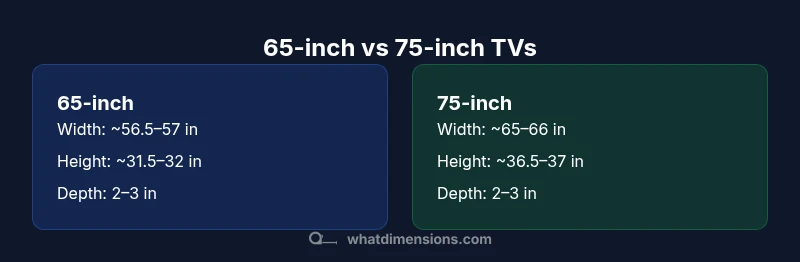
The 65-inch class is a common mid range that fits many living rooms. Its width is roughly 56.5 to 57 inches, height around 31.5 to 32 inches, and depth typically 2 to 3 inches, depending on bezel and panel design. The 75-inch class increases width to roughly 65 to 66 inches and height to about 36.5 to 37 inches, with depth still generally within 2 to 3 inches. These ranges come from standard 16:9 panels; actual models vary with bezel thickness and cabinet or stand design. For viewing distance, a 4K panel allows closer seating than older HDTVs. A common guideline suggests about 1.5 to 2.5 times the diagonal in inches, so roughly 8 to 12 feet for 65 and 9.5 to 14 feet for 75. Pricing varies widely, but expect larger models to sit at the higher end of the spectrum. Your room layout, ceiling height, and seating arrangement all influence whether 65 or 75 inches is the better choice. In a tight room, the extra width may feel excessive; in a large open space, the increased height and width can dramatically improve immersion.
Bezel, depth, and mounting considerations
Bezel thickness affects perceived size more than actual footprint in many cases. A slim bezel reduces the overall visual width while preserving most of the screen area. Depth matters for wall mounting and furniture placement; a deeper panel needs more clearance behind the wall for ventilation and cable routing. When opting for a wall mount, ensure the mount pattern fits the TV and that the mounting bracket clears nearby outlets or windows. Consider the mounting height and viewing angle: a high wall mount can lead to neck strain if the screen sits too high relative to eye level. For freestanding setups, confirm that the stand footprint fits within the furniture width and does not collide with decorative elements. If you plan to mount in a built-in cabinet, take precise measurements for depth and ventilation, and verify that the cabinet doors can open without obstruction. The goal is a robust solution that keeps the screen secure and accessible for everyday use.
Image quality and size: how perception scales
Perceived sharpness and detail improve with resolution, not just screen size. On a 65-inch 4K TV, viewers often notice fine textures and color gradients from moderate seating distances. Moving to a 75-inch panel increases immersion, but the benefit depends on viewing distance and picture quality. If content is upscaled or source material lacks resolution, the difference between 65 and 75 inches may be subtle. Conversely, high dynamic range HDR content can look more dramatic on larger screens, provided the panel delivers sufficient brightness and contrast. In a room that supports ambient light control, a larger screen may reduce the need for higher brightness and maintain more accurate black levels. Remember that processing features, color accuracy, and panel uniformity also influence image quality; size alone does not guarantee a better viewing experience.
Real-world scenarios: room sizes and recommended ranges
Small room scenarios typically favor 55 to 65 inches, which balance visibility with wall space and seating distance. For mid-sized living rooms with seating distances of about 8 to 12 feet, a 65-inch TV is often ideal, delivering immersive viewing without crowding the room. In larger rooms or home theater setups with distances beyond 12 feet, a 75-inch or larger screen increases presence and detail, especially for cinematic content. If you plan a corner installation or have unusually shaped spaces, plan for flexible seating and ensure that you can view the screen from multiple angles. In all cases, test with a paper cutout on the wall to verify the visual proportions from the main seating position. The aim is to achieve a natural field of view and comfortable eye-level alignment without requiring excessive neck movement.
Practical steps to measure and decide
Begin with a simple measurement plan. 1) Measure the primary seating distance from where you sit to the wall where the TV will hang or stand. 2) Measure wall width and height to ensure the screen fits with room for speakers, furniture, and a comfortable margins. 3) Compare two or three sizes, preferably within a 1 to 2 inch difference in width and a similar step in height for visual balance. 4) Check mounting options and ensure you have adequate depth clearance, ventilation, and cable routing space. 5) Create a tabletop mock-up by placing cardboard frames on the wall to simulate bezel thickness and screen footprint. 6) Verify power outlets and streaming device placement. 7) Review the room layout in different lighting conditions. 8) Consult model specifications for VESA patterns and mounting compatibility. 9) Decide based on room proportions, seating distance, and usage needs such as gaming or movie watching.
What to look for in product specs beyond the screen size
Beyond the diagonal, assess panel type (LED/LCD vs OLED), brightness, HDR support, and color accuracy. Look at refresh rate for gaming comfort, viewing angles, and uniformity for large panels. Check the mounting pattern (VESA) and the stated depth, as well as the stand width to avoid furniture clashes. Confirm speaker placement or the need for external sound solutions, as well as cable management options. Finally, review warranty terms and service accessibility in your region to protect your investment.
Sizing checklist: practical accelerator
- Measure seating distance and wall width before choosing a size.
- Compare two realistic sizes and verify mounting depth.
- Confirm that the bezel and stand footprint fit with furniture layout.
- Check HDR, brightness, and processing features that affect perceived image quality.
- Validate wall clearance and ventilation to prevent overheating.
- Use a sizing calculator or room simulator if available.
- Plan for future content with higher resolutions to maximize the perceived value of the chosen size.
Comparison
| Feature | 65-inch TV | 75-inch TV |
|---|---|---|
| Screen diagonal | 65-inch | 75-inch |
| Width (approx) | 56.5–57.0 inches | 65–66 inches |
| Height (approx) | 31.5–32 inches | 36.5–37 inches |
| Depth (typical) | 2–3 inches | 2–3 inches |
| Recommended viewing distance (4K) | 8–10 feet | 9.5–12.5 feet |
| Typical price range | $800–$2,000 | $1,000–$3,000 |
| Best for | Medium rooms with balanced wall space | Large rooms and home theaters with ample seating distance |
Strengths
- Helps ensure the screen fits room proportions
- Larger screens increase immersion when space allows
- 4K content enables closer viewing without loss of detail
- Better for rooms designed for viewing groups and entertainment
The Bad
- Larger sizes require more wall space and deeper mounts
- Higher cost and heavier installations
- Incorrect sizing can feel overpowering in small rooms
- Bezel and stand footprint can affect furniture layout
65-inch strikes the best balance for most mid-sized rooms; 75-inch is ideal for larger spaces
Choose 65-inch if seating distances are around 8–12 feet and wall space is moderate. Opt for 75-inch when you have 12+ feet of viewing distance or a dedicated home theater area for maximum immersion.
Quick Answers
What is the ideal viewing distance for a TV based on size?
A common rule of thumb links distance to screen size. For 4K content, a seating distance of about 1.5 to 2.5 times the diagonal is comfortable. Adjust within this range based on room layout and personal preference.
For a 65 inch TV you might sit around 8 to 10 feet away; for a 75 inch you may prefer 9 to 12 feet, adjusting to your room and comfort.
Is bigger always better for a small living room?
Not necessarily. In small rooms a screen that is too large can overwhelm the space and reduce perceived detail. A balanced choice around 55–65 inches often provides strong immersion without crowding furniture or impairing sightlines.
Size matters, but so do seating distance and wall space. Don’t assume bigger is always better.
How much does bezel size affect overall dimensions?
Bezel thickness adds to the total footprint but typically only a few tenths of an inch. In most modern designs a slim bezel minimizes impact on overall width, while older models can add noticeable width.
Bezel matters less than seating distance and wall space, but it can shift the perceived footprint slightly.
Do wall-mounted TVs require extra clearance?
Yes. Factor in mounting depth, ventilation, and cable routing. A deeper mount or cabinetry behind the TV needs more space, especially for taller walls or built-ins.
Make sure there is room behind the TV for the mount and cables, and that you can access outlets easily.
What if my room has windows or bright light?
Ambient light reduces perceived contrast. Choose a brighter panel with good anti reflection and consider living room lighting strategies to preserve image quality.
If your room gets a lot of glare, prioritize brightness and anti glare features to keep the picture clear.
Main Points
- Measure seating distance before selecting a size
- Don’t rely on diagonal alone; consider wall space and furniture
- 4K content enables closer viewing without sacrificing detail
- Check mounting depth and ventilation for larger screens
- Use a sizing test on your wall to preview proportions