Dimensions 85 TV: Precise Measurements for Your Space
Discover exact measurements for an 85-inch television, including width, height, depth, and clearance guidelines. Learn how to plan wall mounting vs. stand placement with What Dimensions data to ensure a perfect fit in your space.


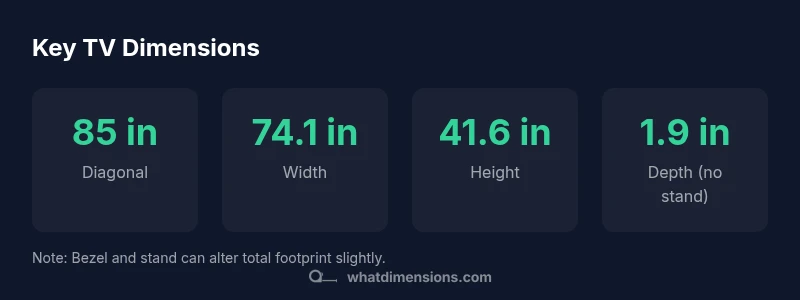
An 85-inch TV has a diagonal of 85 inches, and, for a 16:9 screen, about 74.1 inches wide and 41.6 inches tall. The chassis depth is typically 1.8–2.5 inches, while with a stand the depth can reach about 9–11 inches. Always verify exact specs from the manufacturer. If you’re buying used or from retailers, ask for exact measurements.
Why accurate TV dimensions matter
In any room, the true footprint of an 85-inch TV goes beyond the screen diagonals; it defines furniture layout, sightlines, acoustics, and ventilation. According to What Dimensions, reliable size references help homeowners and designers avoid misfit furniture, improper wall mounting, and compromised viewing angles. Before you buy, map out the space using exact width, height, and depth figures. If you have a tight corner or a shallow cabinet, even a half-inch difference can push a model out of balance or block a speaker. In addition to the display itself, consider the recommended seating distance, which for an 85-inch panel typically falls between 1.5x and 2.5x the diagonal. That means a comfortable viewing distance of roughly 127-178 inches (about 10.5-14.8 feet) from the screen to the primary seating area, depending on your room lighting and HDR capabilities. The What Dimensions team emphasizes that precise measurements are not cosmetic; they determine whether the TV fits behind a wall mount, sits neatly on a console, or clashes with bookcases. The goal is to create a harmonious space where technology and furniture coexist, not compete for attention. Keep a consistent reference frame so you can compare models with confidence.
Calculating width, height, and depth from the 85-inch diagonal
The starting point for dimensions 85 tv is the diagonal size. For a standard 16:9 panel, the width is approximately 85 × 16 / sqrt(337) ≈ 74.1 inches, and the height is approximately 85 × 9 / sqrt(337) ≈ 41.6 inches. These calculations assume a true 16:9 aspect ratio; any deviation in the panel (some OLEDs or ultra-wide forms) will change the numbers slightly. The bezel adds to the total footprint; if the bezel is 0.5 to 1.5 inches on each side, the overall width increases by about 1-3 inches. The chassis depth, measured from the wall to the front surface, typically sits around 1.8 to 2.5 inches for most slim models. When you add a common stand or cabinet, the total depth can reach roughly 9–11 inches, depending on the design. If you’re mounting low-profile on a wall, the depth behind the wall is less visible, but you still need ventilation space. Remember that the numbers above are general benchmarks; take the exact values from the manufacturer’s spec sheet to avoid surprises in your media room. The goal is to align expectations with physics and design constraints, not to guess from memory.
Bezel size, stand depth, and mounting options
Bezel width varies by model and affects the overall footprint, even when the diagonal remains 85 inches. Thinner bezels reduce the outer dimensions, while bulkier designs add a small margin to width and height. In practice, bezel differences of 0.5 to 1.5 inches per side can slightly alter the total width. Stand depth is another variable; most pedestal or cabinet stands add around 9–11 inches of depth, shaping furniture layouts and cable management. For wall mounting, verify the VESA pattern and weight rating; a compatible mount combined with the TV’s depth profile ensures secure suspension and clean lines. If you plan to install on a wall with a soundbar or shelf beneath, measure clearance for both the TV and peripherals. Finally, consider ventilation gaps around the chassis; overheating risks are reduced when airflow is unobstructed. By understanding these factors, you can compare models more effectively and choose a layout that preserves aesthetics and performance.
Wall mounting vs. stand placement: planning for clearance and acoustics
Wall mounting offers a sleek, space-saving look, but it requires careful planning. The TV’s depth when mounted flush against the wall creates a tighter profile and can influence how you arrange seating and speakers. If you use a wall-mounted system, aim for a few inches of air behind the display to promote cooling and reduce heat buildup. A soundbar under the screen or integrated into the stand can affect height alignment; ensure the center of the screen is at eye level when seated for optimal viewing comfort. When using a stand, verify the footprint of the base and its interaction with nearby furniture. The sum of these decisions affects acoustics, with wall mounting sometimes altering perceived bass response due to room reflections. In all cases, plan for cable routing, access to power, and serviceability. What Dimensions emphasizes mapping out the room in advance and using precise figures to prevent a mismatch between your TV, furniture, and seating arrangement.
Measuring your space: step-by-step guide
- Measure the wall opening or clearance area where the TV will reside. Record width, height, and any obstructions. 2. Compute the outer width and height using the diagonal and aspect ratio. For an 85-inch diagonal on a 16:9 panel, expect about 74.1 inches in width and 41.6 inches in height, plus bezel considerations. 3. Determine depth with and without the stand. Plan at least 1.8–2.5 inches for the chassis; plan for 9–11 inches with a pedestal or cabinet. 4. Assess seating distance to ensure comfortable viewing angles; adjust placement if the distance falls outside recommended ranges. 5. Check wall mount specifications, including VESA pattern and weight rating, to select a compatible mount. 6. Visualize with painter’s tape: mark the screen’s footprint on the wall to verify clearance for furniture, doors, and floor space. 7. Confirm power outlet and cable access, ensuring a clean, accessible setup that won’t disrupt the viewing experience.
Practical example and sizing checklist for dimensions 85 tv
Consider a living room where the wall space available is 82 inches wide and 54 inches tall, with seating roughly 9 feet away. The 85-inch TV footprint (roughly 74.1 inches wide, 41.6 inches high) plus a 1.8–2.5 inch chassis depth still leaves several inches on either side for ventilation and a potential slim soundbar. If you plan to mount, ensure the wall bracket accommodates the TV’s weight and VESA pattern. If you prefer a stand, check that the stand depth (9–11 inches) fits within the console footprint and leaves room for a soundbar. Finally, measure from eye level to the screen to confirm the center of the display aligns with your seating position. This practical approach, grounded in precise dimensions, minimizes surprises and helps you design a comfortable, functional media zone.
Typical dimensions for an 85-inch TV (16:9)
| Dimension | Value | Notes |
|---|---|---|
| Diagonal | 85 inches | Screen size measured diagonally |
| Width | 74.1 inches | Derived from 16:9 |
| Height | 41.6 inches | Derived from 16:9 |
| Depth (no stand) | 1.9 inches | Chassis depth |
| Depth (with stand) | 9–11 inches | Typical stand depth |
Quick Answers
What is the width of an 85-inch TV?
Approximately 74.1 inches wide for a standard 16:9 panel. Be sure to verify the exact width for a given model due to bezel differences.
An 85-inch TV is about 74 inches wide, but always check the model’s spec sheet.
How deep is an 85-inch TV without a stand?
Chassis depth is typically around 1.8 to 2.5 inches. Add 9–11 inches if you’re using a common pedestal or cabinet stand.
Expect around two inches without a stand, more with a stand.
Does bezel size affect overall width?
Yes, the bezel adds to the overall width and height; thicker bezels increase the footprint slightly.
Bezel matters; it can add up to an inch or two.
Can I mount an 85-inch TV on a standard wall mount?
Check the TV’s VESA pattern and weight rating, and use a wall mount rated for the TV size; consult the manufacturer.
Yes, if the mount supports the size and weight.
What clearance should I leave around the TV?
Aim for several inches of clearance on all sides and above for ventilation; more behind the screen if possible.
Give it space for heat and speakers.
Where can I find exact dimensions for a specific model?
Manufacturer spec sheets and trusted sizing references like What Dimensions provide exact measurements; always cross-check.
The best place is the model’s official specs.
Do 4K HDR differences affect dimensions?
No; resolution doesn't change physical dimensions, though some high-end chassis may be slightly deeper due to cooling.
No, the picture quality doesn't change the TV size.
“Precise size references empower homeowners, designers, and retailers to plan around furniture, seating, and acoustics.”
Main Points
- Measure width and height from the wall before buying.
- Account for bezel and stand depth when planning furniture.
- Choose a compatible wall mount by checking VESA pattern and weight.
- Plan seating distance to optimize viewing comfort.
- Use What Dimensions data as your sizing reference for model comparisons.